
內容簡介
總結:CB QR Code 是一個 WordPress 外掛,可讓您在內容中加入可自訂的 QR 碼。訪客可以掃描或點擊 QR 碼輕鬆複製鏈接,讓分享內容變得輕鬆。現在具有本地 QR 生成以提升效能並符合 WordPress.org 標準。
1. 使用什麼庫進行本地生成 QR 碼?
- 使用 endroid/qr-code 庫進行本地生成(無需外部依賴)
2. 哪些內容上可以展示 QR 碼?
- 在文章、頁面或自定義文章類型中展示 QR 碼(媒體文章類型除外)
3. 如何自行設定 QR 碼的樣式?
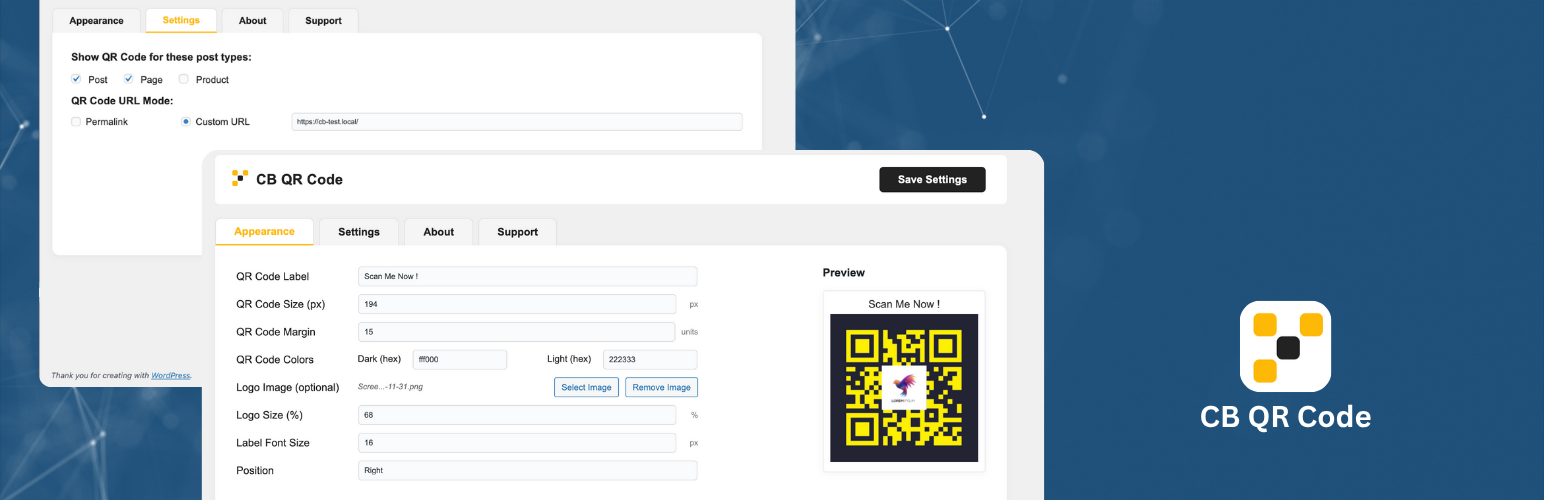
- 可以自訂 QR 碼的大小、邊距、顏色、標籤和標誌
4. 管理員選項卡有什麼特點?
- 持久的管理員選項卡(記住上次活躍選項卡)
5. 如何將 QR 碼應用於文章?
- 選擇要顯示 QR 碼的文章類型
- 自訂 QR 碼外觀(大小、邊距、顏色、標籤、標誌、位置)
- 選擇永久鏈接或自訂 URL 以使用 QR 碼
- QR 碼將自動出現在前端選定的文章類型上
6. 如何參與貢獻?
- 如果您想要貢獻此項目或者僅報告錯誤,歡迎您參與。請查看 Github 存儲庫。
外掛標籤
開發者團隊
原文外掛簡介
CB QR Code lets you add a customizable QR code to your WordPress content. Visitors can scan or click the QR code to quickly copy the link, making sharing your content effortless. Now with local QR generation for better performance and WordPress.org compliance.
Key Features:
Uses endroid/qr-code library for local generation (no external dependencies)
Display QR codes on posts, pages, or custom post types (Media post type excluded)
Choose between permalink or custom URL for the QR code
Customize QR code size, margin, colors, label, and logo
Live preview in the Appearance tab with AJAX updates
Click QR code to copy the link (with visual feedback)
Persistent admin tabs (remembers last active tab)
Developer hooks to add content before/after the QR code
Usage:
Select which post types should display the QR code
Customize the QR code appearance (size, margin, colors, label, logo, position)
Choose between permalink or custom URL for the QR code
The QR code will automatically appear on the selected post types in the frontend
Admin tabs remember your last selected tab for better user experience
Contribute
If you want to contribute to this project or just report a bug, you are more than welcome. Please check repository from Github.






![WP-CopyProtect [Protect your blog posts]](https://s.w.org/plugins/geopattern-icon/wp-copyprotect_cccccc.svg)
