內容簡介
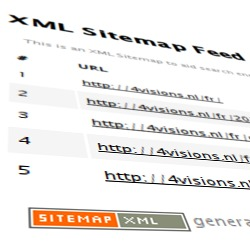
CannyForge Archive Generator 為新聞和部落格網站提供結合 HTML 網站地圖和 JavaScript 驅動的檔案,並取代 WordPress 預設的分類分頁,提供可配置的緊湊序列,讓使用者更容易發現舊有和新內容。
【主要功能】
• 提供可爬行的 HTML 網站地圖檔案頁面
• 支援新聞模式和部落格模式
• 客戶端搜尋及分類/標籤/月份/作者過濾器
• 可配置的緊湊分頁與「查看檔案」連結
• SEO 控制:檔案標題、元描述、機器人指令
• 可選的完整檔案延續功能
外掛標籤
開發者團隊
② 後台搜尋「CannyForge Archive Generator」→ 直接安裝(推薦)
原文外掛簡介
CannyForge Archive Generator gives news and blog sites a combined HTML sitemap and
JavaScript-powered archive, and replaces WordPress’s default taxonomy pagination
with a configurable compact sequence that links out to that archive.
The release supports PHP 8.1 through 8.5. CI runs the automated unit suite on
each of those versions; static analysis is pinned to PHP 8.1. The “Requires
PHP” value above is the minimum supported version, not a claim that every
future PHP release is continuously verified.
The plugin provides a compact pagination experience and a clear HTML archive
link, making older and newer content easier to discover through site
navigation. It does not promise a search-ranking or crawler outcome.
Features:
HTML-sitemap archive page at a crawlable, no-JavaScript URL.
News mode: include content published within a configurable recent window.
Blog mode: a curated URL list, entered manually or imported from CSV.
Client-side search and category / tag / month / author filters.
Configurable compact pagination with a “View Archive” link, targeted per archive type.
Optional full archive continuation: /archive/ stays the optimised first
page and /archive/page/2/ onward lists remaining eligible posts without
JavaScript, newest first.
SEO controls: archive title, meta description, robots directives, canonical.
Content selection: include / exclude by term, drop noindex, pin URLs first.
External services
This plugin can connect to Google services to fetch top-content signals for the
archive. These integrations are optional and are only used when the site owner
configures Google credentials and explicitly connects an account.
Google OAuth / Search Console / Google Analytics 4
What the service is used for:
Google OAuth authenticates the site owner’s Google account and refreshes API access tokens.
Google Search Console can supply top page URLs for the configured property.
Google Analytics 4 can supply top page paths as the primary signal or as a Search Console fallback.
What data is sent and received:
When the owner starts Connect, the browser visits Google’s OAuth
authorisation endpoint with the configured client ID, registered redirect
URI, requested read-only scopes, response type, access type, and a
short-lived state value at
https://accounts.google.com/o/oauth2/v2/auth. Google returns an authorisation code to that
redirect URI; the code, client ID, client secret, redirect URI, and grant
type are sent server-to-server to https://oauth2.googleapis.com/token.
Google returns access and refresh tokens plus the access-token lifetime.
When the access token is missing or expired, the client ID, client secret,
refresh token, and refresh grant type are sent to the same token endpoint.
The returned access token and lifetime are cached encrypted locally; the
refresh token is retained encrypted until Disconnect or plugin deletion.
After a successful connection that requested Search Console access, the
plugin automatically lists the account’s Search Console properties with a
GET to https://www.googleapis.com/webmasters/v3/sites. Google returns
property URLs and permissions. The selected property list is cached for
the current WordPress user for 10 minutes.
When the owner loads Search Console properties, the same property-list call
runs. When the owner refreshes top content, the configured Search Console
property URL, date range, dimensions (page), row limit, and access token
are sent to https://www.googleapis.com/webmasters/v3/sites/{property}/searchAnalytics/query.
Google returns page rows; resolved local post IDs, source URLs, and a
refresh timestamp are stored in the Search Console cache option until the
next refresh, Disconnect, or deletion.
After a successful Analytics wizard connection, the plugin automatically
lists GA4 accounts and properties with the access token at
https://analyticsadmin.googleapis.com/v1beta/accountSummaries. Google
returns account/property names and IDs; the list is cached for the current
WordPress user for 10 minutes. Clicking Load GA4 properties repeats that
call.
When the owner refreshes GA4 top content, the configured numeric property
ID, date range, pagePath dimension, screenPageViews metric, descending
order, row limit, and access token are sent to
https://analyticsdata.googleapis.com/v1beta/properties/{property}:runReport.
Google returns page-path rows; resolved local post IDs, source paths, and a
refresh timestamp are stored in the GA4 cache option until the next refresh,
Disconnect, or deletion.
What access is requested:
The Search Console read-only scope (https://www.googleapis.com/auth/webmasters.readonly) is requested for Search Console-only and combined wizard paths.
The Analytics (GA4) read-only scope (https://www.googleapis.com/auth/analytics.readonly) is requested for Analytics-only and combined wizard paths, or when a GA4 property ID is already configured. A Search Console-only setup never asks for Analytics access.
When it happens:
Only when the site owner clicks Connect, loads a property list, or manually
refreshes a Google-backed cache. The post-Connect Search Console property
listing is automatic only when that access was requested; the GA4 property
listing is automatic for an Analytics wizard connection.
Never during wp.org installation or by default on an unconfigured site.
How credentials are stored and removed:
The client secret, refresh token, and cached access token are encrypted at rest.
Clicking Disconnect makes a best-effort POST to
https://oauth2.googleapis.com/revoke with the refresh token (or still
valid access token) before clearing the locally stored tokens and caches, so
the connection is invalidated on Google’s side as well as locally. If the
endpoint cannot be reached, local credentials are still cleared and the
admin is told the remote grant may need to be revoked manually.
Deleting the plugin (not just deactivating it) makes the same best-effort revocation call, then permanently removes the plugin’s stored settings and credentials, fixed archive caches, and all user-scoped Google property-list and OAuth-state transients, including the encrypted Google credentials. Search-result and rate-limit transients have bounded expirations and are allowed to expire naturally rather than being swept during uninstall. Deactivating the plugin never removes this data — only deleting it does.
Service policies:
Google APIs Terms of Service: https://developers.google.com/terms
Google API Services User Data Policy: https://developers.google.com/terms/api-services-user-data-policy
Google Privacy Policy: https://policies.google.com/privacy
Google Analytics Terms of Service (where GA4 is enabled): https://marketingplatform.google.com/about/analytics/terms/us/