內容簡介
此外掛可以在網站的任何頁面或文章類型上加入 schema 結構化資料,也輕易地創建一張聯絡卡片,並加上正確的結構化資料。讓你的網站增加 SEO 友好的 Schema.org 標記!
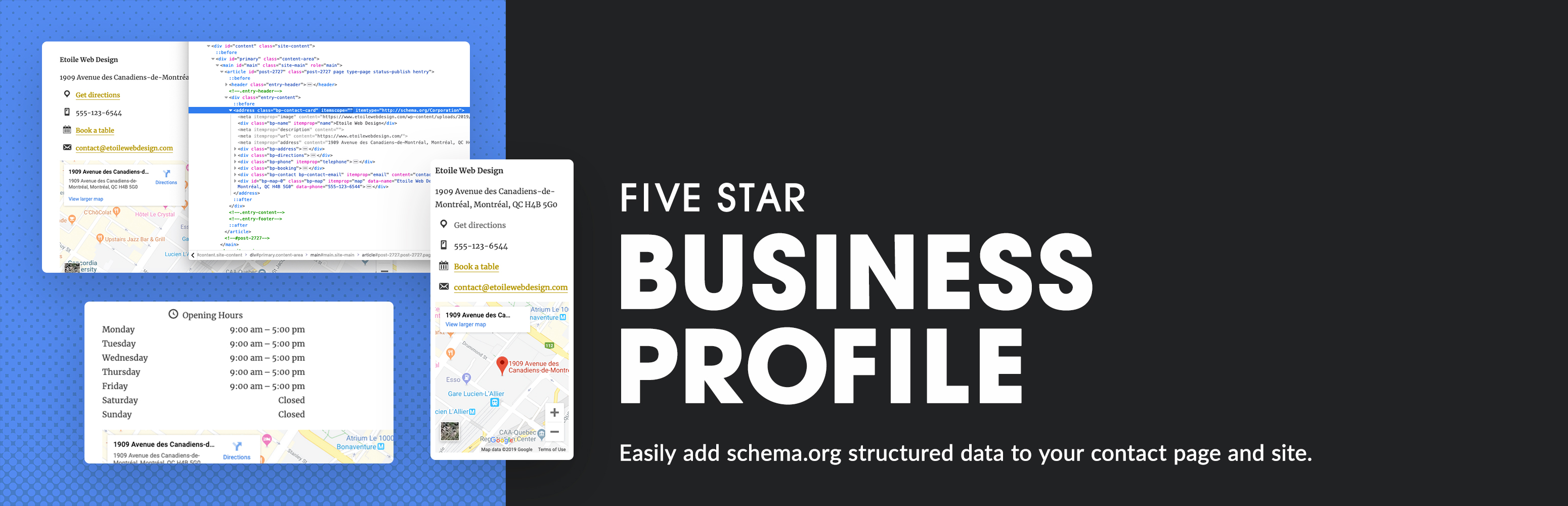
此外掛包括一個 Gutenberg 聯絡卡片區塊以及一個聯絡卡片 Shortcode,因此您可以在任何頁面上顯示您的企業資訊,包括結構化資料,而不論您使用哪個頁面編輯系統。
主要功能如下:
- 將 LD+JSON 結構化資料新增至網站上的所有頁面或文章。
- 支援所有組織 schema 類型。
- 支援所有 schema 丰富的結果類型。
- 在文章編輯頁面上自訂一般/全域 schema 資料。
- 輕鬆創建 SEO 友好的聯絡卡片,並可透過 Gutenberg 區塊或 Shortcode 引入。
- 輕鬆包含 Google 地圖、營業時間以及所有企業詳細資訊。
- 新增多個位置。
- 使用 Google 的豐富結果測試功能測試網站上的任何頁面。
此外掛非常容易使用,啟用後會自動顯示新手引導,協助您新增企業資訊、建立聯絡卡片並新增 schema 規則。
在任何頁面上新增結構化資料:此外掛中包含了每個組織類型 schema 和每個豐富結果類型的資料庫。藉由此功能,您可以輕鬆建立一個新的 schema 元素,並為單獨的頁面、文章、整個文章類型或您的整個網站指定特定的結構化資料類型。
每個 schema 和豐富結果類型都有相對應的屬性/欄位,如 schema.org 所述。當您新增一個 schema 元素時,您可以填寫每個屬性的默認值,以適用於具有 schema 的所有文章/頁面。如果需要更改特定頁面或文章的值,則可以直接在文章編輯頁面上自訂每個屬性。
無論您是經營本地企業、公司、餐廳、特定項目、運動團隊或任何其他類型的組織,只需點擊幾下,即可將正確的 schema 新增到您的頁面,以幫助優化搜索引擎的結果!
企業資料聯絡卡片:此外掛也非常適合在網站上添加聯絡詳細資訊,它提供了一個方便的表單來幫助您填寫資訊,然後智能地將其包含在您的網站上,既可以作為一張聯絡卡片,同時也使用新的 LD+JSON 格式的 schema 結構化資料。
您可以使用區塊、Shortcode 或小工具快速將聯絡卡片添加到網站上的任何位置,顯示以下資訊:
- 商家名稱。
- 地址。
- 電話號碼,擁有單獨的一鍵撥打電話號碼。
- 携帶電話號碼,帶有內置的撥打功能。
- Whatsapp 號碼,帶有撥打功能。
- 傳真號碼。
- 聯絡頁面鏈接或電子郵件地址。
- 鏈接至 Google 地圖,以至到您的場所的路線、顯示您的位置的 Google 地圖和營業時間。
- 營業時間的例外情況,以指定關閉或有不同時間的日期(例如節假日)。
所有這些資訊的正確 schema.org 標記都已使用 LD+JSON 格式添加。這有助於搜索引擎(例如 Google)發現您的地址、電話號碼和營業時間,以便在 Google 上顯示這些資訊。
您可以從各種微資料項目類型中選擇您企業 schema,包括:
- 機關 schema。
- 組織 schema。
- 本地企業 schema。
- 餐廳 schema。
外掛標籤
開發者團隊
② 後台搜尋「Five Star Business Profile and Schema」→ 直接安裝(推薦)
📦 歷史版本下載
原文外掛簡介
Add schema structured data to any page and/or post type on your site. Also easily create a contact card to add all your business details with the correct structured data. Enhance your site with SEO friendly Schema.org markup!
The plugin includes a Gutenberg contact card block as well as a contact card shortcode, so you can display your business info, with included structured data, on any page, no matter which page editing system you are using.
Key Features
Add LD+JSON structured data to any or every page or post on your site
Support for all organization schema types
Support for all schema rich results types
Customize general/global schema data on the post edit screen
Create an SEO-friendly contact card that you can add via Gutenberg block or shortcode
Easily include a Google map, opening hours and all your business details
Add multiple locations
Test any page on your site using Google’s Rich Results Test
Five Business Profile and Schema is very user friendly and comes with a walk-through that runs automatically when you activate the plugin and will help you add your business info, create your contact card and add a schema rule.
Add Structured Data to Any Page
The plugin comes with a database of every organization type schema and every rich results type. With this you can easily create a new schema element and assign a specific structured data type to a page, an individual post, an entire post type, or to your site as a whole.
Each schema and rich results type comes with its corresponding properties/fields, as per schema.org. When you add a schema element, you can fill in each of these properties with defaults that you want to apply to all posts/pages that have the schema. You can then customize each property directly on the post edit screen, should you need to make a change for a specific page or post.
Whether you’re running your website for a local business, a corporation, a restaurant, a specific project, a sports team, or any other type of organization, with just a few clicks, you can have the correct schema added to your pages, to help enhance your results in search engines!
Business Profile Contact Card
The Five Star Business Profile and Schema plugin is also perfect for adding your contact details to any page on your site. It comes with a handy form to help you fill in your info, which then gets automatically included on your site both as a contact card and as schema structured data, using the new LD+JSON format.
Your contact card can be quickly added anywhere on your site using a block, shortocde or widget, which will display the folling info:
Business name
Address
Phone number with separate click-to-call phone number
Cell phone number with click-to-call functionality
Whatsapp number with click-to-call functionality
Fax number
Contact page link or email address
Link to Google Map with directions to your establishment
Google Map showing your location
Opening hours
Exceptions for opening hours, to specify days that are closed or have different hours (e.g. holidays)
For all of this information, the correct schema.org markup is added LD+JSON format. This helps search engines, like Google, discover your address, phone number and opening hours, so they can display them with your listing on Google.
Choose from a wide array of microdata item types for your business schema, including:
Corporation schema
Organization schema
Local Business schema
Restaurant schema
Many more!
Google Maps Structured Data
The integrated Google Maps features allow you to enhance your location structured data by displaying a business map on your site with full schema support. Your business location, including the business address, will be displayed on a map (with the correct map schema), as well as in text with the correct location microdata.
Multiple Locations
Business Profile supports multiple locations. This powerful feature works great for businesses that have several offices, for delivery services, for restaurants with multiple locations, etc. Business location schema is added to each entry and you can showcase your details using the Gutenberg schema block, via the location shortcode or with the included widget. For help getting started with this, you can visit:
https://doc.fivestarplugins.com/plugins/business-profile/user/multiple-locations
The multiple location structured data for your business also syncs up with the Five Star Restaurant Reservations to automatically offer a dropdown in your reservation form, so people can pick which location they want to book at.
You can choose separate organization schema, corporation schema or local business schema for each new location you create, so each schema shortcode and each page’s contact info is uniquely optimized with SEO and search results in mind.
Premium Schema Features
The premium version of the Five Star Business Profile and Schema plugin comes with several extra features that will help you set up and refine your structured data more quickly and more accurately.
These include a default helper functionality for your schema. This option adds a large list of default values to the plugin and allows you to easily populate each schema property with one of these values. No need to be familiar with all the different schema properties and types. Just choose the default you want from the included list and you’re off and running!
The premium version also includes new integrations that will help you automatically apply specific structured data to certain areas of your site. For example, the WooCommerce Integration option will automatically add full Product schema to your WooCommerce shop, helping to enhance the search results for your products.
There is also a posts integration option, which will automatically add Article rich snippets to the default Posts post type. This way, all your articles and blog posts can have the correct schema, without the need for manually inputting it each time you add a new post.
The premium version also syncs with our Five Star Restaurant Manager mobile app (available for iOS and Android) and lets you update your business and contact card info on the go, from a phone or tablet, and without having to be logged in to your WordPress site.
Key premium features include:
Schema default helpers, which let you choose defaults for all schema properties.
Post rich snippets, to automatically add full Article schema.org markup to posts
WooCommerce Integration, to automatically add full Product structured data to your shop.
Access to the Five Star Restaurant Manager mobile app, to manage your business and contact card info on the go.
This schema structured data and contact card plugin is one part of our suite of plugins designed to give you the best WordPress business and restaurant experience. Our plugins provide an intuitive and easy-to-use interface that make sure you don’t lose out on business to your competitors. For more info:
Restaurant Reservations plugin that lets your customers reserve a table directly on your site.
Restaurant Menu plugin that lets your customers view your full menu directly on your site.
For help and support, please see:
Our documentation and user guide, here: https://doc.fivestarplugins.com/plugins/business-profile/user/
Our FAQ page, here: https://wordpress.org/plugins/business-profile/faq/
Our installation guide, here: https://wordpress.org/plugins/business-profile/installation/
Our tutorial videos, here: https://www.youtube.com/playlist?list=PLEndQUuhlvSoOidQF7iRvstiKjOT4tX71
The Business Profile and Schema support forum, here: https://wordpress.org/support/plugin/business-profile/
Our Support Center, here: https://www.fivestarplugins.com/support-center/
Developers
This plugin is packed with templates and hooks so you can extend it as needed. Read the developer documentation.