內容簡介
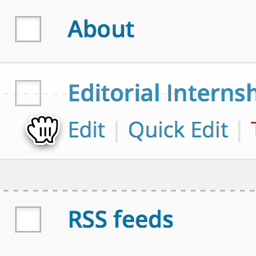
Bracket Post Order 讓您完全掌控內容的排序,無需學習新介面或使用額外的排序頁面,只需透過拖放即可完成。此外掛支持每個分類、標籤或自訂分類術語的獨立排序,讓您能夠針對不同的分類顯示不同的內容順序。
【主要功能】
• 全球文章排序:拖放重新排序文章、頁面及自訂文章類型
• 每個術語的文章排序:針對特定分類獨立排序
• 分類術語排序:拖放重新排序分類、標籤及自訂分類術語
• 重置排序:一鍵依日期或標題重置文章排序
• 撤銷功能:可隨時撤銷最近的排序變更
• 行動裝置支援:手機和平板的完整觸控拖放功能
外掛標籤
開發者團隊
原文外掛簡介
Bracket Post Order gives you complete control over how your content is sorted — directly from the native WordPress admin screens you already use. No new interfaces to learn, no separate reorder pages. Just drag and drop.
A key feature is per-term post ordering: the ability to define a different post order for each individual category, tag, or custom taxonomy term. Show your products in one order on “Summer Collection” and a completely different order on “Best Sellers” — each term maintains its own independent sort.
Three Types of Ordering
1. Global Post Ordering
Drag-and-drop to reorder posts, pages, and custom post types on the standard admin list table. The new order is saved to menu_order and automatically applied on the front end.
2. Per-Term Post Ordering
Filter your admin list by a category or taxonomy term, and the interface switches to per-term mode. Drag posts into the order you want for that specific term. Assign the same post to multiple categories — each one keeps its own sort. New posts added to a term automatically appear first (newest on top).
3. Taxonomy Term Ordering
Reorder categories, tags, and custom taxonomy terms themselves via drag-and-drop on the native edit-tags.php screen. The new term order is applied to get_terms() queries and navigation menus on the front end.
Key Features
Reset Order — Reset post order by date or title with one click. Most requested feature across all ordering plugins.
Undo — “Order saved. [Undo]” link appears for 8 seconds after every reorder. Click to revert instantly.
Mobile/Touch Support — Full touch drag-and-drop on phones and tablets via jQuery UI Touch Punch.
Keyboard Accessibility — Tab to a row, Enter to activate, Arrow keys to move, Enter to save, Escape to cancel. WCAG compliant.
Order Column — “#” column shows each post’s position number at a glance.
WPML & Polylang Support — Per-term ordering works correctly across languages.
Admin Bar Indicator — Shows current ordering mode (Global or Per-Term) in the admin bar.
Settings Link — Quick access from the Plugins page.
How It Works
Go to Settings > Bracket Post Order
Toggle on the post types you want to reorder
Toggle on taxonomies for per-term post ordering
Toggle on taxonomies for term reordering
Visit your admin list pages and start dragging
Changes save automatically via AJAX — no page refresh needed.
Built for WordPress, Not Against It
Works directly inside native admin list tables (edit.php and edit-tags.php)
Uses standard menu_order for global ordering — compatible with any theme
Uses term_order for taxonomy terms — the same column WordPress defines
Per-term order stored as term meta — clean, portable, conflict-free
Front-end queries are modified transparently via pre_get_posts and posts_clauses
Explicit orderby parameters (date, title, etc.) are never overridden
Works With
Any public custom post type (portfolios, team members, testimonials, events, FAQs, services)
WooCommerce products and product categories
Any registered taxonomy with a UI
Page builders that use standard WP_Query (Elementor, Divi, Beaver Builder)
Themes that follow WordPress template hierarchy
WPML and Polylang multilingual plugins
For Developers
Bracket Post Order provides hooks so you can extend or control its behavior:
// Filter: skip per-term ordering for a specific query
add_filter( 'bracket_po_apply_term_post_order', function( $apply, $term_id, $query ) {
// Return false to skip
return $apply;
}, 10, 3 );
// Filter: modify the retrieved term post order
add_filter( 'bracket_po_get_term_post_order', function( $ordered_ids, $term_id ) {
return $ordered_ids;
}, 10, 2 );
// Actions: fired after order is saved via drag-and-drop
do_action( 'bracket_po_global_order_updated', $post_ids );
do_action( 'bracket_po_term_post_order_updated', $term_id, $post_ids );
do_action( 'bracket_po_term_order_updated', $term_ids );
// Actions: fired after order is reset
do_action( 'bracket_po_global_order_reset', $post_type, $sort_by );
do_action( 'bracket_po_term_post_order_reset', $term_id );
To apply per-term order in custom queries, set orderby to menu_order and include a tax_query with a single term:
$query = new WP_Query( [
'post_type' => 'product',
'orderby' => 'menu_order',
'order' => 'ASC',
'tax_query' => [ [
'taxonomy' => 'product-category',
'field' => 'term_id',
'terms' => 42,
] ],
] );
The plugin will automatically apply the saved per-term order via FIELD() SQL — ordered posts appear first, new/unordered posts appear last (sorted by date, newest on top).