外掛標籤
開發者團隊
② 後台搜尋「BoardIt tennis, padel and pickleball」→ 直接安裝(推薦)
原文外掛簡介
BoardIt is the court booking board for your club website. Members see at a glance which courts are free, book a court with their playing partners in a few clicks, and move or cancel it themselves. The committee sets the rules once; BoardIt makes sure everyone sticks to them.
Made for tennis, padel and pickleball clubs: one board for all your courts, each sport with its own playing time. Six courts or twenty, fifty members or a thousand: there are no limits on courts, members or bookings.
BoardIt works on its own. No other plugins and no external services are needed, and members and bookings stay in your own WordPress database.
Try it yourself on the demo club: demo.boardit.nl.
A booking board members understand at once
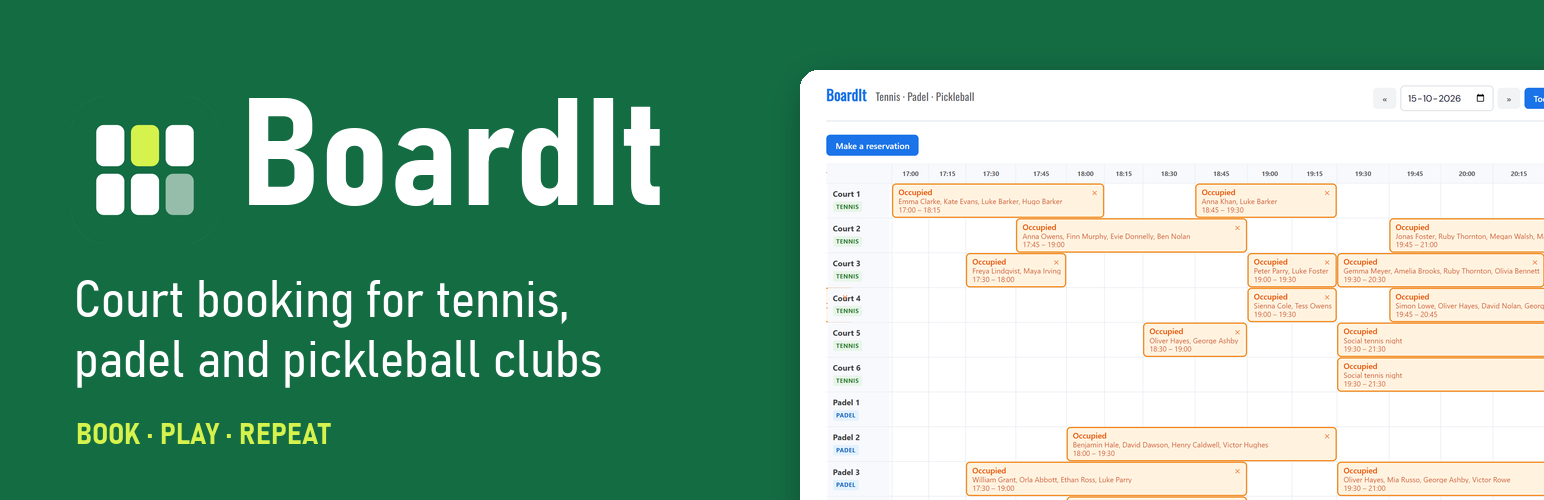
All courts side by side in a 15-minute grid, with free, occupied and past slots in clear colours and the member’s own bookings highlighted.
Book in a few clicks: click a free slot, add playing partners (with suggestions of people you often play with) and confirm.
Move a booking by drag and drop to another time or court on the same day; BoardIt checks the rules of the new court.
Cancel with one click, on the board or in the “My reservations” overview.
Horizontal or vertical view, and on a phone the times stay in view while scrolling.
Always up to date: the board refreshes itself when someone else books, moves or cancels.
Tennis, padel and pickleball on one board
Tennis: the playing time depends on the number of players (15 minutes per player), with an optional 15 extra minutes per court for a warm-up or a short post-game.
Padel (90 minutes) and pickleball (60 minutes) have a fixed playing time, or set your own.
Minimum and maximum number of players per court.
Booking rules for a fair club
Opening and closing time of the courts.
How many days ahead members may book, and how far back they may browse.
How many bookings a member may have at the same time, including bookings as a playing partner.
Block members who may not book for a while.
Login required, or an open board.
For the committee and the club desk
Reservations per day, with date navigation and cancellation.
Members overview with upcoming and total bookings, search, block and unblock.
A “Tennis club manager” role for the club desk or the court committee: managers book for any member and manage all bookings on the board, without administrator rights.
Automatic emails when a booking is made, moved or cancelled, to every player, with a calendar file (.ics) and an “Add to Google Calendar” button. Change the sender, subject and text yourself, with placeholders such as the court, date and players.
Your club logo in every email.
Club colours: choose the colours of the board to match your website.
Privacy-friendly
Members are ordinary WordPress users and log in with their email address and WordPress password.
Names in old bookings are anonymised automatically after 1, 2 or 3 years (your choice); the court, date and time stay for statistics.
BoardIt never adds “Powered by” links or credits to your board or emails.
Seven languages
English, Dutch, German, French, Spanish, Italian and Portuguese. Every WordPress user can choose their own language.
BoardIt Pro
Everything above stays free, with as many courts as you like. BoardIt Pro adds tools for busy clubs:
Guest players: members add up to 3 non-members to a booking.
Guest fee: members pay a fixed amount per guest player online with Mollie, using the club’s own Mollie account. The court is held while the member pays, and the fee is refunded automatically when the booking is cancelled.
Fixed reservations, once or every week, for lessons, competitions, social evenings and maintenance, on one or more courts at once. The courts are blocked on the board automatically.
Statistics: busiest days and times, court occupancy, monthly trend, most active members and most cancellations.
Show the names of all players on the board to logged-in members.
Sponsor logos at the bottom of every email.
See BoardIt → BoardIt Pro in your dashboard. More information: boardit.nl.
Privacy
BoardIt stores the bookings in your own WordPress database: the court, date, time and the players (WordPress users, and with BoardIt Pro the names of guest players). Members are WordPress users; BoardIt only keeps whether a member is blocked. Booking data is never sent to external services.
The names in bookings are anonymised automatically after the period you choose (default 2 years, or 1 or 3 years, or never). The court, date and time remain for statistics.
Members only see the names in their own bookings, unless the club turns on “Show all player names” (BoardIt Pro).
The board remembers the chosen view (horizontal or vertical) and whether the suggestions are open, only in the member’s own browser (localStorage).
Uninstalling the plugin removes the courts, bookings and settings of BoardIt.
External services
BoardIt uses Freemius (https://freemius.com) for the optional usage opt-in and for buying, activating and updating BoardIt Pro. BoardIt never sends members, reservations or other booking data to Freemius.
Opt-in: after activation BoardIt asks whether you want to share basic data with Freemius, to receive notices about security and feature updates. Nothing is sent unless you choose “Allow & Continue”; you can skip this and use BoardIt as usual. When you opt in, Freemius receives your WordPress user’s first and last name and email address, the homepage URL and title, the WordPress and PHP versions and the site language, and the BoardIt and SDK versions and whether BoardIt is active or uninstalled. The list of plugins and themes (names, slugs, versions and whether they are active) is only shared if you allow it. You can opt out at any time with the “Opt Out” link on the Plugins screen.
Deactivation feedback: when you deactivate BoardIt, you can tell why in a short form. The answer is only sent to Freemius when you submit it; you can skip the form.
BoardIt Pro: when you choose to upgrade, the Freemius checkout opens and the details you enter there (name, email address and payment details) go to Freemius, which handles the payment, the license and the Pro downloads. When you activate a license, Freemius receives the homepage URL and the BoardIt and SDK versions, so the license can be linked to your site.
Freemius terms of service: https://freemius.com/terms/
Freemius privacy policy: https://freemius.com/privacy/
Mollie (BoardIt Pro only)
With the guest fee in BoardIt Pro, members pay online for their guest players via Mollie (https://www.mollie.com). This only happens when the club turns on the guest fee and enters its own Mollie API key. BoardIt then connects to the Mollie API (https://api.mollie.com) to create a payment when a member books with guest players, to check its status, and to refund it when the reservation is cancelled. BoardIt sends the amount, a short description (number of guests, court, date and time, club name), the return address and the reservation number. The member enters the payment details on the payment page of Mollie; BoardIt never receives them. The free version of BoardIt does not contain this code.
Mollie terms of service: https://www.mollie.com/legal/user-agreement
Mollie privacy policy: https://www.mollie.com/privacy
Google Calendar
Confirmation emails contain a plain link to add the reservation to Google Calendar. Nothing is sent to Google unless the recipient clicks that link.
Third-party libraries
Chart.js 4.4.0 (MIT license), only in BoardIt Pro, used on the statistics page. Source: https://github.com/chartjs/Chart.js — the full license is in pro__premium_only/admin/js/lib/chart.js-LICENSE.md.
Freemius WordPress SDK 2.13.4 (GPLv2 or later), used for the opt-in and for BoardIt Pro licenses and updates. Source: https://github.com/Freemius/wordpress-sdk