內容簡介
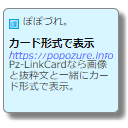
SU Blocks - Blogcard 外掛可將任何連結顯示為時尚的卡片,並自動擷取標題、描述及縮圖,提升網站內容的可視化效果。使用者只需在區塊編輯器中貼上網址,即可快速生成部落格卡片。
【主要功能】
• 簡易操作:輸入網址即可立即生成部落格卡片
• 通用相容性:支援非 WordPress 網站
• 自動擷取元資料:自動獲取標題、描述及縮圖
• 可自訂:擷取的資訊可後續編輯
• SEO 友好:可設定 rel 屬性如 nofollow、noreferrer
• 響應式設計:在行動裝置上美觀顯示
外掛標籤
開發者團隊
📦 歷史版本下載
原文外掛簡介
WordPress’s standard URL embedding feature only works with WordPress sites.
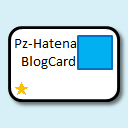
This plugin was created to display any link destination as a stylish card with thumbnails.
Just paste the URL into the block editor. Blog cards are displayed in an instant.
New features from version 2.0.0 include the ability to create blog cards from site search.
This allows you to search for articles within your own site and convert them into blog cards.
Important Notice:
Starting from version 2.1.0, the block is rendered dynamically on the server side to improve stability.
Note: Manual edits made via “Edit as HTML” will be reset to the standard design.
If you see “Attempt Block Recovery” after updating, please click the button to recover the block.
External services
This plugin relies on the following third-party service.
Google Favicon Service (https://www.google.com/s2/favicons)
When a blog card has no favicon of its own, the card falls back to a favicon supplied by Google. The image is requested by the visitor’s browser while the page is being displayed, so the visitor’s IP address, user agent, and the domain name of the linked site are sent to Google.
This happens only on pages that contain a blog card whose favicon could not be determined when the card was created.
Terms of service: https://policies.google.com/terms
Privacy policy: https://policies.google.com/privacy
Separately, when you create or refresh a blog card, your server fetches the page at the URL you entered in order to read its title, description, thumbnail and favicon. That request is made by your site, not by your visitors, and it sends no information about them.
Key Features
Easy Operation: Simply enter a URL and press Enter to instantly generate a blog card
Universal Compatibility: Works with non-WordPress sites (note, Zenn, Qiita, GitHub, etc.)
Automatic Metadata Fetching: Automatically retrieves title, description, and thumbnail images
Customizable: Retrieved information can be edited later
SEO Friendly: Set rel attributes like nofollow, noreferrer, sponsored, ugc
Responsive Design: Beautiful display on mobile devices
Caching: Caches retrieved metadata for fast display
Site Search: Search and convert internal posts into blog cards
Dark Mode Support: Switches to a dark palette while the page has a data-theme=”dark” attribute
Advanced Management: Configure default link targets, cache duration, and manual favicon support
Usage
Basic Usage
Click the ‘+’ button in the post/page editor
Search for and select ‘Blog Card’
Enter the destination URL in the URL input field
Press Enter to automatically fetch metadata and generate a blog card
Advanced Settings
When the block is selected, the following settings appear in the right sidebar:
URL: Destination URL
TARGET Attribute: How to open the link (_blank, _self, etc.)
Rel Attributes: noopener, nofollow, noreferrer, sponsored, ugc
Thumbnail: Show/hide thumbnail image
Title: Manual title editing
Description: Manual description editing
Thumbnail Image: Manual thumbnail image setting
Support
For questions about the plugin or bug reports, please use the following methods:
GitHub Issues: [Plugin repository URL]
Email: [Support email address]
Developer Information
This plugin is developed using the following technologies:
WordPress Block Editor (Gutenberg)
React
WordPress REST API
PHP 7.4 or higher
If you would like to customize or add features, please send a pull request to the GitHub repository.
License
This plugin is released under the GPLv2 or later license.
Acknowledgments
In developing this plugin, we referenced the following open source projects:
WordPress
React
Other open source libraries
Development
This plugin is actively maintained and developed. Contributions are welcome!
For development setup and contribution guidelines, please refer to the GitHub repository.