內容簡介
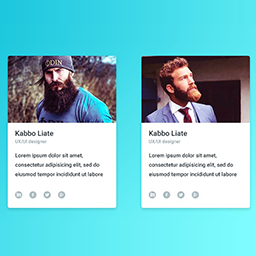
Blog Authors 是一個易於管理的 WordPress 外掛,可以讓您顯示網站的團隊成員。Blog 有選項可以使用短代碼顯示所有團隊成員的頁面。Blog Authors 還有選項可以在他們的文章下顯示 Blog 作者卡。網站所有者可以啟用一個功能,允許作者嵌入他們的 Blog 作者卡以顯示他們的個人資料。如果啟用,會列出該作者最近的十篇文章。Blog Authors 選項面板有添加和排序用戶的選項。Blog Authors 根據每個團隊成員的設定自動提取信息。用戶檔案中添加了其他幾個字段,例如社交網絡路徑,只對添加到 Blog Authors 的用戶可見。Blog Authors 使用添加的社交網絡路徑並顯示社交網絡圖標。整個設計是高度可自定義的。它帶有一個子菜單,專門用於自定義 Blog 作者卡的展示方式。Blog Authors 的美妙之處在於信息是由添加的用戶通過其檔案提供的。
外掛標籤
開發者團隊
原文外掛簡介
Blog Authors is an easy-to-manage WordPress plugin that allows you to display your site’s team members. Blog has options to display a page of all team members using a short code. Blog authors also has the option to show a Blog Author Card under their post. Site owners can enable a feature that allows authors to embed their blog authors card to show their profile. If enabled, there is a list of the ten latest posts by that author. The Blog Authors options panel has options to add and order users. Blog Authors automatically takes each team member’s information based on their profile. Several other fields in the user’s profile are added such as social networking paths and are only visible to users added to blog authors. Blog Authors uses the added social network paths and displays the social networking icons. The overall design is heavily customizable. It comes with a submenu dedicated to customizing the presentation of the the Blog Author Card. The beauty of Blog Authors is that the information is provided by the added user via their profile.