內容簡介
總結:這是一個 WordPress 外掛,可以增加它自動建立的虛擬 robots.txt 檔案的內容,將內容加到阻擋 OpenAI ChatGPT-User 機器人在網站上瀏覽的相關部分。需要注意的是,使用此外掛前請了解它的作用。
問題與答案:
- 這個 WordPress 外掛的功能是什麼?
- 可以增加內容到虛擬 robots.txt 檔案,以遮蔽 OpenAI ChatGPT-User 機器人在網站上瀏覽的相關部分。
- 這個外掛是基於什麼想法開發的?
- 沒有特定的想法,只是爲了快速解決 OpenAI ChatGTP 插件瀏覽網站的問題,所以開發了此外掛。
- 什麼是 robots.txt 檔案呢?
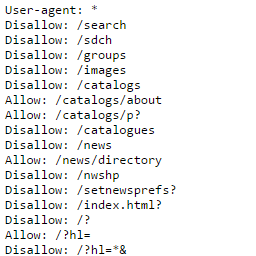
- robots.txt 是一個位於網域根目錄(或子域名)下的純文本檔案,告訴網路爬蟲(如 Googlebot)哪些網站部分可以瀏覽和索引。
- 這個外掛的系統需求是什麼?
- 需要 PHP 版本 7.4 或更高,因爲開發者希望大家都使用現代的 PHP 版本。WordPress 建議使用 7.4 或更高的版本,但建議使用 8.0 或更高的版本,因爲 7.4 的安全更新已在 2022 年 11 月 28 日停止。
- 怎樣才能在其他語言下使用這個外掛?
- 外掛的第一個版本支持英語和西班牙語。在「語言」文件夾中,我們包含了翻譯此外掛所需的文件。如果你想要使用其他語言,請使用原生 WordPress 翻譯功能。
- 如何聯繫開發者獲取更多信息?
- 可以發送電子郵件聯繫。
外掛標籤
開發者團隊
② 後台搜尋「Block Chat GPT via robots.txt」→ 直接安裝(推薦)
原文外掛簡介
This plugin adds lines to the virtual robots.txt file that WordPress creates automagically if the file is not present physically on the server to block the OpenAI ChatGPT-User bot that is used by plugins in ChatGPT to crawl websites. Here is the information about the ChatGPT-User bot. It also blocks the the GPTBot user agent that may potentially be used to improve future models.
Please be aware of what this plugin does exactly: If you activate the plugin it will add some lines to the robots.txt file to tell Open AI Chat GPT bots (ChatGPT-User + GPTBot) to not to crawl and index parts of this website.
Please only activate this plugin if you know what you’re doing.
What can I do with this plugin?
This plugin adds the necessary lines to the virtual robots.txt file that WordPress creates automagically to block the OpenAI ChatGPT-User bot that is used by plugins in ChatGPT to crawl websites + the GPTBot user agent that may potentially be used to improve future models.
What ideas is this plugin based on?
None. After the launch of the OpenAI ChatGTP plugins that crawl websites, we needed a fast solution to add these lines to the robots.txt file and this was the solution we coded.
In August 2023 OpenAI added information about the GPTBot so we added this user-agent to the plugin.
What is the robots.txt file?
The robots.txt file is a plain text file located at the root folder of a domain (or subdomain) which tells web crawlers (like Googlebot) what parts of the website they should access and index.
The first thing a search engine crawler looks at when it is visiting a page is the robots.txt file and it controls how search engine spiders see and interact with the web pages.
System requirements
PHP version 7.4 or greater.
We require 7.4 or higher because we believe that everybody should be running a modern PHP version. When releasing this plugin WordPress recommends PHP 7.4 or higher. We would recommend 8.0 or higher as 7.4 has no security updates since 28 Nov 2022.
How to get this plugin in your Language!
The first release is avaliable in English and Spanish. In the “languages” folder we have included the necessary files to translate this plugin.
If you would like the plugin in your language and you’re good at translating, please use the native WordPress Translation functionality.
New to Translating a plugin? First read through the Translator Handbook, then select your locale at Translating WordPress and finally go to the translation page for this plugin to translate it.
Further Reading
You can access the description of the plugin in Spanish at: Block Chat GPT via robots.txt en español.
Contact
For further information please send us an email.