
內容簡介
Block Accessibility Checks 是一款全面的 WordPress 外掛,旨在於內容編輯過程中主動防止可及性問題。它為 Gutenberg 區塊編輯器提供即時驗證,確保區塊、文章元資料及整體文件結構符合 WCAG 標準。
【主要功能】
• 即時視覺反饋:用顏色邊框顯示可及性問題
• 智能發布控制:關鍵可及性錯誤阻止發布
• 全面區塊覆蓋:內建驗證圖片、按鈕等
• 文件範圍驗證:檢查標題層級以確保結構正確
• 標題驗證:即時確認文章標題設置
• 智能 URL 驗證:使用公共後綴列表進行驗證
外掛標籤
開發者團隊
📦 歷史版本下載
原文外掛簡介
Block Accessibility Checks is a comprehensive WordPress plugin that proactively prevents accessibility issues in your content before they reach your audience. Designed for the Gutenberg block editor, it provides real-time validation with a three-tier system that ensures your blocks, post meta fields, and overall document structure meet WCAG (Web Content Accessibility Guidelines) requirements.
Unlike reactive accessibility tools that scan published content, this plugin catches problems during the editing process—giving immediate visual feedback and preventing publication of content with critical accessibility errors. Content creators get clear guidance on what needs fixing, while developers can extend the system with custom checks for blocks, meta fields, and editor-level validation.
Whether you’re a content creator ensuring your posts are accessible, a developer building accessible blocks, or an organization maintaining compliance standards, Block Accessibility Checks provides the tools you need to create inclusive content effortlessly.
Features for Content Creators & Editors:
Real-time Visual Feedback – See accessibility issues instantly with color-coded borders (red for errors, yellow for warnings) around problematic blocks and detailed error messages in the block inspector panel
Smart Publishing Control – Critical accessibility errors prevent publishing until resolved, while warnings allow publication with user awareness
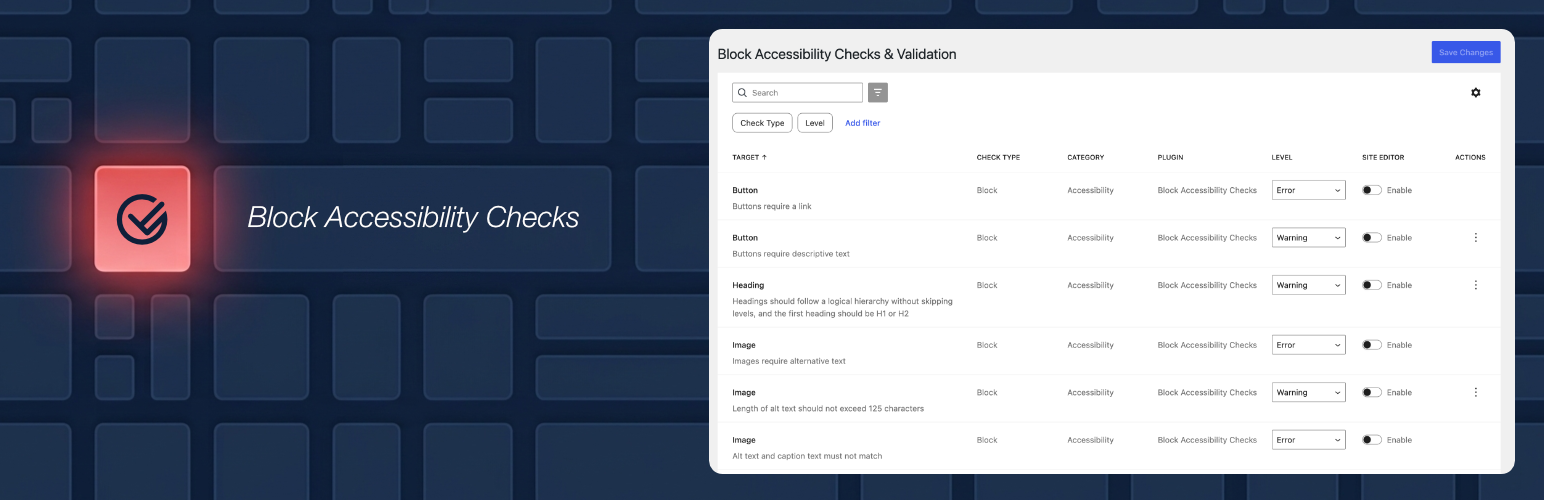
Comprehensive Block Coverage – Built-in validation for images, buttons, tables, headings, and galleries with clear guidance on how to fix issues
Document-Wide Validation – Advanced heading hierarchy checking prevents skipped heading levels and ensures proper content structure across your entire post
Title Validation – Ensures posts and pages have a title set for accessibility and SEO, validates in real-time as you type
Intelligent URL Validation – Real TLD validation using the Public Suffix List ensures only legitimate domains are accepted in button links
Configurable Settings – Control which checks are errors (prevent publishing), warnings (allow with notice), or disabled through an intuitive admin interface
Grouped Error Display – All accessibility issues shown at once in organized groups, eliminating the “fix one, see another” frustration
Works Everywhere – Validation runs in both the post editor and site editor (templates/template parts) with separate configurable settings
Features for Developers & Plugin Authors:
Three-Tier Validation API – Register custom checks for block attributes, post meta fields, and editor-level validation using comprehensive hooks and filters
JavaScript-Only Validation – All validation logic runs in JavaScript for real-time editor feedback without server round-trips
Automatic Settings Integration – Checks from external plugins automatically appear in the unified settings table, attributed and filterable by plugin
External Plugin Support – Works seamlessly with custom blocks from third-party plugins and themes
Heading Source Declaration – Blocks that render their own headings count toward heading order validation, automatically or via ba11yc_register_heading_source()
Extensive Hook System – 20+ action and filter hooks for complete customization of registration, validation, and display behavior
Well-Documented API – Complete developer documentation with quick start guides and working code examples
Upgrading an integration from v3? Version 4.0.0 introduced breaking changes to the developer API — registration functions, argument keys, and JavaScript filter names all changed, and v3 integrations stop validating silently rather than erroring. See the v4 upgrade guide for a complete migration reference.
How It Works:
The plugin provides immediate feedback as you edit content through a sophisticated three-tier validation system:
Block Validation – Validates individual block attributes in real-time as you type and edit
Meta Field Validation – Checks required post meta fields with automatic post locking when validation fails
Editor-Level Validation – Validates document-wide concerns like heading hierarchy that span across multiple blocks
When accessibility issues are detected, they are highlighted with visual indicators (red for errors, yellow for warnings) and detailed messages explain how to fix the problems. Critical errors prevent publishing until resolved, while warnings allow publication with user acknowledgment.
Built-in Accessibility Checks:
Button Blocks – Ensures buttons have descriptive text content and validates link destinations using real TLD validation (Public Suffix List)
Image Blocks – Requires alt text (unless marked decorative), validates alt text length (warns if exceeding 125 characters), prevents caption duplication, and detects non-descriptive patterns like “image of” or “photo123”
Table Blocks – Requires proper headers or captions for screen reader navigation
Heading Blocks – Validates heading hierarchy across the whole document, including headings rendered by other blocks. Requires the first heading to be H1 or H2, and any of H1–H6 can be disabled (H1 by default)
Gallery Blocks – Applies comprehensive image accessibility checks to all gallery items (alt text, length, patterns, caption duplication)
Post & Page Title Validation – Ensures posts and pages have a title set for accessibility and SEO, validates in real-time as users type, prevents publishing content without a title, configurable independently for posts and pages
Post Meta Fields – Validate required custom fields with real-time validation, automatic post locking for errors, and seamless integration with block validation system
Perfect For:
Government websites requiring WCAG compliance
Educational institutions with accessibility mandates
Businesses committed to inclusive web content
Developers building accessible WordPress themes and plugins
Content teams who want accessibility guidance built into their workflow
Developer Resources:
Extend the plugin with custom accessibility checks using the comprehensive validation API. See the complete developer documentation for quick start guides, API reference, code examples, and a working example plugin.
Getting Involved
If you would like to get involved and contribute to the development of this plugin or view it’s source code you can find more information in the plugins GitHub repo.












