內容簡介
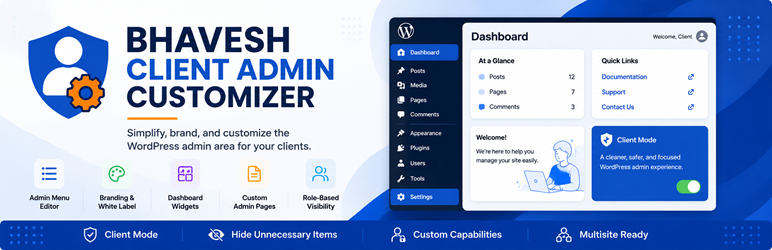
Bhavesh Client Admin Customizer 外掛幫助代理商、自由工作者、開發者和網站擁有者簡化 WordPress 控制台的管理體驗。此外掛提供輕量級介面,讓使用者可以自訂 WordPress 管理區域的特定部分,無需修改核心檔案或使用頁面建構器。
【主要功能】
• 管理選單編輯器:重新命名、隱藏或重新排序管理選單項目
• 角色基礎可見性:針對特定角色隱藏或重新命名選單
• 客戶模式:隱藏進階選單項目及更新通知
• 登入品牌化:自訂 WordPress 登入標誌及其網址
• 自訂管理頁面:創建自訂內容的管理頁面
• 配置預設:一鍵應用現成的選單規則
外掛標籤
開發者團隊
② 後台搜尋「Bhavesh Client Admin Customizer」→ 直接安裝(推薦)
原文外掛簡介
Bhavesh Client Admin Customizer helps agencies, freelancers, developers, and website owners create a simpler and more focused WordPress administration experience.
The plugin provides a lightweight interface for customizing selected parts of the WordPress admin area without modifying WordPress core files or requiring a page builder.
It is useful when handing a WordPress website over to a client and you want to remove unnecessary administration items, provide useful information, or add custom client-facing administration pages.
Features
Admin Menu Editor — Rename, hide, reorder, or re-icon registered top-level administration menu items.
Submenu Management — Rename or hide registered submenu items.
Role-Based Visibility — Scope any hide/rename rule to specific roles instead of applying it to every user.
Custom Capabilities — Override the capability required for a menu item or custom page, e.g. to expose something to non-administrators.
Client Mode — One toggle that hides advanced menu items, update notices, and file-editing capability from every role except Administrator.
Login Branding — Customize the WordPress login logo and its destination URL.
Admin Branding — Hide the WordPress logo from the administration toolbar, hide the WordPress version information, and customize the administration footer text.
Dashboard Widgets — Hide selected default WordPress dashboard widgets.
Custom Dashboard Widgets — Add custom dashboard widgets for support information, onboarding instructions, documentation, contact information, or useful links, placed in either dashboard column.
Dashboard Layout — Set the default number of dashboard columns for your users.
Custom Admin Pages — Create custom administration pages with your own content.
Post Type Submenus — Attach custom administration pages as submenu pages under supported post types.
Top-Level Admin Pages — Create standalone top-level administration pages.
Configuration Presets — Apply a ready-made set of menu rules (Minimal Client Access, Support Team, Full Team Access) in one click.
Import / Export — Download your configuration as JSON and re-apply it on another site.
Reset to Defaults — Restore every setting to its default state in one click.
Multisite Support — A Network Admin screen lets a super admin force branding and hidden menus across every site on the network.
WordPress-Native — Uses WordPress administration APIs and hooks without modifying WordPress core files.
Lightweight — No page builder, frontend framework, or external service is required.
Use Cases
Bhavesh Client Admin Customizer can be useful for:
Agencies managing WordPress websites for clients.
Freelancers handing completed websites over to clients.
Developers creating simplified WordPress administration interfaces.
Website owners who want to reduce unnecessary administration menu items.
Agencies providing clients with support information and documentation inside WordPress.
Agencies managing many client sites from one WordPress Multisite network.
Important Information
This plugin changes the visibility and presentation of selected WordPress administration elements.
Hiding an administration menu does not, by itself, change the underlying WordPress capability required to access that page directly. Use the Capability field on a menu rule or custom page if you also need to restrict direct access, not just visibility.