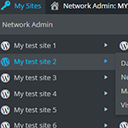
內容簡介
當使用 WordPress 多站點功能時,「我的網站」選單將會新增至管理列上。然而,原因如下,這個選單新增還是有一些限制:
1. 選單寬度會跟網站標題最長的那一個一樣長,有點不方便。
2. 如果你有很多網站,那麼這個選單就會超出螢幕範圍,無法點選下方的項目,這也很不方便。
此外掛試圖解決上述問題,讓多站點管理者可以更方便地使用我的網站選單。
此掛件會:
1.當一個使用者擁有的網站超過一個數量時,可以滾動列表,讓使用者能夠瀏覽所有網站。
2.當網站標題太長時,會自動縮短,讓你的選單不會過度寬廣。
總體而言,此外掛是一個非常輕量級的掛件。它會移除現有的我的網站選單,並加入這個選單以及先前描述的功能。
外掛標籤
開發者團隊
原文外掛簡介
When using WordPress multisite, the “My Sites” menu item will be added to the admin bar. Out of the box, this menu has a few limitations:
1. It is as wide as the longest title of one of your sites. Lame.
1. If your list of sites is too long, it will not fit on your screen and you can’t reach the bottom ones. Also lame.
This plugin is an attempt to remedy these and other issues and make the My Sites menu as useful as possible for multiple-site admins.
What it does:
1. If a user’s list of sites grows past a certain number, scrolling is enabled on the list. This way you can always reach every site.
1. Site titles are truncated if they get too long so your menu isn’t crazy wide.
All in all, this is a very light plugin. How it works is it removes the existing My Sites menu and adds in this one plus the previously described functionality.