
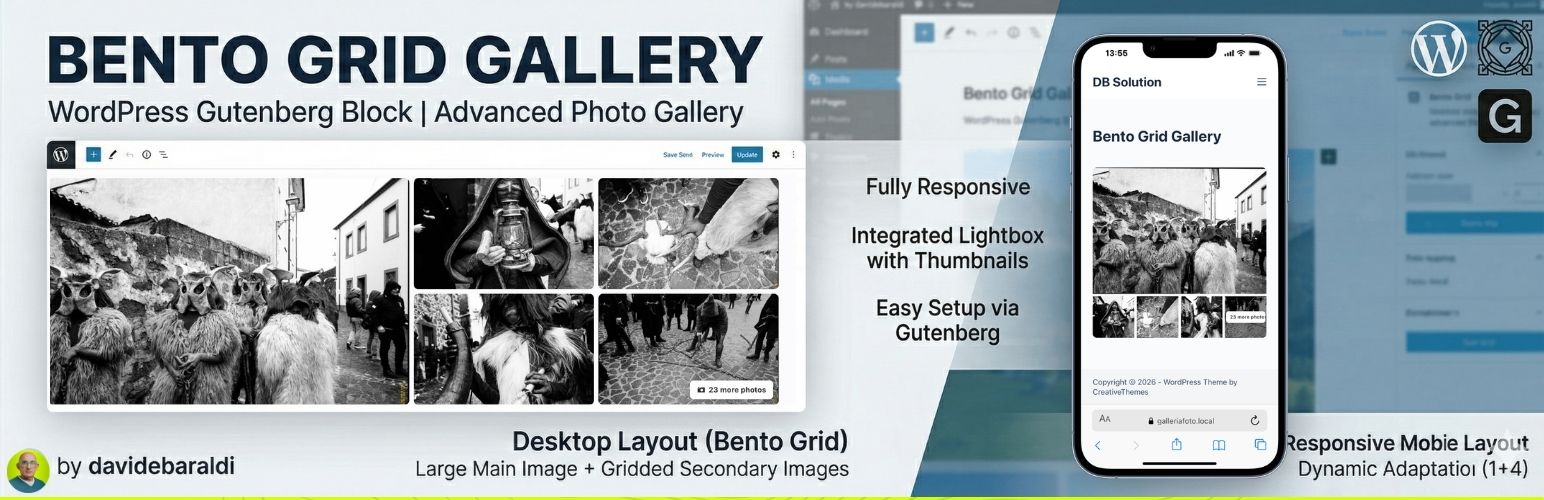
內容簡介
Bento Grid Gallery 是一款輕量且功能強大的 Gutenberg 區塊外掛,可快速建立現代感的便當格(Bento Grid)相片藝廊,無需繁複設定即可擺脫傳統無聊版面,特別適合旅遊網站與新聞文章使用。
【主要功能】
• 桌面版 Bento Grid 動態排版,主圖搭配副圖格線
• 行動裝置完整響應式設計,可自訂欄數
• 可自訂桌面高度、桌面欄數與手機欄數
• 進階燈箱瀏覽,支援箭頭導覽與縮圖列
• 原生 WordPress 圖庫管理,支援拖放排序
• 自動載入適當圖片尺寸,優化載入效能
外掛標籤
開發者團隊
原文外掛簡介
Bento Grid Gallery is a lightweight and powerful plugin that adds a new block to the WordPress Gutenberg editor. It allows you to create modern, eye-catching photo galleries without complex configurations, perfect for tourism portals and news articles to avoid classic boring layouts.
Key Features:
Desktop Layout “Bento Grid”: Displays a dynamic composition with a large main image on the left and a grid of secondary images on the right.
Mobile Layout: Fully responsive, adapts to your custom column settings.
Customizable Columns & Height: Manage desktop height, desktop columns, and mobile columns directly from the Gutenberg Inspector Controls.
Advanced Lightbox: Full-screen image viewing with navigation arrows and a bottom thumbnail strip for quick navigation (visible on both Desktop and Mobile).
Native Management: Uses the standard WordPress “Edit Gallery” interface for adding, removing, and reordering photos with native Drag & Drop.
Performance Optimization: Automatically loads appropriate image sizes (large for main, medium_large for secondary) to ensure fast loading speeds.
“+X Photos” Counter: If you upload more images than the visible grid allows, the last thumbnail automatically shows an overlay.












