內容簡介
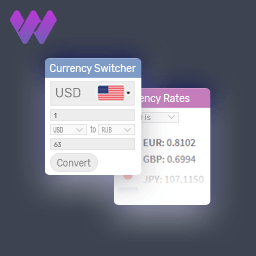
Baxtersweb Currency Switcher 外掛讓訪客能選擇熟悉的貨幣,並在 WordPress 或 WooCommerce 中顯示轉換後的價格。這個外掛不會改變原始價格,並且能在不需要完整多貨幣結帳系統的情況下,提供多貨幣顯示功能。
【主要功能】
• 支援多種貨幣顯示而不改變原始價格
• 訪客可透過前端貨幣切換器選擇顯示貨幣
• 自動轉換 WooCommerce 商品價格
• 支援自訂價格值的轉換
• 提供多種切換器樣式與自訂選項
外掛標籤
開發者團隊
② 後台搜尋「Baxtersweb Currency Switcher – Display Prices in Multiple Currencies」→ 直接安裝(推薦)
原文外掛簡介
Baxtersweb Currency Switcher lets visitors choose a familiar currency and see converted prices across WordPress or WooCommerce. Your original stored prices stay unchanged, and WooCommerce continues to use its configured store currency for cart, checkout, orders and payments.
It is designed for multi-currency price display without a full multi-currency checkout system and works with WooCommerce prices, custom fields, shortcodes, templates and dynamic JavaScript values.
Display multiple currencies without changing original prices
Visitors select a display currency using a frontend currency switcher. The plugin converts supported price displays using the active exchange rate and remembers the visitor’s selection in a browser cookie.
The plugin does not:
Rewrite stored product or custom-field prices
Change the WooCommerce store currency
Process payments in the selected display currency
Change cart, checkout, order or account values
WordPress and WooCommerce price sources
Choose the workflow that matches your site:
Custom price values — convert numeric ACF fields, standard WordPress post meta or supplied values using the shortcode.
WooCommerce product prices — automatically convert standard shop and product price displays while WooCommerce continues to transact in the store currency.
WooCommerce is optional. ACF is also optional.
Visitor currency switcher
Place the switcher anywhere shortcodes are supported:
[bxtr_currency_switcher]
Optional label:
[bxtr_currency_switcher label="Currency:"]
Display codes, symbols and locally bundled SVG flags, with Basic, Clean and Pill switcher styles that remain easy to override with theme CSS.
Exchange rates and price control
The plugin retrieves daily European Central Bank (ECB) reference rates and stores the latest successful rate set in WordPress.
For each enabled currency, configure its symbol, percentage adjustment, optional manual rate, rounding, decimals and visitor availability. You can also choose the default display currency, switcher format and converted-price format.
Convert custom prices with shortcodes
Configured field on the current post:
[bxtr_currency]
Specific field:
[bxtr_currency field="itinerary_price"]
Specific post:
[bxtr_currency id="123"]
Supplied numeric value:
[bxtr_currency value="2450"]
WooCommerce product price in a custom template:
[bxtr_currency source="woocommerce" id="123"]
Add surrounding text when needed:
[bxtr_currency value="2450" prefix="From " suffix=" per person"]
JavaScript API for dynamic prices
Dynamic controls can use the same selected currency, rates, adjustments, rounding and formatting:
BXTRCurrency.convert(5000)
BXTRCurrency.format(5000)
BXTRCurrency.getCurrency()
BXTRCurrency.getConfig()
Useful for sliders, calculators and configurators where the underlying value remains in the site’s base currency.
WooCommerce display behaviour
Automatic WooCommerce conversion supports standard simple, sale and variable product price output on product and shop pages.
Cart, checkout, orders, payments and account pages remain in the WooCommerce store currency.
Some themes and builders bypass WooCommerce’s standard price output. In those cases, use the manual WooCommerce shortcode in the custom template.
Live Demo
View the live demo
Documentation
View the documentation
Support
For support, use the public support forum on WordPress.org.
External services
Baxtersweb Currency Switcher connects to the European Central Bank (ECB) to retrieve public daily reference exchange rates used for display conversion.
The plugin requests this fixed XML feed:
https://www.ecb.europa.eu/stats/eurofxref/eurofxref-daily.xml
The request is made from the WordPress website server when the plugin is activated, when an administrator selects Update rates now, and during the scheduled daily update when automatic updates are enabled.
The plugin does not add visitor details, WordPress user details, customer information, payment information, website content, selected currencies or custom query parameters to the request. Standard server connection information such as the requesting server’s IP address may be processed by the external service.
The returned public exchange-rate data and update timestamp are stored locally in WordPress. ECB reference rates are informational and may differ from commercial, card-provider or payment-gateway rates.
ECB reference-rate feed: https://www.ecb.europa.eu/stats/eurofxref/eurofxref-daily.xml
ECB disclaimer and copyright: https://www.ecb.europa.eu/services/using-our-site/disclaimer/html/index.en.html
ECB privacy statement: https://www.ecb.europa.eu/services/privacy/html/index.en.html
By enabling and using exchange-rate conversion, the website makes requests to this external ECB service under the ECB’s applicable terms and privacy information.