內容簡介
<h3>總結:</h3>
<ul>
<li>在不到 2 分鐘內,將您的 WordPress 網站轉變為安全要塞。</li>
<li>BaseCloud Security Manager 透過先進的 HTTP 安全標頭提供企業級安全保護,這是財富 500 強公司用來保護其網站的技術。無需技術專業知識。</li>
</ul>
<h3>問題與答案:</h3>
<ul>
<li><strong>為什麼安全標頭很重要?</strong></li>
<ul>
<li>安全標頭是您網站的第一道防線,指示瀏覽器如何安全處理您的內容。沒有安全標頭,您的網站容易受到以下風險:</li>
<ul>
<li>Cross-Site Scripting(XSS)攻擊 - 87% 的網站容易受到風險</li>
<li>窺探攻擊,竊取使用者憑證</li>
<li>透過不安全連接竊取數據</li>
<li>透過引用來源泄漏違反隱私權</li>
<li>惡意代碼注入</li>
</ul>
<li><strong>BaseCloud 有什麼不同之處?</strong></li>
<ul>
<li>一鍵保護 - 使用一鍵啟用軍事級安全保護</li>
<li>零設置需求 - 智能默認立即保護您</li>
<li>極速快 - 不會影響您的網站性能</li>
<li>全面控制 - 進階用戶可自訂每個設置</li>
<li>開發者友好 - 乾淨、有文獻記錄的程式碼</li>
<li>不需變更伺服器 - 在任何主機提供商上運作</li>
</ul>
<li><strong>什麼是完整的安全避險設備?</strong></li>
<ul>
<li>主安全開關:一鍵開啟所有保護 - 非技術性使用者想要在不複雜的情況下獲得最佳安全性。</li>
<li>強制 SSL/HTTPS 到處都有:自動將所有 HTTP 流量重定向到 HTTPS,確保所有數據傳輸加密。防止中間人攻擊。</li>
<li>內容安全政策(CSP):XSS 保護的黃金標準。精確控制在您的網站上可以運行的腳本、樣式和資源。包括智能默認,可與 99% 的 WordPress 主題和插件配合使用。</li>
<li>HTTP 嚴格傳輸安全性(HSTS):強制瀏覽器僅通過 HTTPS 通信,防止 SSL 降級攻擊。支持預加載以獲得最大的保護。</li>
<li>進階引用來源政策:通過控制哪些信息來保護使用者隱私</li>
</ul>
</ul>
</ul>
外掛標籤
開發者團隊
📦 歷史版本下載
原文外掛簡介
Transform your WordPress site into a security fortress in under 2 minutes.
BaseCloud Security Manager delivers enterprise-level security protection through advanced HTTP security headers – the same technology used by Fortune 500 companies to protect their websites. No technical expertise required.
🎯 Why Security Headers Matter:
Security headers are your website’s first line of defense, instructing browsers on how to handle your content safely. Without them, your site is vulnerable to:
• Cross-Site Scripting (XSS) attacks – 87% of websites are vulnerable
• Clickjacking attacks that steal user credentials
• Data theft through insecure connections
• Privacy violations through referrer leaks
• Malicious code injection
✨ What Makes BaseCloud Different:
🚀 One-Click Protection – Enable military-grade security with a single click
🔒 Zero Configuration Required – Smart defaults protect you instantly
⚡ Lightning Fast – No performance impact on your site
🎛️ Full Control – Advanced users can customize every setting
🛠️ Developer Friendly – Clean, well-documented code
🔧 No Server Changes – Works on any hosting provider
🛡️ Complete Security Arsenal:
🎯 Master Security Switch
Enable all protections instantly – perfect for non-technical users who want maximum security without complexity.
🔐 Force SSL/HTTPS Everywhere
Automatically redirect all HTTP traffic to HTTPS, ensuring all data transmission is encrypted. Protects against man-in-the-middle attacks.
🛡️ Content Security Policy (CSP)
The gold standard of XSS protection. Controls exactly which scripts, styles, and resources can run on your site. Includes smart defaults that work with 99% of WordPress themes and plugins.
🔒 HTTP Strict Transport Security (HSTS)
Forces browsers to communicate exclusively over HTTPS, preventing SSL stripping attacks. Includes preload support for maximum protection.
🕵️ Advanced Referrer Policy
Protects user privacy by controlling what information is shared when visitors click links, preventing data leaks to third parties.
🎤 Permissions Policy (Feature Policy)
Block unauthorized access to sensitive browser features like camera, microphone, geolocation, and payment APIs – preventing malicious sites from accessing these features.
🍪 Secure Cookie Protection
Automatically applies HttpOnly and Secure flags to session cookies, preventing JavaScript access and ensuring cookies are only sent over HTTPS.
👻 Server Fingerprinting Protection
Removes server signatures and version information that hackers use to identify vulnerabilities in your hosting setup.
⚡ Essential Security Headers Included:
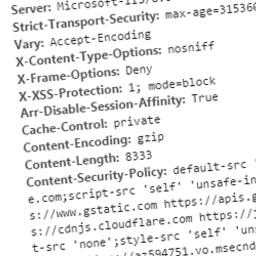
• X-Frame-Options: SAMEORIGIN (prevents clickjacking)
• X-Content-Type-Options: nosniff (prevents MIME-type confusion attacks)
• X-XSS-Protection: 1; mode=block (legacy XSS protection for older browsers)
💼 Perfect For:
• Business owners who want enterprise security without technical complexity
• Developers building secure WordPress applications
• Agencies managing multiple client sites
• Anyone serious about website security
🎯 Use Cases:
• E-commerce sites handling sensitive customer data
• Membership sites with user logins
• Business websites with contact forms
• Blogs that want to protect visitor privacy
• Development sites that need security during testing
BaseCloud Security Manager is lightweight, efficient, and designed to integrate seamlessly into your WordPress admin experience without clutter or intrusive advertising.
Additional Information
🎯 Why Choose BaseCloud Security Manager?
✅ Instant Protection – Works immediately after activation
✅ Zero Learning Curve – No technical knowledge required
✅ Enterprise Grade – Same technology used by Fortune 500 companies
✅ Fully Customizable – Advanced users have complete control
✅ Regular Updates – Stay protected against emerging threats
✅ Expert Support – Professional team ready to help
🔗 Useful Links:
• Documentation: BaseCloud Security Docs
• Support: [email protected]
• Security Testing: Mozilla Observatory
• Header Verification: SecurityHeaders.com
🤝 Join Our Community:
Connect with other security-conscious WordPress users, get tips, and stay updated on the latest security trends.
⭐ Love BaseCloud Security Manager?
Help others discover enterprise-grade security by leaving a review. Your feedback helps us improve and helps other users make informed decisions about their website security.
Made with ❤️ by the BaseCloud Team – Securing WordPress sites worldwide since 2024