內容簡介
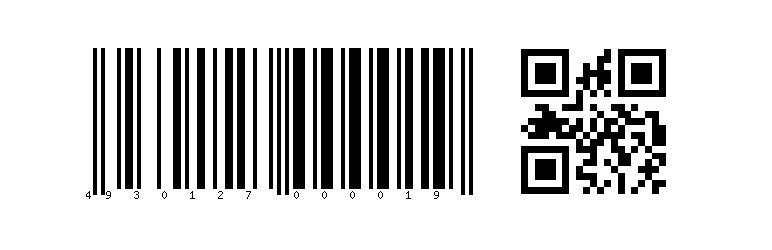
Barcode QRcode Generator 外掛提供輸出條碼和 QR Code 的功能,只需使用 [barcode] 和 [qrcode] 兩個短代碼即可建立。
如何使用 [barcode]
要輸出條碼,請使用 [barcode]。 提供 [barcode] 的一些屬性。
text … 條碼圖片中要包含的文字。
type … 條碼類型:code39、int25、ean13、upca、upce、code128、ean8 和 postnet。 預設值:ean13
imgtype … 要生成的影像類型:gif、jpg 和 png。 預設值:png
height … 影像高度(px)。 預設值:60
width … 影像寬度。 預設值:1
showText … 文字應放置在條碼下方。 預設值:1
rotation … 旋轉角度。 預設值:0
transparency … 透明背景。 預設值:0
remake … 將每次重新生成條碼。 預設值:0
textfilename … 以文字值作為檔名。 預設值:0
例如:[barcode text=4930127000019 height=100 width=2 transparency=1]
如何使用 [qrcode]
要輸出 QR Code,請使用 [qrcode]。 提供 [qrcode] 的一些屬性。
text … QR code 影像中要包含的文字。
eclevel … 錯誤修正等級。 0(等級 L)、1(等級 M)、2(等級 Q)和 3(等級 H)。 預設值:3
height … 影像高度(px)。 預設值:60
width … 影像寬度(px)。 預設值:60
transparency … 透明背景。 預設值:0
remake … 將每次重新生成 QR code。 預設值:0
textfilename … 以文字值作為檔名。 預設值:0
例如:[qrcode text=4930127000019 height=100 width=100 transparency=1]
日文說明文件
Barcode QRcode Generator
解除安裝
停用外掛
完成! 🙂
外掛標籤
開發者團隊
原文外掛簡介
The Barcode QRcode Generator plugin adds the functionality to output barcodes and qrcodes by use of the shortcodes [barcode] and [qrcode].
How to use [barcode]
In order to output barcodes, [barcode] will be used. There are some attributes for [barcode].
text … A text that should be in the image barcode.
type … The barcode type: code39, int25, ean13, upca, upce, code128, ean8, and postnet. Default: ean13
imgtype … The image type that will be generated: gif, jpg, and png. Default: png
height … The image height (px). Default: 60
width … The image width. Default: 1
showText … The text should be placed under barcode. Default: 1
rotation … The rotation angle. Default: 0
transparency … The transparent background. Default: 0
remake … The barcode will be regenerated every time. Default: 0
textfilename … The text value will be the file name. Default: 0
Ex) [barcode text=4930127000019 height=100 wdith=2 transparency=1]
How to use [qrcode]
In order to output qrcodes, [qrcode] will be used. There are some attributes for [qrcode].
text … A text that should be in the image qrcode.
eclevel … Error correction level. 0(Level L), 1(Level M), 2(Level Q), and 3(Level H) Default: 3
height … The image height (px). Default: 60
width … The image width (px). Default: 60
transparency … The transparent background. Default: 0
remake … The barcode will be regenerated every time. Default: 0
textfilename … The text value will be the file name. Default: 0
Ex) [qrcode text=4930127000019 height=100 width=100 transparency=1]
Documentation in Japanese
Barcode QRcode Generator
Uninstall
Deactivate the plugin
That’s it! 🙂