內容簡介
BanglaPress 是一個 WordPress 外掛,它能輕鬆將你的 Bangla WordPress 網誌變成一個適用於行動裝置的 Bangla 網誌,並使用預設的 bangla 佈景主題。
如何使用!
當你從 WordPress 的外掛目錄下載 BanglaPress 外掛後,你會得到一個壓縮檔。現在,你需要將它解壓縮。
在你解壓縮後的目錄中,你會發現一個名為 bangla-press 的文件夾。在 bangla-press 文件夾中,還有一個名稱為 [bangla-press] 的文件夾。
現在,你進入到這個 [bangla-press] 文件夾,你就會找到這個插件的所有文件了。接下來,你只需要將這些文件選中並複製到 bangla-press 文件夾中,並將 [bangla-press] 文件夾刪除。
最後一個提示就是,你只需要將這些插件文件放在一個名為 "bangla-press" 的文件夾中,并複製到插件目錄中,然後啟用插件即可。
插件允許 WordPress 佈景主題開發人員為啟用了 BanglaPress 的博客創建自定義的 mobile Bangla 主題。佈景主題設計人員可以為 iPhone 創建特定的 bangla 主題,或為其他移動設備創建通用的 bangla 移動主題。
BabglaPress 是具有 SEO 功能的,它可以檢測 Google、Yahoo 和 MSN 的移動搜索機器人。
有關更多信息和完整文檔,請訪問 BanglaPress 官方網站:bdweblab.com
鳴謝
我喜歡你的工作,你可以接受聘用嗎?
當然可以,請訪問我的Cx Rana官方頁面了解更多信息。
[注:如果你想將預設的日期和時間轉換為 bangla,只需安裝 Arif Nezami 的 bangla-numbers-in-date-and-time 插件
下載]
功能:
* BanglaPress 是一個 WordPress 外掛,可以將你的 WordPress 網誌轉換成適用於手機的版本
* Bangla(Unicode)語言
* 桌面版和行動版系統,僅需一個點擊
* SEO 友好
由 Cx Rana 開發。需要一位網頁設計師吗?
配置和設置
安裝成功後,會出現幾個選項。
網誌標題
更改此選項將在移動設備上查看您的網誌時更改網誌標題。因此,您可以將其替換為“我的 Bangla 網誌”,而不是“我的技術網誌”。這不會影響您在常規 Web 瀏覽器中查看網站的方式。
網誌描述
這與更改網誌標題相同,但會修改您的網誌描述。
強制移動站點
此選項將強制設置您的網站以手機網站模式顯示。
外掛標籤
開發者團隊
② 後台搜尋「bKash & Mobile Payment – Fast Checkout, Partial Payment & Buy Now Button」→ 直接安裝(推薦)
原文外掛簡介
BanglaPress WooCommerce Payment: bKash, Nagad, Rocket, Upay, and Partial Payment is the ultimate payment and checkout toolkit for WooCommerce in Bangladesh. It provides a secure, customizable gateway for bKash, Nagad, Rocket, and Upay, supporting both Simple and Variable Products, Buy Now Button, Payment ID, Dynamic Shipping Zones and Partial Payments.
New Features
–Buy Now Button: This button is added after the “Add to Cart” button for quick purchases.
–Dynamic Shipping Zone: Supports Flat Rate and Free Shipping based on selected zones.
–Types of Products: Compatible with both Simple Products and Variable Products.
–Custom Design: Includes a unique CSS design for the “Buy Now” button.
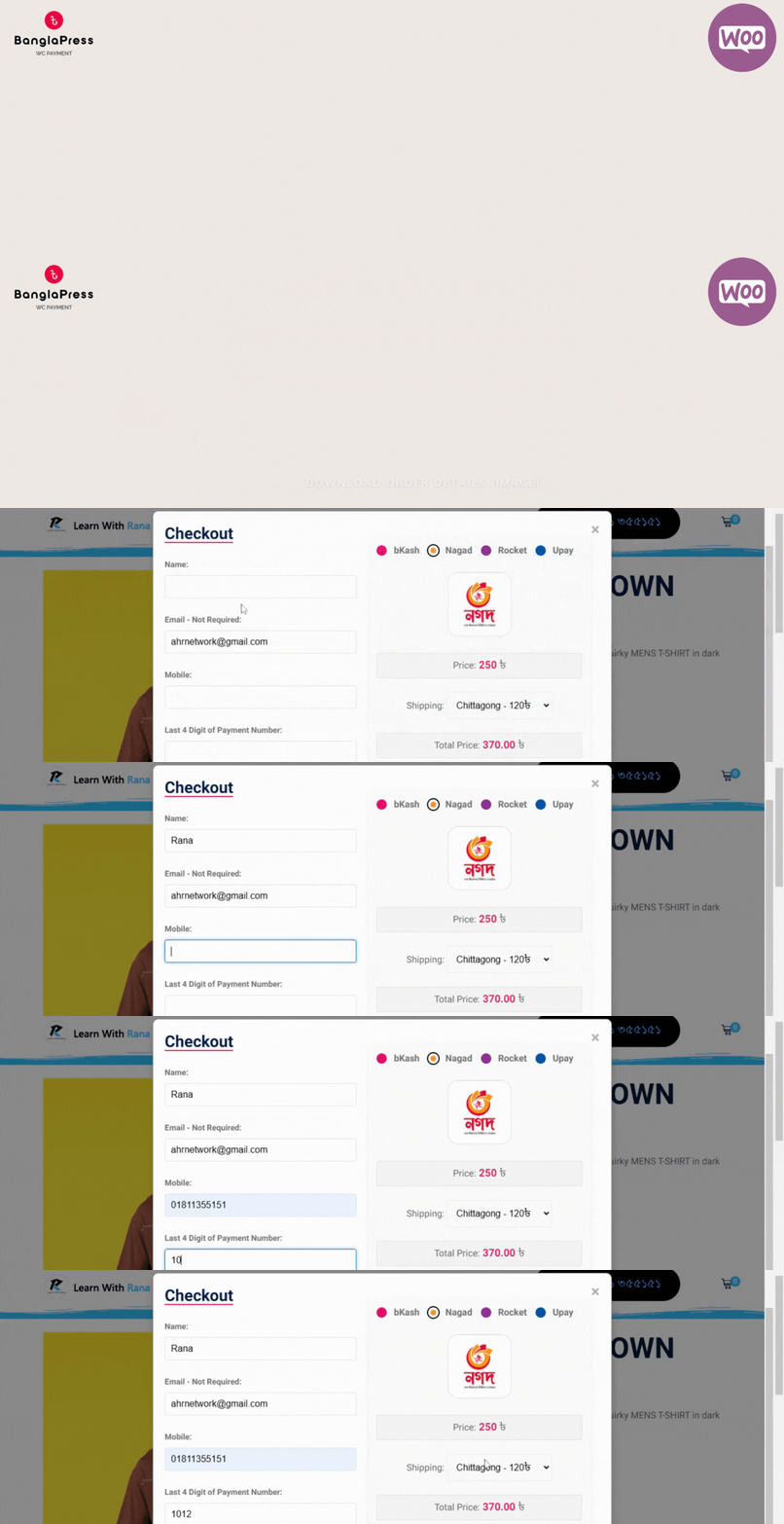
–Payment ID: Requires only the last 4 digits of the payment number, eliminating the need to enter a full bKash transaction ID.
–Download Order Details: Customers can now download their order details as an image after completing payment.
Version 1.2 Features
Sell Anything with bKash and More! Whether you’re offering freelance services, selling photos,facebook businesses, custom-printed mugs,electronics items,cloths,sharee,cosmetics, or homemade food, this plugin makes it easy. Simply create WooCommerce products and link them with the payment button to process payments through bKash and additional manual payment options.
Compatible with Elementor, Block Editor, and classic WordPress themes, this plugin lets you add payment buttons or landing pages effortlessly anywhere on your site.
Full Setup – Bangla Video
Key Capabilities
Instant Payment Button on Any Page: Add payment buttons anywhere on your website using a shortcode. Customers can pay instantly without navigating to the cart or checkout page.
Partial Payment Support: Accept partial payments for orders, allowing customers to reserve their order with an advance and pay the remainder on delivery.
Flexible Payment Gateway Options: Enable or disable specific payment gateways (bKash, Nagad, Rocket, Upay) based on your store’s needs, with customization options for each.
Dynamic Order Summary: Dues and balances are automatically recalculated and displayed for customers, with detailed records in the order summary.
Custom Checkout Form and Button Texts: Customize checkout field labels, button titles, and payment instructions from the admin dashboard. Add unique branding with custom logos and QR codes.
Easy Setup & Integration: With clear options in the WooCommerce settings page, set up and manage all features without any complex configuration.
Free Forever: No hidden charges or subscription fees – this plugin is free to use.
Video Walkthrough
Watch our setup and usage guide for BanglaPress – bKash & More on YouTube:
Features
🚀 One-Click Payment – Quickly add payment buttons anywhere with a shortcode.
🔄 Partial Payments – Offer customers the flexibility of partial payments for orders.
💳 Multiple Payment Gateways – Supports bKash, Nagad, Rocket, and Upay.
🖋️ Customizable Texts & Labels – Personalize button labels, form fields, and instructions.
📊 Order Summaries – Dynamic calculation of dues and balances.
🎨 Custom Branding Options – Use custom logos or QR codes.
💸 Completely Free – Enjoy all features at no cost.
Usage
Fix Checkout Page Issues
If the checkout page is unresponsive, try switching to the Block Editor or Classic Editor,first install Classic Editor
removing the default checkout, and adding the shortcode [woocommerce_checkout]
To add a payment button to any page, use the following shortcode format:
[bkash_payment_button product_id="123"]
product_id – Specify the WooCommerce product ID.
label – (Optional) Customize the button label.
Example:
[bkash_payment_button product_id=”101″ label=”Quick Pay with bKash”]
You Can Use My Free Plugins
Multi Step Contact Form
Origami For Contact Form 7 Addons
voice Input For Contact Form 7 Addons
Blog/Post Reading Progress Bar
Additional Information
For more details and support, please visit Developer page