
外掛標籤
開發者團隊
② 後台搜尋「Aviation Company Flight Search & Booking」→ 直接安裝(推薦)
原文外掛簡介
Aviation Company Flight Search & Booking provides a flight-search widget built around Gravity Forms for aviation companies, airlines, and private charter operators; GF-based aviation company flight search and booking widget plugin for WordPress aviation company websites. This widget extends Gravity Forms and is suitable for all types of aviation companies, i.e., for regular commercial airlines as well as private charter jets.
The plugin (with all plans) can:
Create flight-search form in Gravity Forms.
Provide configurable departure and arrival airport choices.
Provide one-way flight-search functionality.
Provide responsive flight-search functionality for desktop and mobile websites.
Allow users to request a booking through the flight-search form and admin receives an email notification.
Pro (paid) Plan Perks:
Popup calendar with blockable flight date availabilities.
Flight prices optionally shown with dates in calendar.
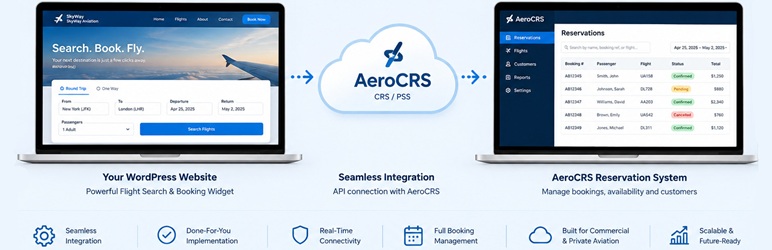
Integrates with 3rd party reservation management system / PSS, i.e., GO7 AeroCRS, for an end-to-end customer flight booking experience.
Connect eligible configurations to GO7 AeroCRS for flight availability, prices, and booking workflows.
Provide WordPress administration settings for airport lists, widget appearance, booking behavior, API credentials, and license/plan information.
The plugin requires Gravity Forms to be installed and active.
Requirements
WordPress 6.5 or later.
PHP 8.3 or later.
Gravity Forms.
Configuration
Configure the plugin from:
Settings > Aviation Company Flight Search & Booking
Available settings include:
Departure airport states and codes.
Arrival destination airport states and codes.
Widget appearance and theme options.
Flight-search informational messaging.
Manual booking-request handling.
Airport Lists
Airport choices can be configured through the plugin settings using the expected airport-name/code format.
After changing airport lists, verify the corresponding Gravity Forms fields and front-end widget.
Site Title
For email notifications associated with flight-search form submissions, configure the aviation company’s name in Settings > General > Site Title if that is the name you want WordPress/Gravity Forms notifications to use as the site name.
Gravity Forms
Gravity Forms is the form-processing layer for the flight-search workflow.
The plugin creates a form and uses its entries when processing flight-search requests.
The plugin validates relevant flight-search values. Site administrators should also configure Gravity Forms’ own retention, notification, and privacy settings as appropriate.
Security
The plugin uses WordPress security practices including input validation/sanitization, output escaping, Settings API sanitization, and protected administration settings.
Keep WordPress, PHP, Gravity Forms, and other installed software up to date.
Privacy
The plugin can process flight-search information submitted through Gravity Forms.
The plugin does not replace the site’s own privacy policy. Site administrators are responsible for documenting the site’s complete data flows, retention practices, notifications, and third-party services.
The plugin provides privacy-policy guidance for these data flows in the WordPress administration area.
Troubleshooting
Flight search or availability is not working
Check that Gravity Forms is active, airport codes and dates are valid, and that passenger count is valid. Check WordPress/PHP logs and browser developer tools for errors.