內容簡介
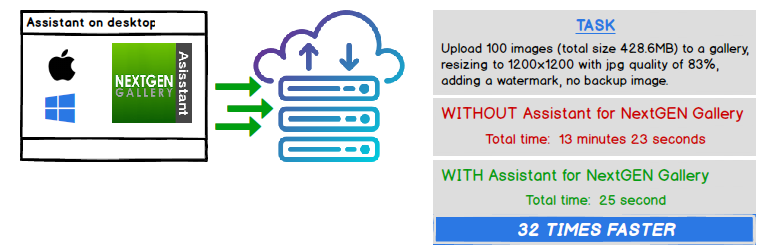
NextGEN Gallery 圖片上傳、圖片處理和畫廊管理功能已從網站/瀏覽器移至在您更強大的桌面系統上運行的桌面應用程式。
功能
* 超快的圖片處理 - 性能
* 上傳圖像前自動旋轉、調整大小、調整圖像品質、創建縮略圖並應用水印
* 添加/刪除 NextGEN 畫廊
* 將圖像上傳到 NextGEN 畫廊
* 從圖像中刪除 EXIF 數據
* 無限圖像文件大小
* 使用 JWT Authentication for WP-API Plugin 進行安全上傳
* 強制實施與 NextGEN Gallery 相同的安全限制
* 快速上傳調整為 WordPress 配置
* 每個用戶的配置設置
有關更多功能細節和性能比較,請訪問Assistant for NextGEN Gallery。
使用方法
安裝了 Assistant for NextGEN Gallery 插件後,
從Assistant for NextGEN Gallery下載和安裝桌面應用程式 (Windows 或 MACOS),開始上傳圖像。
要求
* Windows 7 (64 bit) 或 Windows 10 (64 bit)
* OS X 10.9.5 或更高版本
* 不支援 IIS Web 伺服器
* 不支援 WordPress 多站點
外掛標籤
開發者團隊
② 後台搜尋「Assistant for NextGEN Gallery」→ 直接安裝(推薦)
原文外掛簡介
NextGEN Gallery image upload, image processing, and gallery management functions are moved from the website/browser to a desktop app running on your more powerful desktop system.
Features
* Super fast image processing – Performance
* Auto rotate, resize, adjust image quality, create thumbnails, and apply watermarks before uploading images
* Add/Remove NextGEN galleries
* Upload images to a NextGEN gallery
* Remove EXIF data from images
* Unlimited image file size
* Secure uploads using JWT Authentication for WP-API Plugin
* Imposes the same security restrictions as NextGEN Gallery
* Fast uploads tuned to your WordPress configuration
* Per-user configuration settings
For more feature details and performance comparisons, visit Assistant for NextGEN Gallery.
Usage
Once the Assistant for NextGEN Gallery plugin has been installed,
download and install the companion desktop app (Windows or MACOS) from Assistant for NextGEN Gallery and start uploading your images.
Requirements
* Windows 7 (64 bit) or Windows 10 (64 bit)
* OS X 10.9.5 or higher
* IIS Web Server – not supported
* WordPress multi-site – not supported