
內容簡介
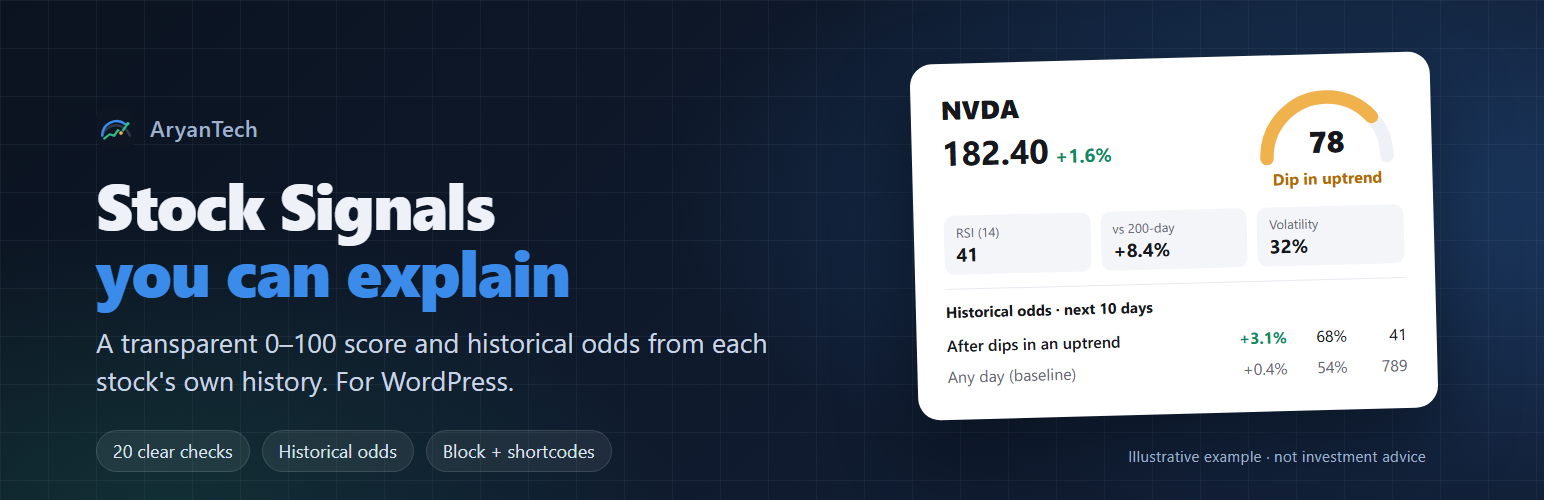
AryanTech Stock Signals 外掛專為金融部落格、電子報、投資俱樂部及交易教育網站設計,提供股票價格行為的深入解釋及歷史數據支持,讓讀者能夠清楚理解買賣信號的背後意義。
【主要功能】
• 提供 0-100 的信號評分,基於 20 項透明檢查
• 以簡單易懂的標籤顯示市場狀態
• 顯示歷史機率及過去案例數據
• 提供價格圖表及過去信號標記
• 支援最多 25 支股票的排名篩選表
外掛標籤
開發者團隊
原文外掛簡介
Most stock plugins show a price or a chart. AryanTech Stock Signals explains what the price action means, and backs it with the stock’s own history, so readers can see the evidence instead of a black-box “buy/sell”.
Built for finance blogs, newsletters, investment clubs and trading-education sites. For each stock you get:
A 0-100 signal score from 20 transparent checks across trend, momentum, dip setup, risk and relative strength, with the full breakdown one click away.
A plain-English label: Strong, Positive, Neutral, Weak, Downtrend, or “Dip in uptrend”.
Historical odds from the stock’s own history: “after dips in an uptrend, this stock averaged X% over the next 10 days, with a Y% win rate”. The number of past cases is always shown, and small samples are flagged.
A price chart with 50- and 200-day averages and past dip signals marked.
A screener table that ranks up to 25 stocks by score.
Everything renders server-side as lightweight HTML and SVG: no JavaScript on your pages, no external scripts or fonts, and light and dark modes built in.
Shortcodes
[atss_signal symbol="AAPL"] – signal card (options: odds, chart, checks = yes/no)
[atss_chart symbol="NVDA" days="250"] – price chart
[atss_screener symbols="AAPL, MSFT, NVDA"] – ranked table (no symbols = your watchlist)
[atss_disclaimer] – your disclaimer text
Or add the Stock Signal block in the editor.
Market data
Choose a provider in Stock Signals > Settings:
Demo data: synthetic prices, works instantly with no account. Clearly labelled as demo data wherever it appears.
Twelve Data: use your own API key.
Alpha Vantage: use your own API key (full history needs a premium key).
You are responsible for using a data plan whose licence allows displaying prices publicly on your website. Results are cached (30 minutes by default) and the last good copy is kept if the provider is down. The public REST endpoint only serves symbols your site already shows, so visitors can’t spend your API quota.
Important
This plugin displays information for educational purposes. It is not investment advice. Historical odds describe the past and do not predict future results. Please check what your jurisdiction requires before publishing market signals, for example rules on financial promotions or investment recommendations.
External services
This plugin connects to third-party market-data services only if you choose one in Stock Signals > Settings. With the default “Demo data” provider, no external requests are made.
Twelve Data (https://twelvedata.com): when selected, your server requests daily price history for the symbols shown on your site (the ticker symbol and your API key are sent), at most once per symbol per cache period. Terms of service, Privacy policy.
Alpha Vantage (https://www.alphavantage.co): when selected, your server requests daily price history for the symbols shown on your site (the ticker symbol and your API key are sent), at most once per symbol per cache period. Terms of service, Privacy policy.
Requests are made from your web server, never from your visitors’ browsers, and no visitor data is sent.