
內容簡介
**總結:**
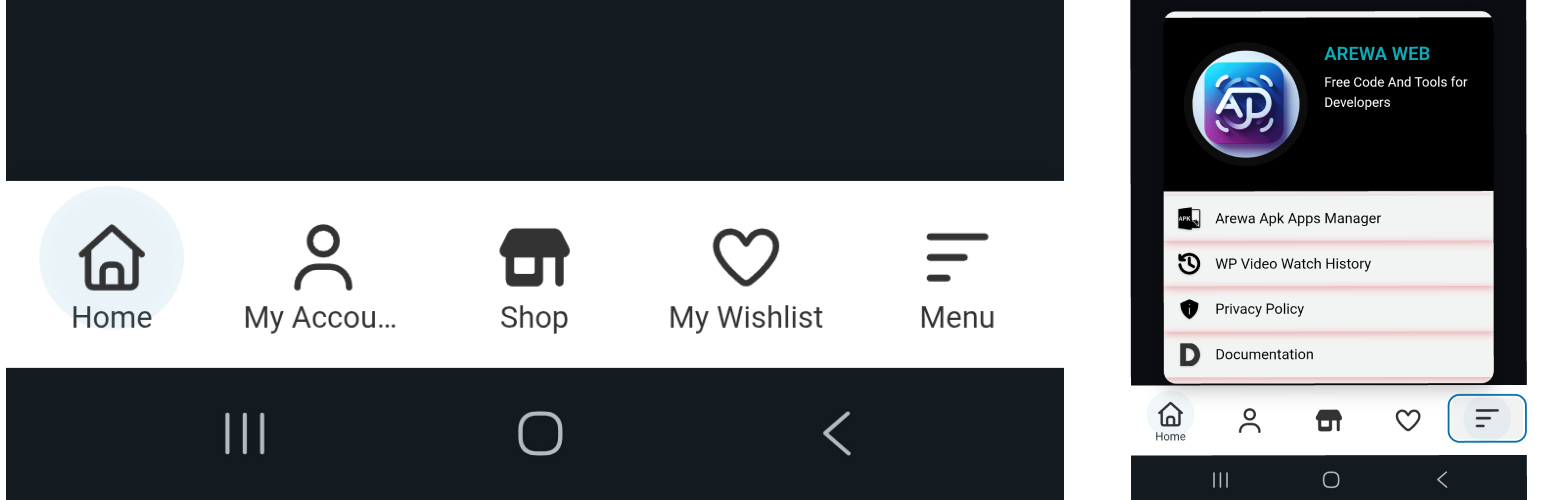
Arewa Mobile Bottom Navigation 是一個強大且功能豐富的 WordPress 外掛,可在您的網站上添加引人注目的浮動底部導覽列。以移動優先原則設計,這個外掛將使您的網站導覽變成現代化、類似應用程式的體驗,深受使用者喜愛。
**問題與答案:**
1. Arewa Mobile Bottom Navigation 為什麼被稱為「WordPress 的終極移動導覽列解決方案」?
- 因為它是一個功能豐富的外掛,可添加引人注目的浮動底部導覽列,設計遵循移動優先原則,提供現代化、應用程式般的使用體驗。
2. Arewa Mobile Bottom Navigation 提供了哪些選擇和功能?
- 針對移動設備設計的移動導覽列、完全可自訂的顏色、尺寸、動畫和樣式、輕量級代碼以確保網站速度、直觀的管理介面、高級的可見性控制、緩存優化、流暢的動畫效果、子選單支援及多種佈局風格等。
3. Arewa Mobile Bottom Navigation 的 WebView/App Detection 功能是怎麼樣的?
- 它可以通過使用者代理檢測在移動應用程式中控制導覽列的可見性,并支持設定自定義使用者代理字符串、靈活的可見性模式、多個應用程式支持以及緩存安全實施等功能。
外掛標籤
開發者團隊
② 後台搜尋「Arewa Mobile Bottom Navigation Bar」→ 直接安裝(推薦)
原文外掛簡介
🚀 The Ultimate Mobile Navigation Bar Solution for WordPress
Arewa Mobile Bottom Navigation is a powerful, feature-rich WordPress plugin that adds a stunning floating bottom navigation bar to your website. Designed with mobile-first principles, this plugin transforms your site’s navigation into a modern, app-like experience that users love.
✨ Why Choose Arewa Mobile Bottom Navigation?
📱 Mobile-First Design – Built specifically for mobile devices with responsive design that adapts perfectly to all screen sizes
🎨 Fully Customizable – Complete control over colors, sizes, animations, and styling
⚡ Lightning Fast – Lightweight code that won’t slow down your site
🔧 Easy to Use – Intuitive admin interface, no coding required
🎯 Advanced Visibility Controls – Show or hide navigation on specific pages, posts, categories, and more
📱 WebView/App Detection – NEW! Control navigation visibility within mobile apps using User-Agent detection
🚀 Cache-Optimized – Smart caching system prevents visibility issues and ensures consistent behavior
💫 Smooth Animations – Beautiful hover effects and pulse animations
📋 Submenu Support – Create nested menus for complex navigation structures
🎭 Multiple Layout Styles – Icon only, icon + text, or text on active button only
🌟 Key Features:
Navigation Customization
Choose between 2-6 navigation buttons
Three layout styles: Icon Only, Icon + Text, or Icon + Text on Active Button
Drag-and-drop button reordering
Custom SVG icons for each button
Individual color customization for icons, text, backgrounds, and active states
WebView & App Detection (NEW!)
User-Agent Detection – Configure custom User-Agent strings to detect mobile apps and WebViews
Flexible Visibility Modes – Show only in apps, hide only in apps, or show everywhere
Multiple App Support – Support multiple apps with different User-Agent strings
Cache-Safe Implementation – Prevents caching issues that could cause inconsistent visibility
Submenu System
Create unlimited submenu items for any button
Custom icons and colors for submenu items
Beautiful slide-in submenu overlay
Optional submenu header with logo and site title
Fully customizable submenu styling
Advanced Styling Options
Custom background colors and opacity
Border radius control
Box shadow with customizable color
Button text and icon size controls
Hover effects toggle
Active button pulse animation
Submenu styling with full color control
Smart Visibility Controls
Display on entire site or specific pages/posts
Category-based visibility
Custom post type support
Device-specific visibility (mobile, tablet, desktop)
Hide on login/register pages
Hide in admin dashboard
Combine multiple visibility rules
Professional Design
Modern, clean interface
Smooth animations and transitions
Responsive design for all devices
WordPress admin integration
Easy-to-use settings panel
🎯 Perfect For:
E-commerce websites
Business websites
Portfolio sites
Blog sites
News websites
Any WordPress site wanting modern mobile navigation
💡 Use Cases:
Create an app-like navigation experience
Improve mobile user experience
Add quick access to important pages
Implement modern bottom navigation pattern
Enhance mobile site usability
Create custom mobile menu structures
🔒 Security & Performance:
Follows WordPress coding standards
Secure data sanitization
Optimized for performance
No external dependencies (except Select2 for dropdowns)
Regular security updates
📚 Documentation:
Full documentation available at: https://arewa.dev/arewa-mobile-bottom-navigation-bar/
Support
For support, documentation, and updates, visit:
Credits
Developed by A-Said
Website: https://arewa.dev/
Privacy
This plugin does not collect, store, or transmit any user data. All settings are stored locally in your WordPress database.
Development
GitHub: Coming soon
Issues: Report via plugin support page
Contributions: Welcome!
Additional Information
Performance:
* Lightweight and fast
* No external API calls
* Optimized CSS and JavaScript
* Minimal database queries
Compatibility:
* WordPress 5.0+
* PHP 7.2+
* All modern browsers
* Mobile and desktop devices
* All WordPress themes
* Major page builders (Elementor, Gutenberg, etc.)
Accessibility:
* Keyboard navigation support
* Screen reader friendly
* ARIA labels included
* Semantic HTML structure
Translation Ready:
* Text Domain: arewa-mobile-bottom-navigation-for-wordpress
* POT file included
* Ready for translation
Technical Details
File Structure:
* Main plugin file: arewa-mobile-bottom-navigation-for-wordpress.php
* Admin settings: includes/admin-settings.php
* Frontend rendering: templates/navigation.php
* Visibility logic: includes/visibility-conditions.php
Hooks & Filters:
* arewa_mbn_settings – Filter settings before save
* arewa_mbn_should_display – Filter visibility check
* arewa_mbn_button_html – Filter button HTML output
Database:
* Options stored in: arewa_mbn_settings, arewa_mbn_buttons, arewa_mbn_submenus
* No custom database tables
* Easy to export/import settings
License
This plugin is licensed under the GPL v2 or later.
Author
A-Said
* Website: https://arewa.dev/
* Plugin URI: https://arewa.dev/arewa-mobile-bottom-navigation-bar/
Tags
mobile navigation, bottom navigation, mobile menu, responsive navigation, floating navigation, bottom bar, mobile-first, navigation bar, sticky navigation, app-like navigation, mobile bottom menu, WordPress mobile, mobile UX, bottom menu bar, mobile navigation plugin, WordPress navigation, mobile site navigation, bottom navigation bar, mobile menu plugin, responsive menu