內容簡介
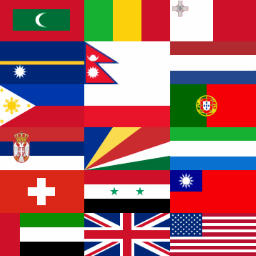
總結:Aquiline Comment Country Flags 外掛可讓 GeneratePress 部落格的讀者在評論標頭部分的名字旁加上國旗。透過在評論提交表單中新增一個可選欄位,讀者可以從網站管理員啟用的國家列表中選擇。
1. 這個外掛允許在 GeneratePress 部落格上的評論者可以在他們的名字右側的評論標頭上附上國旗。在評論提交表單中新增一個選擇欄位,該欄位會列出網站管理員在設定面板中啟用的國家的字母排序列表。
2. 外掛需要活動父題為 GeneratePress v3.1.0 或更新版本,因為它依靠這個版本引入的自訂操作掛鈎。評論者的選擇是通過使用Cookie與名稱和電子郵件一樣“被記住”的。國旗圖片在公共領域中,由Flagpedia.net提供。該網站與Wikimedia Commons緊密合作,以維護“官方”國旗的最新、全球性存儲。
3. 若參觀者對顯示的國旗不熟悉,若有滑鼠等指示設備可用,他們可以將滑鼠指向國旗以顯示國家名稱。在某些移動瀏覽器中,例如Android Chrome,長按國旗會彈出顯示國家名稱的彈出視窗。
4. 一個限制是,已登錄用戶無法進行國家選擇和國旗顯示。由於這些用戶的元資料(名字和電子郵件)是由WordPress內部處理的,因此決定在這種情況下支持國家領域將顯得過於複雜。已登錄用戶只需登出,然後重訪博客以進行他們的國旗選擇。
5. 通過明確用戶的選擇來啟用國旗顯示,而不是通過基於IP地理定位,具有幾個優點。它提供更大的隱私性,並且不受VPN或代理使用時可能發生的“錯誤”讀數的干擾。此外,評論者(例如在國外工作的人)可能選擇識別與其互聯網連接來源不同的國家。
外掛標籤
開發者團隊
② 後台搜尋「Aquiline Comment Country Flags for GeneratePress」→ 直接安裝(推薦)
原文外掛簡介
The Aquiline Comment Country Flags plugin affords a commenter on a GeneratePress blog the option to affix a country flag to the right of their name in the comment header. A new, optional field is added below the existing fields in the Comment submit form. The commenter is presented with an alphabetical list of the countries which the site administrator has enabled in the plugin settings panel.
The plugin requires the active parent theme to be GeneratePress v3.1.0 or later, since it relies on a custom action hook introduced with that version. The commenter’s selection is “remembered” in the same way as the name and email, i.e., through use of a cookie. The flag images are in the public domain, and are provided by Flagpedia.net. That site works closely with Wikimedia Commons to maintain an up-to-date, worldwide store of “official” flags.
In cases where a visitor to the site is unfamiliar with a displayed flag, and a pointer such as a mouse is available, they can hover over the flag to reveal the country name. A long press on the flag in some mobile browsers, e.g. Android Chrome, has been seen to produce a popup with the country name at the top.
One limitation is that the Country selection and flag display are not available to logged-in users. Since such users’ metadata (name and email) are handled internally by WordPress, it was decided that support for the Country field in this case would be unduly complex. The logged-in user would just need to log out, then revisit the blog to make their flag selection.
Enabling the flag display via explicit user selection, rather than via IP-based geolocation, has several advantages. It affords greater privacy, and is immune to “false” readings that could occur when a VPN or proxy is in use. Also, a commenter (e.g. someone working abroad) may choose to identify with a country other than that from which their internet connection originates.
Credits
Flag Images: Flagpedia.net
License: Public Domain