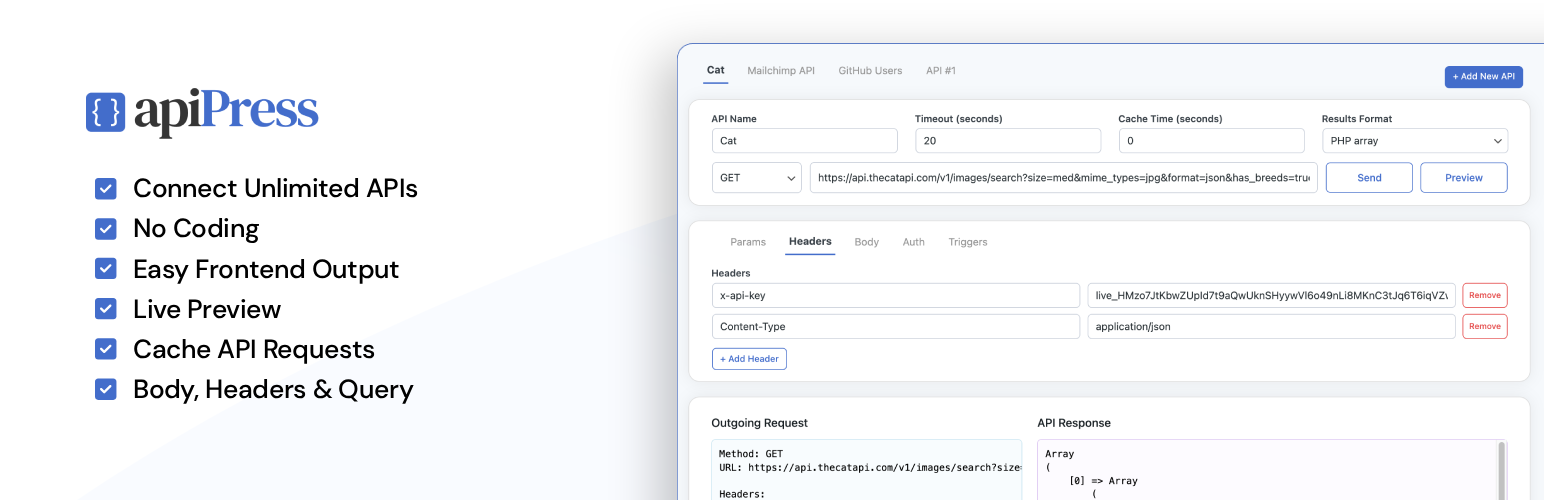
內容簡介
總結:API Press讓連接任何外部API到WordPress變得簡單。透過WordPress管理員直接建立請求。每個API都以獨立條目方式存儲,無需編寫代碼即可建立多個集成。輕鬆使用短代码或樣板標籤顯示API輸出。
1. 使用API Press可以做什麼?
- API Press讓您可以輕鬆連接任何外部API到WordPress。
- 您可以直接在WordPress管理員中創建請求,並即時查看參數、標頭、驗證等內容。
- 每個API都以獨立條目方式存儲,讓您可以建立多個集成,無需編寫代碼。
- 您可以使用短代碼或樣板標籤輕鬆顯示API輸出。
2. API Press有哪些特點?
- 支援無限數量的API。
- 可運作於任何REST API。
- 支援GET、POST、PUT、PATCH和DELETE HTTP方法。
- 可以設置查詢參數、標頭和主體資料。
- 支援API呼叫快取、所有請求的日誌記錄和發送原始JSON、表單資料和x-www-form-urlencoded主體類型。
- 可以在管理員中直接預覽API響應,並使用短代碼或樣板標籤在網站的任何位置輸出API數據。
- 驗證選項包括API密鑰、Bearer令牌、基本身份驗證、無身份驗證(PRO中的OAuth 2.0)。
- 無需編寫代碼。
3. API Press PRO有哪些高級特點?
- 可以在WordPress操作上觸發API請求(例如,當用戶註冊或提交表單時)。
- 支持變數 – 可以動態地將用戶資料、文章資料或網站數據發送到您的API。
- 支持OAuth 2.0授權。
- 提供自動HTML格式化以顯示API響應,並在響應失敗時發送電子郵件提醒。
- 提供一鍵複製API,并可以在發送請求前預覽API請求。
4. API Press適合哪些人士使用?
- API Press對開發人員、網站建構者和需要在WordPress內靈活、無需編寫代碼方式使用API的企業非常理想。
5. 如何在WordPress上使用API Press連接到API?
- 您只需安裝此外掛,然後訪問管理員中的API Press以添加新API。
- 填寫您的API的詳細信息,包括URL、任何標頭、查詢字串、主體參數或驗證,然後點擊發送即可。
外掛標籤
開發者團隊
② 後台搜尋「API Press – Plugin for WordPress API Integration」→ 直接安裝(推薦)
原文外掛簡介
API Press is a free WordPress API integration plugin that lets you easily connect external APIs to WordPress — no coding required.
Setup and manage unlimited API integrations, right from your WordPress admin. You can define the endpoint and add query paramaters, headers, body data and authentication settings. Click Send to see the API response and then use the shortcode or template tag to display the data anywhere on your site.
Simple and flexible API integration in WordPress.
API Press Features
Unlimited API integrations
Works with any REST API
GET, POST, PUT, PATCH & DELETE HTTP methods
Query parameters, headers and body data
Cache API calls
Logging of all requests
Send raw JSON, form-data and x-www-form-urlencoded body types
Preview API responses directly in the admin
Use shortcode or template tag to output API data anywhere on your site
Authentication options: API Key, Bearer token, Basic Auth, no auth (OAuth 2.0 in PRO)
No code
API Press PRO Features
Templates – Output API data with pre-built templates – Gallery, Table, Carousel etc.
Triggers – call API on WordPress actions (e.g., when a user registers or a form is submitted)
Variables – dynamically send user data, post data or site data to your API
OAuth 2.0 Authorization
Auto HTML formatting for displaying API responses
Email alerts on failed responses
One-click cloning of APIs
Preview API request before sending
View the API Press PRO plugin.
API Press is an easy to use WordPress API integration plugin that is ideal for developers, site builders and businesses that need a flexible, no-code way to connect APIs and manage API integrations inside WordPress.
WordPress API Integration Plugin
Using API Press is simple: To connect your API to your WordPress site, simply install this plugin and then visit API Press in your admin to add a new API. Fill in the details of your API including URL and any headers, query strings, body parameters or authentication and click Send.