內容簡介
總結:Anywhere Elementor Template by Shortcode 外掛讓使用者能夠在其 WordPress 網站的任何地方顯示 Elementor 部分/畫布/樣板。
問題與解答:
1. 如何使用 Anywhere Elementor Template by Shortcode 外掛?
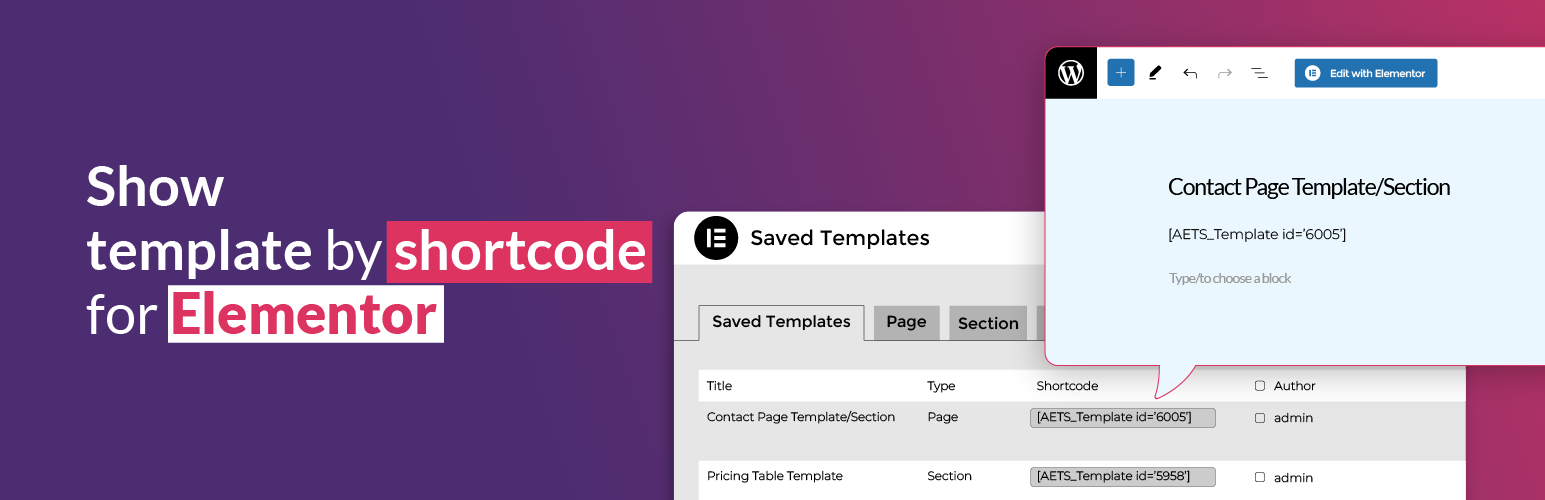
- 答:透過短碼方式:[AETS_Template id='123'],將模板的 id 插入,而非使用 123。
- 提示:前往儀表板 -> 範本(從短碼欄位中尋找短碼)。
2. 這個外掛的主要功能是什麼?
- 答:
- 在任何 WordPress 網站區域輕鬆插入您所建立的 Elementor 樣板。
- 透過簡單地複製並貼上生成的短碼,在頁面、文章、小工具或其他建構元素中顯示您的樣板。
- 與任何 WordPress 佈景主題或頁面建構工具無縫兼容,確保最大的彈性。
3. 這個外掛如何幫助您提升 Elementor 設計?
- 答:透過這個強大且易於使用的外掛,將您的 Elementor 設計帶入到更高層次。
4. 這個外掛利用哪些第三方資源來提升功能?
- 答:
- Elementor 網站建立工具:Elementor 是領先的 WordPress 網站建立平臺,讓您無縫地建立專業且像素完美的網站。
- WordPress:我們感謝 WordPress 平臺為提供支持我們的外掛所需的框架。其開源性質和廣泛的社區支持使其成為創建強大且可自定義解決方案的理想環境。
外掛標籤
開發者團隊
② 後台搜尋「Show template by shortcode for Elementor」→ 直接安裝(推薦)
原文外掛簡介
Show template by shortcode for Elementor plugin allows users to display Elementor sections/canvas/templates anywhere on their WordPress site.
How to use?
By shortcode: [AETS_Template id='123'] – use template’s id, instead 123.
Tips: Go to Dashboard -> Templates (find shortcode from Shortcode column).
Key Features:
Use Templates Anywhere – Effortlessly insert your Elementor-created templates into any section of your WordPress site.
Shortcode Integration – Simply copy and paste the generated shortcode to display your template in pages, posts, widgets, or other builder elements.
Seamless Compatibility – Works with any WordPress theme or page builder, ensuring maximum flexibility.
Take your Elementor designs to the next level with this powerful and easy-to-use plugin!
Credits
We believe in giving credit where it’s due. Our plugin utilizes the following third-party resources to enhance its functionality:
Elementor Website Builder: Elementor, the leading WordPress website creation platform, empowers you to build professional, pixel-perfect websites seamlessly.
WordPress: We are indebted to the WordPress platform for providing the framework that powers our plugin. Its open-source nature and extensive community support make it an ideal environment for creating powerful and customizable solutions.