內容簡介
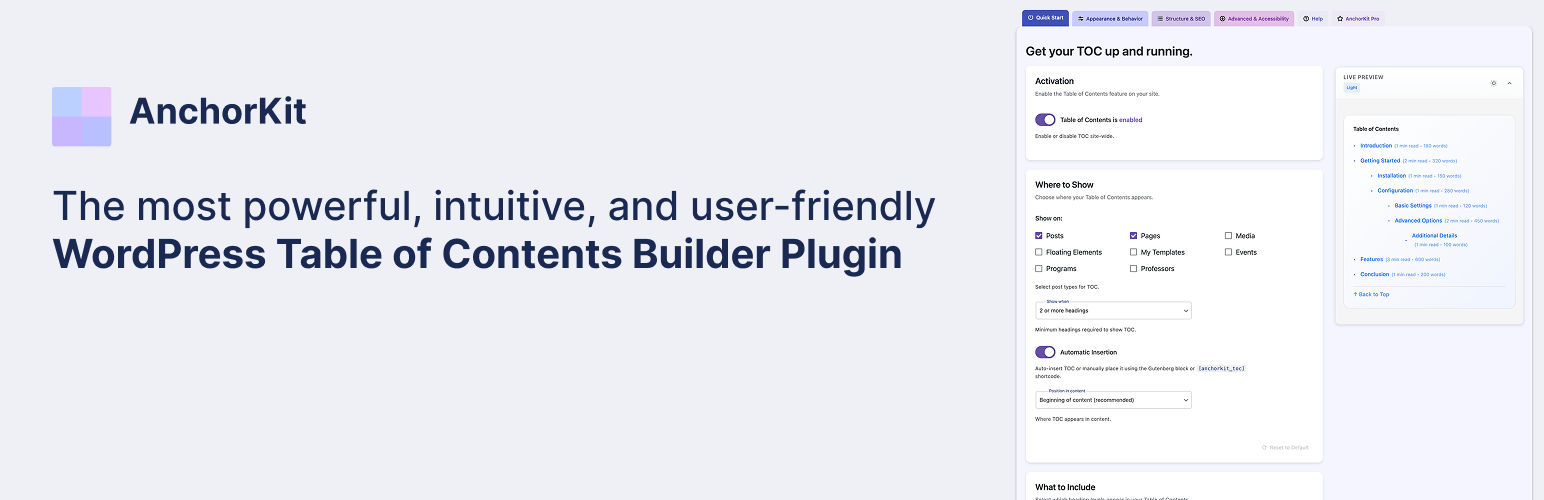
AnchorKit 外掛可自動或依需求在文章和頁面中添加目錄,並生成每個部分的錨點連結,提供平滑的滾動體驗。使用者可透過設定頁面即時預覽設計,並確保符合無障礙標準。
【主要功能】
• 自動插入目錄於文章、頁面及自訂文章類型
• 支援多種顯示位置與手動放置選項
• 自訂目錄樣式與主題,支援即時預覽
• 提供無障礙功能與鍵盤導航支援
• Pro 版具備固定目錄與滾動偵測功能
外掛標籤
開發者團隊
② 後台搜尋「Table of Contents – AnchorKit」→ 直接安裝(推薦)
原文外掛簡介
AnchorKit adds a table of contents to your posts and pages automatically, or exactly where you want it with the table of contents block, the [anchorkit_toc] shortcode, or a sidebar widget. It reads your headings, builds anchor links to each section, and scrolls readers there smoothly.
You design it in a settings page with a live preview, so you see every change before you save. It follows your visitor’s light or dark mode, and it is built accessibility-first: semantic navigation markup, a customizable ARIA label, keyboard support, and respect for reduced-motion preferences.
Free features
Placement
Auto-insert a table of contents on posts, pages, and custom post types
Choose the position: before the first heading, after the first paragraph, top of content, or end of content
Only show it when a post has enough headings (1 to 10, you choose)
Place it manually with the Gutenberg block, the [anchorkit_toc] shortcode, or the classic widget
Works with the Classic Editor, the block editor, and any page builder that supports shortcodes (Elementor, Divi, WPBakery and others)
Content
Pick which heading levels to include (H1 to H6)
Nested (hierarchical) or flat list
Exclude headings with CSS selectors, for example .no-toc
Anchor IDs generated from your heading text
Replace heading text in the TOC with custom labels
Design
Live preview while you edit settings
Light, dark, and automatic (follows the visitor’s system setting) themes
Minimal preset, plus a custom styling mode for colors, fonts, spacing, borders, width, and alignment
Collapsible TOC that starts expanded or collapsed
Smooth scrolling with an offset for sticky headers
Accessibility and mobile
Semantic nav markup with an ARIA label you can change
Keyboard navigation and screen reader support
Respects the “reduce motion” setting
Custom mobile breakpoint and an option to hide the TOC on small screens
For developers
15+ actions and filters, such as anchorkit_toc_headings, anchorkit_should_display_toc, and anchorkit_toc_html
20+ shortcode attributes (see below)
No front-end tracking and no third-party requests on visitor pages
AnchorKit Pro
Pro adds the features long-form sites and agencies ask for most:
Sticky table of contents: keep it in view while readers scroll, inside the content or floating on the left or right
Scroll spy: highlights the section the reader is on
Back-to-top link and View more/less for long tables of contents
Reading time and word count per section
Elementor widget with live preview, and the full set of options in the Gutenberg block
More design control: Classic and Modern presets, custom bullets and numbering formats, advanced typography, box shadows, entrance animations, scroll easing, and a custom CSS class
Smarter headings: exclude by keyword, trim patterns from heading text, and set a minimum and maximum depth
SEO: Schema.org JSON-LD structured data, plus sequential or prefixed anchor IDs
Integrations: Advanced Custom Fields (build the TOC from ACF fields) and AMP
Priority email support
Plans start at $59/year for one site. The Agency plan covers unlimited sites. Every plan has a 14-day money-back guarantee. Upgrade from Settings > AnchorKit > AnchorKit Pro. Checkout and licensing are handled by Freemius.
Shortcode
Add the table of contents anywhere with:
[anchorkit_toc]
Attributes override your global settings for that one TOC:
[anchorkit_toc header_label="In this article" heading_levels="2,3" initial_view="hide"]
Display
header_label="Contents": TOC title
display_header_label="no": hide the title
toggle_view="no": remove the collapse toggle
initial_view="hide": start collapsed
theme="dark": system, light, or dark
hierarchical="yes": nest sub-headings
smooth_scroll="no": turn off smooth scrolling
device_target="mobile": show only on mobile or desktop
Content
heading_levels="2,3": include only these heading levels
min_headings="3": only show the TOC if the post has at least this many headings
post_types="post,page": limit to these post types
post_in="1,2": only these post IDs
post_not_in="1,2": never these post IDs
Pro attributes
preset="modern": Classic or Modern preset
display_counter="yes": numbered list
class="my-toc": custom CSS class
sticky="yes": sticky TOC
view_more="5": show the first 5 items, then a “View more” button
show_reading_time="yes" and show_word_count="yes": section metadata