
內容簡介
總結:AnchorKit 提供了簡單的方法,在網站的任何地方添加專業的內容表格,並具有無與倫比的自定義和開發人員友好的功能。
問題與答案:
1. AnchorKit 的核心功能有哪些?
- 自動生成符合 WCAG 標準的、具有存取性的內容表格,可解析內容標題用於文章、頁面和自訂文章類型。
- 首先考慮的是無障礙設計,包括 ARIA 標籤、鍵盤導航和屏幕閱讀器相容性。
- 支援使用 Classic Editor、Gutenberg、Elementor、Divi、WPBakery Page Builder 和 Visual Composer。
- 可選擇將 TOC 自動插入內容或使用手動放置,並使用短代碼、小工具或區塊。
- 具有控制 TOC 出現時間和位置的綜合設置等功能。
2. AnchorKit 的外觀和主題方面有哪些特點?
- 提供淺色/深色/系統主題,並能自動偵測。
- 有三種預設風格(Minimal、Modern、Clean)以及完整的自定義風格。
- 提供多種標記格式:無、十進制、數字、羅馬數字和自訂字符等。
- 可自訂顏色、字體、間距和動畫等。
3. AnchorKit 如何確保存取性?
- 符合 WCAG 標準,並具有正確的 ARIA 標籤和鍵盤導航。
- 與屏幕閱讀器相容,並提供描述性標籤。
- 可配置標題級別和錨點格式。
- 具有適當的標題層次的語義化 HTML 結構。
外掛標籤
開發者團隊
② 後台搜尋「AnchorKit – Table of Contents」→ 直接安裝(推薦)
原文外掛簡介
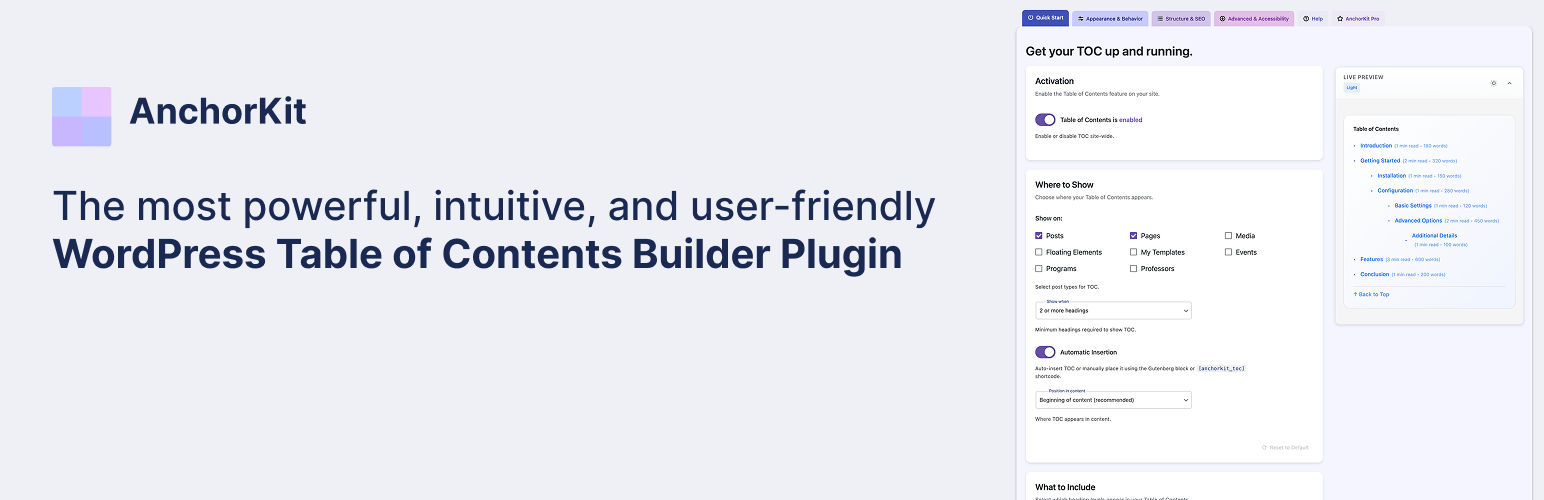
AnchorKit makes it simple to add a professional table of contents anywhere on your site with unparalleled customization and developer-friendly features:
🚀 Core Features:
– Automatically generate WCAG compliant, accessible table of contents for posts, pages, and custom post types by parsing content for headers
– Accessibility-first design with ARIA labels, keyboard navigation, and screen reader compatibility
– Works with Classic Editor, Gutenberg, Elementor, Divi, WPBakery Page Builder, and Visual Composer
– Optionally auto-insert TOC into content or use manual placement with shortcodes, widgets, or blocks
– Comprehensive settings for controlling when and where TOC appears
– Multiple built-in themes with custom colors for borders, backgrounds, and links
– Hierarchical display with nested sub-headings and proper heading structure
– Smooth scrolling with configurable offset and keyboard-friendly navigation
– Collapsible TOC with customizable initial states and focus management
– Selective enable/disable on post-by-post basis with user preference respect
– Advanced heading filtering with keywords, selectors, and regex patterns
– Mobile-responsive with customizable breakpoints and touch-friendly controls
🎨 Appearance & Themes:
– Light/dark/system themes with automatic detection
– Three preset styles (Minimal, Modern, Clean) plus full custom styling
– Multiple bullet formats: none, decimal, numeric, roman numerals, and custom characters
– Customizable colors, fonts, spacing, and animations
– Theme-aware styling that adapts to your site’s design
♿ Accessibility First:
– WCAG compliant with proper ARIA labels and keyboard navigation
– Screen reader compatible with descriptive labels
– Configurable heading levels and anchor formats
– Semantic HTML structure with proper heading hierarchy
🛠️ Developer Friendly:
– Extensive action hooks and filters for customization
– Pull requests and feature requests welcomed on GitHub
– Comprehensive shortcode attributes for granular control
– Schema.org SiteNavigation markup support
– ACF field integration for dynamic content
– WordPress coding standards compliant
📱 Advanced Features:
– Sticky TOC positions with customizable offset
– Scroll spy with active section highlighting
– Reading time and word count metadata
– “View more” truncation for long TOCs
– Back-to-top links with smooth scrolling
– AMP-compatible output (Pro)
– Custom taxonomy description support
Shortcode
Take full command of your table of contents with AnchorKit’s comprehensive shortcode system. Perfect for users who prefer code over visual editors or need granular control. All shortcode attributes maintain full accessibility compliance and WCAG standards.
Basic Usage:
[anchorkit_toc]
Advanced Usage with Attributes:
[anchorkit_toc header_label="Contents" display_counter="yes" theme="dark"]
Supported Attributes:
Display Control:
– header_label="Title" – Custom TOC title
– display_header_label="no" – Hide title
– toggle_view="no" – Disable collapsible toggle
– initial_view="hide" – Start collapsed
Content Filtering:
– heading_levels="2,3" – Include only H2 and H3 headings
– exclude="Test,Draft" – Exclude headings containing these keywords
– post_types="post,page" – Limit to specific post types
– post_in="1,2" – Include only specific post IDs
– post_not_in="1,2" – Exclude specific post IDs
– min_headings="3" – Require minimum number of headings
Appearance:
– display_counter="yes" – Enable numbered lists
– class="custom-toc" – Add custom CSS class
– theme="dark" – Set theme (system/light/dark)
– preset="modern" – Choose style preset
Behavior & Accessibility:
– hierarchical="yes" – Enable nested sub-headings with proper heading structure
– smooth_scroll="no" – Disable smooth scrolling (accessibility option)
– device_target="mobile" – Show only on mobile/desktop for responsive design
PRO Features:
– view_more="5" – Show only first 5 headings initially (PRO)
– sticky="yes" – Enable sticky positioning
– show_reading_time="yes" – Display reading time
– show_word_count="yes" – Display word counts
Upgrade to AnchorKit Pro
Take AnchorKit to the next level with professional features and premium support:
🎨 Enhanced Integration:
– Elementor Widget – Drag-and-drop TOC creation
– Gutenberg Block – Advanced block editor support
– ACF Support – Generate TOC from custom fields
– AMP Compatibility – Automatic AMP-friendly output
📍 Advanced Positioning:
– Fixed/Sticky TOC – Multiple positioning options
– Sticky Customization – Theme-aware sticky styling
– Scroll Spy – Active section highlighting
– Back-to-Top Links – Smooth scroll to top
📊 Content Enhancement:
– Reading Time – Display estimated read time
– Word Count – Show word counts per section
– View More – Truncate long TOCs elegantly
– Schema.org Markup – Rich snippets for SEO
♿ Enterprise Accessibility:
– WCAG 2.1 AA Compliance – Full accessibility audit and certification
– Advanced ARIA Support – Complex widget patterns and live regions
– Keyboard Navigation – Full keyboard and screen reader support
– Multi-device Testing – Accessibility validation across all devices
🛠️ Developer Features:
– Priority Support – Direct developer assistance
– Advanced Hooks – Extended customization API
– Migration Tools – Import from other TOC plugins
– Custom Integrations – Third-party plugin support
Privacy
Opt-in telemetry only: the free plugin never transmits site data. When you opt in, we only collect your site URL, WP/PHP versions, and admin email to issue a license.
No front-end tracking: AnchorKit does not load external trackers, ads, pixels, or front-end scripts from third-party domains.
Self-hosted assets: all CSS/JS lives inside the plugin; no CDNs or remote calls are made on visitor pages.
Upgrade to AnchorKit Pro inside the plugin to unlock Elementor widget, sticky TOC positions, reading-time metadata, schema, ACF integration, and more. Purchases and license management are handled securely via Freemius (Stripe/PayPal).














