內容簡介
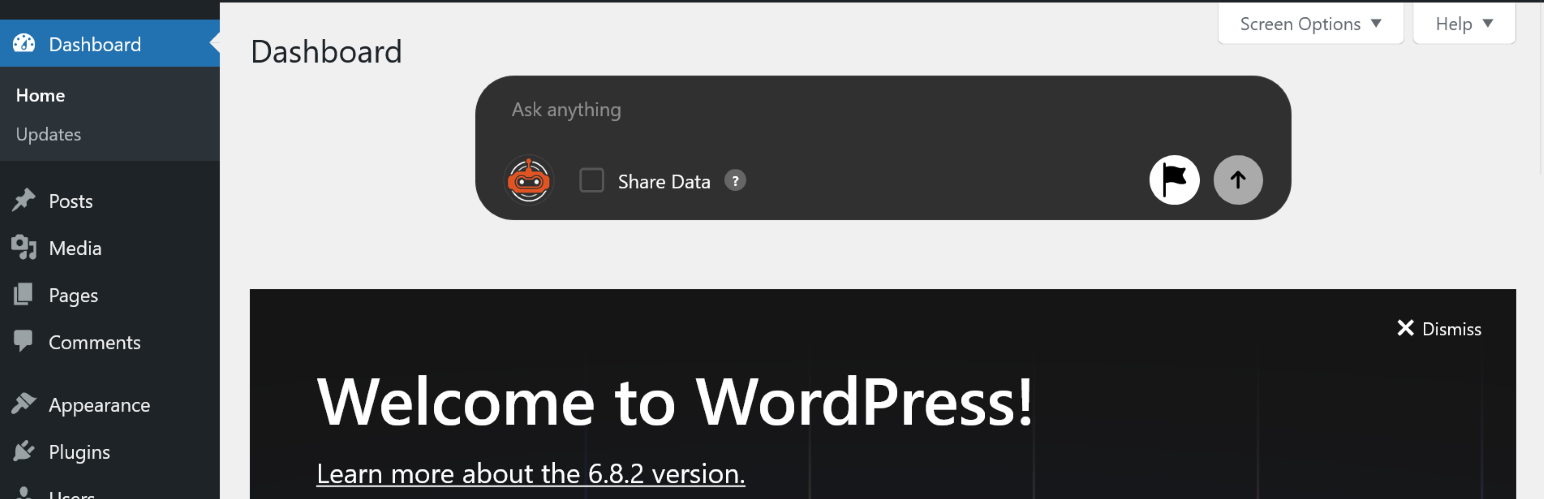
WPadmin.AI 是一款為 WordPress 提供即時協助的外掛,能在控制台內回答使用者的問題,提供設定、外掛、佈景主題等方面的指導,幫助使用者更有效地管理網站。
【主要功能】
• 控制台內的 AI 聊天框
• 提供針對 WordPress 的問題解答
• 常見故障排除步驟
• 外掛與佈景主題建議
• 內容與設定協助
• 每月提供 30 次問題詢問
外掛標籤
開發者團隊
② 後台搜尋「WPadmin.AI – AI Assistant for WordPress」→ 直接安裝(推薦)
📦 歷史版本下載
原文外掛簡介
WPadmin.AI Assistant for WordPress helps site owners get clear answers inside the WordPress dashboard. Ask a question in plain language and get steps you can follow.
The free plugin can help with WordPress settings, plugin questions, theme guidance, WooCommerce questions, SEO questions, content help, and common troubleshooting steps. It is built to stay out of the way on page builder editing screens, including Elementor, Gutenberg, Divi, Oxygen Builder, Bricks Builder, Beaver Builder, Visual Composer, WPBakery, Breakdance, and similar builders.
For users who need more than written answers, WPadmin.AI Premium is available at an additional cost. WPadmin.AI Premium gives you an AI development plugin for WordPress, a test copy of your website, and a safe process to move approved changes to the live website using the one-click Sync button.
Learn more at wpadmin.ai.
Free and Premium
Free includes:
AI chatbox inside the WordPress dashboard
site-aware WordPress answers
troubleshooting steps
plugin and theme suggestions
content and configuration help
30 monthly questions
WPadmin.AI Premium is paid access and includes:
everything in Free
no partner ads
Premium support
more usage for dashboard answers
the WPadmin.AI WPadmin.AI Premium
a test copy of your website prepared for safer AI-assisted changes
help with advanced troubleshooting, plugin work, theme work, and site improvements
one-click Sync to move approved staging changes to the live website
pricing: first month free, then $30 per month
What WPadmin.AI Assistant for WordPress Does
WPadmin.AI Assistant for WordPress is the everyday help layer inside the WordPress dashboard. It can help users:
understand plugin, theme, and WordPress settings
troubleshoot common WordPress errors with clear steps
get plugin recommendations for business goals
write content in a usable format
request code snippets for common WordPress changes
understand WooCommerce, forms, SEO, security, and performance questions
analyze attached site data on the Premium plan when data sharing is enabled
What WPadmin.AI Premium Adds
WPadmin.AI Premium is for users who need more than answers.
After setup, WPadmin.AI prepares a test copy of the live website. You can ask for deeper changes, review the work safely, test it, and move approved changes to the live website using the one-click Sync button.
WPadmin.AI Premium can help with:
advanced troubleshooting for WordPress sites
plugin and theme help
harder site issues that need deeper review
guided implementation for changes that go beyond written instructions
AI development for WordPress sites in a safer test copy
Premium Use Cases
Troubleshoot a plugin conflict that needs deeper investigation than written steps.
Review and improve a custom plugin or theme.
Build small WordPress features, shortcodes, admin tools, or theme adjustments.
Investigate WooCommerce, forms, SEO, cache, security, or performance issues in more detail.
Prepare changes on a test copy, review them, and use one-click Sync for approved changes.
Get AI development help for WordPress when generic public answers are not enough.
Compatibility
The free WPadmin.AI Assistant for WordPress can answer questions about public WordPress plugins and themes based on site context and publicly available information.
WPadmin.AI is compatible with popular page builders by avoiding unnecessary assistant loading on builder editing screens. Supported page builders include Elementor, Gutenberg, Oxygen Builder, Divi Builder, Bricks Builder, Beaver Builder, Visual Composer, WPBakery Page Builder, Breakdance, and similar WordPress builder tools.
WPadmin.AI also works alongside popular WordPress plugins and site tools such as WooCommerce, Yoast SEO, Rank Math, Gravity Forms, WPForms, Contact Form 7, Advanced Custom Fields, Wordfence, LiteSpeed Cache, WP Rocket, and other widely used WordPress plugins.
With WPadmin.AI Premium, all plugins and themes can be supported, including custom-built plugins, custom themes, and private site-specific code, because changes can be prepared and reviewed on a test copy before approved updates move live.
Example Uses
Ask why a plugin is causing an error.
Get help choosing a booking, form, SEO, cache, or security plugin.
Ask how to fix a WooCommerce checkout issue.
Generate content for a page, product, email, or blog post.
Ask for a code snippet for a common WordPress customization.
Use Premium data-aware answers to understand your site setup.
Use WPadmin.AI Premium when you need deeper help with plugin, theme, or technical site work.
Privacy and Security
Prompt text and site context are sent to WPadmin.AI servers to generate responses.
WordPress admin requests use capability checks and nonce validation.
License and entitlement decisions are handled server-to-server.
WPadmin.AI Premium requires setup and customer verification before advanced changes begin.
Privacy Policy: https://members.wpadmin.ai/privacy-policy
Terms of Service: https://members.wpadmin.ai/terms-of-service
Support
Email: [email protected]
Website: https://wpadmin.ai/