
內容簡介
<strong>WPadmin.AI - 智慧助手為您的 WordPress 控制面板</strong>
<ul>
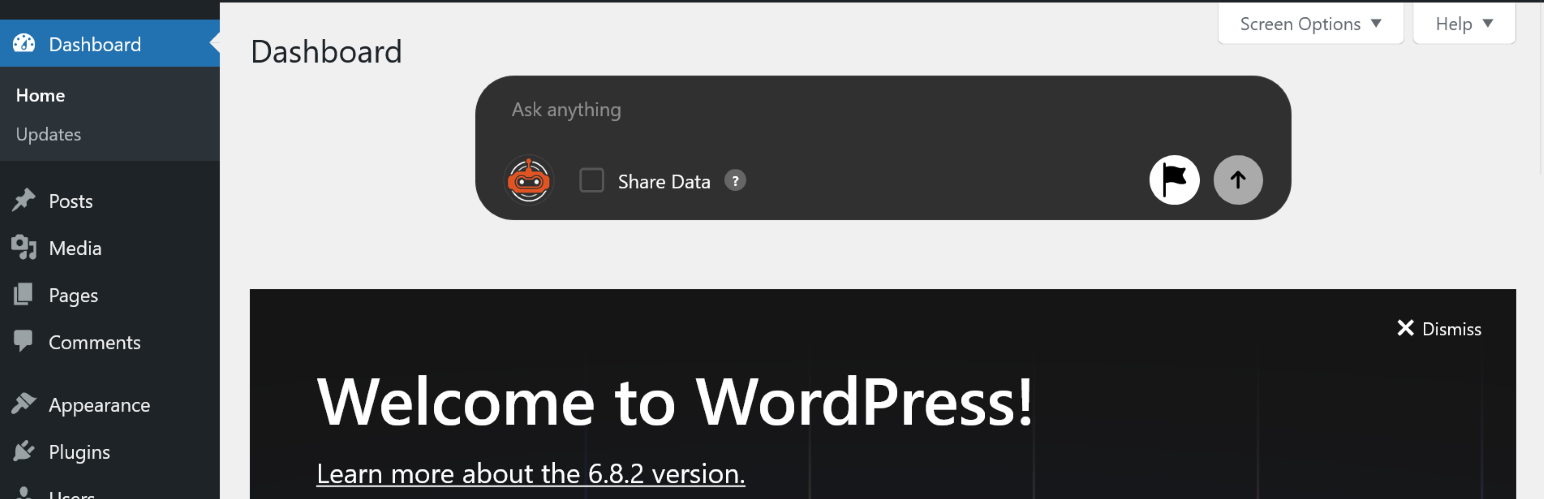
<li><strong>什麼是 WPadmin.AI?</strong><br>WPadmin.AI 是您智慧的助手,無縫集成到您的 WordPress 控制面板中。設計用於優化您的站點管理,WPadmin.AI 提供即時的故障排除、洞察力、插件建議等,就在您需要的地方。告別無盡的搜索,獲取針對您特定網站設置的即時答案。</li>
<li><strong>它是如何運作的?</strong><br>WPadmin.AI 借助尖端的 AI 技術來了解您的站點結構、插件、主題和配置。通過管理面板中的簡單問題框,您可以立即獲取專家級指導、數據洞察和常見 WordPress 問題的解決方案。</li>
<li><strong>示例用例</strong></li>
<ul>
<li><strong>故障排除 WordPress 錯誤</strong><br>問:「如何修復 500 內部服務器錯誤?」<br>答: 針對您網站的設置量身定制的逐步指南。</li>
<li><strong>內容洞察</strong><br>問:「我有多少已發布的部落格文章?」<br>答: 一個快速計數和最近更新的清單。<br>即將推出的高級版: 包括文章表現和參與度指標的增強分析。</li>
</ul>
</ul>
外掛標籤
開發者團隊
② 後台搜尋「The AI Assistant for the WPadmin」→ 直接安裝(推薦)
原文外掛簡介
🤖 WPadmin.AI — Your Smart AI Assistant Inside WordPress
Stop switching between tabs, forums, and search engines. WPadmin.AI brings a powerful AI chatbot directly into your WordPress admin dashboard, giving you instant, site-aware answers tailored to your exact setup — your plugins, your theme, your content.
Whether you’re a beginner trying to fix an error or a seasoned developer looking for quick answers, WPadmin.AI saves you time by delivering expert-level guidance in seconds.
🔑 Key Features
💬 AI Chatbox in Your Dashboard — Ask questions in plain English and get instant, context-aware answers right inside wp-admin.
🔍 Site-Aware Responses — The AI knows your active plugins, theme, and site structure to give relevant, personalized answers.
🔌 Smart Plugin Recommendations — Get plugin suggestions that actually match your setup and business needs.
📊 Data Analysis (Premium) — Share your page, post, or WooCommerce order data with the AI for deeper insights and reports.
🛠️ Step-by-Step Troubleshooting — Fix common WordPress issues with guided instructions tailored to your environment.
🔒 Privacy First — All data is deleted from our servers after 2 hours of inactivity. No personal data stored long-term.
⚡ Zero Performance Impact — All AI processing happens on our external servers. Your site stays fast.
📋 Use Cases — What Can You Ask WPadmin.AI?
🐛 Troubleshoot WordPress Errors
“How do I fix a 500 internal server error?” — Get step-by-step guidance specific to your site’s plugins and configuration.
🔌 Get Plugin Recommendations
“What’s the best SEO plugin for my setup?” — Receive suggestions that are compatible with your current theme and plugin stack.
🛒 Manage WooCommerce (Premium)
“What were my total sales last month?” — Get instant sales summaries and order insights directly in your dashboard.
📝 Content Insights (Premium)
“How many blog posts have I published this year?” — Quick content counts, recent updates, and publishing stats.
📊 Analyze Form Submissions (Premium)
“How many contact form submissions did I get this week?” — Real-time form stats without navigating away from your dashboard.
🎨 Theme & Design Help
“How do I change the header color in my theme?” — Get CSS snippets and customization guidance tailored to your active theme.
🔐 Security Guidance
“Is my site secure? What should I improve?” — Receive security best practices based on your current setup.
⚙️ WordPress Configuration
“How do I set up a custom permalink structure?” — Step-by-step instructions for common WordPress settings.
💡 Code Snippet Generation
“Give me a code snippet to disable comments on all pages.” — Get ready-to-use PHP, CSS, or JavaScript snippets.
🚀 Performance Optimization
“How can I speed up my website?” — Get actionable recommendations based on your plugins and hosting setup.
📧 Email & Notification Setup
“How do I configure SMTP for WordPress?” — Guided setup for email deliverability with plugin suggestions.
🌐 Multisite Support (Premium)
“How do I manage plugins across my multisite network?” — Expert guidance for WordPress Multisite configurations.
🔧 Works Great With These Popular Plugins
WPadmin.AI is designed to understand and work alongside the plugins you already use:
🛒 WooCommerce — Sales reports, order management, product questions
📋 Gravity Forms — Form submissions, field insights, troubleshooting
🧩 Advanced Custom Fields (ACF) — Field setup, template integration, data queries
🎨 Elementor — Design questions, widget help, layout troubleshooting
📈 Yoast SEO — SEO configuration, meta data analysis, optimization tips
🛡️ Wordfence — Security configuration questions and best practices
📬 Contact Form 7 — Form setup, email issues, submission management
📦 WP All Import / WP All Export — Import/export guidance and troubleshooting
🔄 UpdraftPlus — Backup configuration and restore assistance
📊 MonsterInsights — Analytics setup and data interpretation
🧱 Beaver Builder — Page builder questions and layout help
🛍️ Easy Digital Downloads — Digital product management and sales queries
…and many more! The AI adapts to whatever plugins and themes you have installed.
📦 Plans & Pricing
WPadmin.AI offers both Free and Premium plans. Visit wpadmin.ai to view pricing and choose the plan that fits your needs.
Privacy
This plugin sends prompt text and your site URL to the WPAdmin.AI API for response generation and license checks. No personal or sensitive data is shared.
Privacy Policy: https://members.wpadmin.ai/privacy-policy
Terms of Service: https://members.wpadmin.ai/terms-of-service
External Services
This plugin connects to WPAdmin.AI servers to provide AI responses.
Data Sent: Prompt text and site URL
When: On plugin activation and when prompts are submitted
Service: WPAdmin.AI (https://members.wpadmin.ai/)