內容簡介
您正在尋找最佳的願望清單外掛嗎?Advanced Wishlist for WooCommerce 就是您建立網站願望清單所需的外掛。
這個外掛不僅能在您的 WooCommerce 商店中加入願望清單功能。作為商店擁有者,您還可以查看用戶願望清單中添加的流行產品清單,這對於進一步的行銷目的非常有幫助。使用這個外掛可以創建書籤、收藏清單以及其他用途。
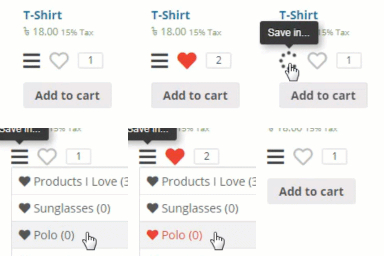
添加「加入願望清單」按鈕到您的網站非常容易且可透過自訂器進行風格設定。您可以在商品頁面和商店循環中都顯示願望清單按鈕,並分別調整每個按鈕的風格。
使用 Advanced Wishlist for WooCommerce,用戶可以與親戚、朋友和其他人分享自己的願望清單。使用它可以創建生日、婚禮或嬰兒淋浴願望清單,並通過單個按鈕點擊將願望清單中的產品添加到購物車中。
Advanced Wishlist for WooCommerce 主要特色
選擇願望清單頁面
選擇願望清單按鈕位置:在商店循環中、在商品頁面中或在每個地方都顯示
在自訂器中設計願望清單按鈕風格
自訂願望清單按鈕圖示
選擇在將產品添加到願望清單後顯示的內容(查看或移除)
自定義願望清單頁面
添加產品到購物車後的可調整行為
未經授權的用戶也可以使用願望清單
通過 WhatsApp、Facebook、Twitter、Pinterest、電子郵件或連結分享願望清單
分析添加到願望清單的熱門產品
下載添加熱門產品到願望清單的用戶列表
Advanced Wishlist for WooCommerce 短碼
您可以使用短碼將願望清單放置在您網站的任何頁面上:
[awl_products_of_wishlist]
您還可以使用短碼在您的產品或商店頁面的任何位置添加願望清單按鈕:
[awl_add_button]
有想法或功能要求嗎?
如果您有任何想法或新功能的建議,請在“支援”區域中創建一個新主題,我們將非常樂意與您分享。
外掛標籤
開發者團隊
② 後台搜尋「Advanced Wishlist for WooCommerce」→ 直接安裝(推薦)
原文外掛簡介
Are you searching for the best wishlist plugin? Advanced Wishlist for WooCommerce is exactly what you need for creating a wishlist on your site.
This plugin not only adds wishlist to your WooCommerce store. As a shop owner, you can view a list of popular products added to the users’ wishlists that is so helpful for the further marketing purposes. Use the plugin to create bookmarks, a list of the favorite products, and in many other ways.
It is so easy to setup “Add to wishlist” button on your site and change it style through the Customizer. You can show the wishlist button both on the product page and on the shop loop and adjust the style of each button separately.
With Advanced Wishlist for WooCommerce users can share their wishlist with relatives, friends and other people. Use it to create a birthday, wedding or baby-shower wishlist and add the wishlist’s products to the cart by one button clicking.
Main features of the Advanced Wishlist for WooCommerce
Select the wishlist page
Select the wishlist button position: on the shop loop, on the product page or everywhere
Stylize of the wishlist button in the Customizer
Custom icons for the wishlist button
Select what to show after the product is added to the wishlist (View or remove)
Customize the wishlist page
Adjustable behavior after adding the products from the wishlist to the cart
Availability of the wishlist for the unauthorized users
Sharing of the wishlist through WhatsApp, Facebook, Twitter, Pinterest, email or as a link
Analyse the popular products added to the wishlists
Download users’ list that added the popular products to their wishlists
Advanced Wishlist for WooCommerce shortcodes
You can place the wishlist on any of your site page using the shortcode:
[awl_products_of_wishlist]
You can also place the wishlist button on any place of your product or shop page using the shortcode:
[awl_add_button]
Have an idea or feature request?
We will be happy if you share them with us. Create a new topic in the “Support” section with any ideas or suggestions for new features.