
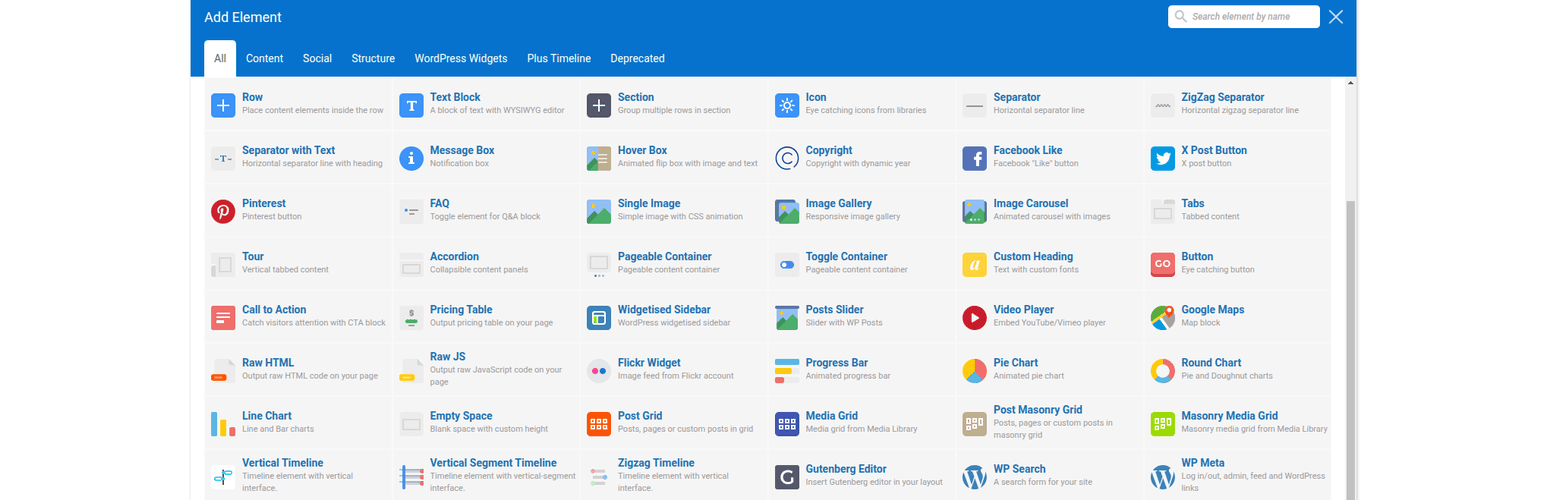
內容簡介
總結:這個 WordPress 外掛將一個模組添加到 WPBakery Page Builder 外掛中,將 WPBakery 在 8.0 版本之前使用的老式編輯元素圖示風格帶了回來。
問題與答案:
1. 這個外掛的功能是什麼?
這個外掛將一個模組添加到 WPBakery Page Builder 外掛中,將老式編輯元素圖示風格帶回WPBakery 在 8.0 版本之前使用的風格。
2. 如果我不喜歡 WPBakery Page Builder 8.0 版本後引入的新「新增元素」彈出式圖示,這個外掛對我有什麼幫助?
如果您不喜歡 WPBakery Page Builder 8.0 版本後引入的新「新增元素」彈出式圖示,此外掛將對您有所幫助。
3. 安裝了這個外掛後,我可以在哪些編輯器中使用舊的圖示風格?
安裝後,您可以在 WPBakery Page Builder 的後端和前端編輯器中再次享受舊式圖示風格。您可以在 WPBakery Page Builder 設定頁面的模組介面中隨時打開或關閉此功能。
4. 想要查看源文件代碼在哪裡可以找到?
您可以在我們的 GitHub 外掛頁面上找到源文件代碼。
外掛標籤
開發者團隊
② 後台搜尋「Add Old School Elements Icons Module for WPBakery Page Builder」→ 直接安裝(推薦)
原文外掛簡介
This WordPress plugin adds a module to WPBakery Page Builder plugin, bringing back the old school style of editor elements icons that WPBakery used in versions prior to 8.0.
If, like me, you fall in love with interfaces you’ve used for decades, then this plugin can be useful for you if you don’t feel comfortable with the new ‘Add Element’ popup icons in WPBakery Page Builder introduced after version 8.0.
After installing the plugin, you can enjoy the old icon style again in both the backend and frontend WPBakery Page Builder editors. You can always switch it on or off in the Module interface on the WPBakery Page Builder settings page.
Source file code you can find on our GitHub plugin page