內容簡介
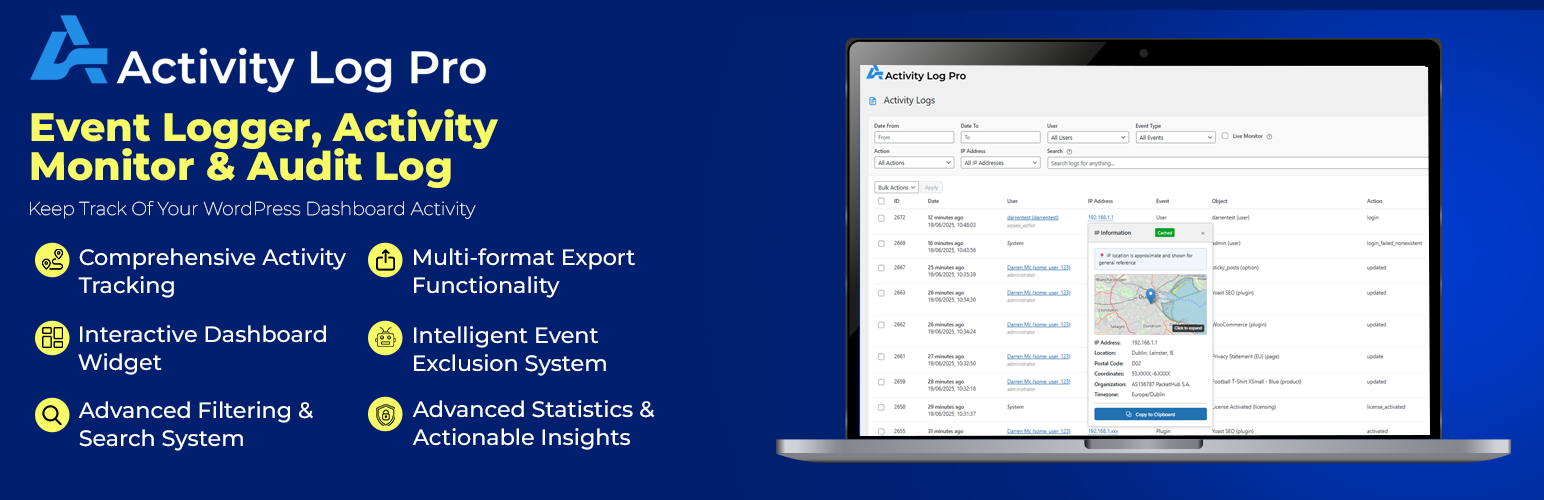
Activity Log Pro 是一款 WordPress 網站活動記錄外掛,可完整追蹤使用者登入、內容變更、外掛更新及可疑行為等操作,適合企業、電商、多人協作網站用於安全監控、合規稽核與問題排查。
【主要功能】
• 完整記錄使用者登入/登出及 IP 位址追蹤
• 監控登入失敗次數,即時偵測可疑行為
• 追蹤文章、頁面及自訂文章類型的變更紀錄
• 記錄外掛與佈景主題的安裝、更新與修改
• 支援 GDPR、HIPAA 等法規合規稽核需求
• 提供完整操作軌跡,掌握誰在何時做了什麼
外掛標籤
開發者團隊
② 後台搜尋「Activity Log Pro – Event Logger, Activity Monitor & Audit Log」→ 直接安裝(推薦)
原文外掛簡介
“This is a super slick plugin guys. Very simple to use, very clean interface. Super excited about it.” – Ryan @ InfluenceWP.com
“Perfect! Robust and exemplary neat plugin! All the info that you need is in a clear overview.” – @mixha
Activity Log Pro gives you a complete audit trail of everything happening on your WordPress site. See who logged in, what content changed, exactly when it happened, which plugins were updated and any suspicious activity – all in one place.
Perfect for businesses, e-commerce stores, agencies, and multi-user sites that need visibility into who did what, when, and where. Whether you’re troubleshooting issues, staying compliant, or monitoring for security threats, Activity Log Pro makes it easy to keep your site secure and transparent.
Why Use an Activity Log in WordPress?
Understand every action on your site, reduce security risks, and simplify compliance.
Security & Compliance: Stay compliant with GDPR, HIPAA, and other regulations while detecting failed logins, role changes, and suspicious behavior.
Troubleshooting & Debugging: See exactly what changed before something broke – track plugin updates, theme edits, and content changes.
User Accountability & Audit Trails: Know exactly who did what, when, and from which IP address for complete transparency and legal compliance.
Performance & Site Health: Monitor plugin installations, theme changes and modifications that impact your site’s speed and stability.
Enhanced Backup Strategy: Create detailed change logs that complement your backups – know exactly what to restore and when changes occurred.
WordPress Security Monitoring: Track failed logins, suspicious activities, user role changes, and potential security threats in real-time.
Key Features Our Users Love
🚀 Complete Core Activity Tracking
User login/logout activities with IP tracking
Failed login attempt monitoring for security
Post, page, and custom post type changes (create, update, delete)
Media library activities (upload, edit, delete)
Plugin installations, activations, deactivations, and updates
Theme switches, installations, and customizer changes
WordPress core updates
Widget modifications and placement changes
Menu creation, updates, and deletions
User registration, profile updates, and role changes
Comment activities (approved, spam, trash, delete)
Settings and options changes
Category and tag management
🔌 Advanced Plugin Integrations
WooCommerce Integration: Complete e-commerce activity monitoring – track order modifications, product changes, inventory updates, customer data edits, payment gateway settings, and coupon usage for full store audit trails (Premium)
Yoast SEO Integration: Monitor all SEO changes including meta descriptions, title tags, search engines follow links, Advanced Meta Robots, Breadcrumbs Title updates, focus keyword changes, and readability optimizations to maintain SEO integrity (Premium)
Free Professional Features
Real-time activity monitoring dashboard
Advanced filtering and search capabilities
Detailed activity metadata and context
IP address tracking for security analysis
User role-based activity permissions
Customizable data retention policies
Export capabilities (CSV, JSON, HTML and TXT formats)
Clean, responsive admin interface
Database optimization for performance
💎 Premium Features
Upgrade to Activity Log Pro Premium for advanced security and privacy controls:
Advanced IP Privacy Controls – GDPR-compliant IP anonymization and masking options
IP Location Mapping – Geographical insights for visitor analysis and security monitoring
Enhanced Security Features – Real-time logs and suspicious activity logs (via Live Monitor)
JSON Feed Export – SIEM integration with secure token-based access
WooCommerce Logger – Comprehensive e-commerce tracking (orders, products, customers)
Yoast SEO Logger – Complete SEO audit trails for meta data and schema changes
Priority Support – Direct access to expert support with faster response times
👉 Compare Free vs Premium Features → | 👉 Try out the Demo →
Enterprise-Grade Performance & Database Architecture
⚡ Optimized Data Storage
Activity Log Pro utilizes a dedicated custom database table specifically engineered for high-performance activity logging. This intelligent architecture ensures your WordPress site maintains peak performance even with extensive logging enabled. Our custom table design eliminates the overhead associated with WordPress’s standard post and meta tables, delivering lightning-fast query responses and minimal server resource consumption.
✔️ Performance Features
Optimized Logging – Our logging system captures activities with minimal performance impact through efficient database operations and intelligent caching. While logging occurs in real-time to ensure data integrity, the system is designed with optimized queries and caching strategies to minimize any potential impact on site performance.
Complete Uninstall & Database Hygiene
🧹 Professional Clean Removal
The plugin includes a comprehensive uninstall option that completely removes all plugin data when you choose to uninstall. Our automated cleanup routine meticulously removes the custom activity log table, plugin options, scheduled tasks, and any associated metadata, leaving your WordPress database in its original pristine state.
🗂️ Database Integrity Protection
We prioritize your database’s long-term health. The uninstall process includes verification steps to ensure complete data removal without affecting any other WordPress functionality. This commitment to database cleanliness means you can confidently test or temporarily use Activity Log Pro without worrying about leftover data cluttering your system.
🛡️ Security & Privacy
Activity Log Pro takes your privacy and security seriously:
IP Address Anonymization by Default – All IP addresses are automatically anonymized (e.g., 192.168.1.xxx) for privacy protection
WordPress Standard Security – Database security practices (prepared statements, input sanitization)
Configurable Data Retention – Meet your privacy requirements with customizable retention periods
Administrator-Only Access – All plugin features require administrator privileges for security
Third-Party Services
This plugin uses the following third-party services:
IP Geolocation Service (ipinfo.io)
– Purpose: Provides geographical location data for IP addresses to enhance security monitoring
– Data Sent: IP addresses are sent to ipinfo.io for location lookup when administrators manually request IP location information
– When Used: Only when administrators manually request IP location information via the admin interface
– Privacy Policy: https://ipinfo.io/privacy-policy
– Terms of Service: https://ipinfo.io/terms-of-service
– Data Storage: Location data is cached locally for 24 hours to minimize API calls
– User Control: This feature is optional and only available to administrators who explicitly request IP location data
Payment Processing Service (LemonSqueezy)
– Purpose: Handles secure payment processing, license validation, and subscription management for premium features
– Data Sent: When users choose to purchase premium plans, payment information (credit card details, billing address), email address, and license details are processed by LemonSqueezy
– When Used: Only when users voluntarily initiate premium plan purchases, license activation, or subscription management
– Privacy Policy: https://www.lemonsqueezy.com/privacy
– Terms of Service: https://www.lemonsqueezy.com/terms
– Data Storage: Payment and license data is managed entirely by LemonSqueezy – no payment information is stored on your WordPress site
– User Control: Users have complete control over whether to purchase premium features and can manage their subscriptions through LemonSqueezy’s customer portal
Newsletter Subscription Service (LemonSqueezy)
– Purpose: Allows users to voluntarily subscribe to product updates and educational content newsletters
– Data Sent: Name and email address only when users explicitly choose to subscribe to the newsletter
– When Used: Only when users voluntarily fill out and submit the newsletter subscription form in the plugin settings
– Privacy Policy: https://www.lemonsqueezy.com/privacy
– Terms of Service: https://www.lemonsqueezy.com/terms
– Data Storage: Newsletter subscription data is managed by LemonSqueezy – no subscription information is stored on your WordPress site
– User Control: Users have complete control over newsletter subscription and can unsubscribe at any time via email links or LemonSqueezy’s customer portal
📊 Perfect For
Business Websites & Corporate Sites: Maintain GDPR compliance, PCI DSS standards, and audit trail requirements for regulatory inspections and security protocols.
WooCommerce & E-commerce Stores: Track order modifications, product changes, inventory adjustments, customer data access, and payment processing for fraud prevention and compliance.
Multi-user WordPress Sites: Monitor team member activities, role changes, content approvals, and administrative access for complete user accountability.
WordPress Development & Staging Sites: Track plugin installations, removal, theme modifications.
Digital Agencies & Web Development Companies: Provide detailed client reporting, transparent site maintenance logs, and professional audit documentation.
Membership Sites & Private Communities: Track member activities, subscription changes, content access, and community moderation actions.
Educational Institutions & Learning Management: Monitor student submissions, instructor activities, course content changes, and user enrollment modifications.
News & Publishing Websites: Monitor editorial workflows, content publication schedules, author activities, and SEO optimization changes.
🔧 Easy Setup & Configuration
Get started in minutes:
1. Install and activate the plugin – it works out of the box with default settings
2. Configure which activities to track (optional)
3. Set your data retention preferences (optional)
4. Start monitoring immediately
(There are various other Settings for you to explore)
No complex setup required – Activity Log Pro works right away with sensible defaults while offering extensive customization options for advanced users.
💡 Use Cases
Troubleshooting: “What changed right before the site broke?”
Security Monitoring: “Who attempted to login with admin credentials?”
Content Management: “When was this post last modified and by whom?”
Compliance: “Show me all user activities for the past 6 months”
Performance: “What plugins were recently activated that might be slowing the site?”
System Requirements
WordPress 6.3 or higher
PHP 7.4 or higher
MySQL 5.6 or higher (or MariaDB 10.0+)
Minimum 64MB PHP memory limit (128MB recommended)
Database Information
Creates custom table: {prefix}actlogpro_activity_log_pro_all_logs
Estimated storage: ~1KB per logged event
Automatic cleanup: Based on retention settings (7-365 days)
Uses WordPress database prefix: Follows WordPress naming conventions
Known Limitations
Multisite networks: Each site maintains separate logs (no network-wide centralized logging)
Administrator-only access: Requires manage_options capability – only Administrators and Super Admins can access plugin features
High-traffic sites: Consider adjusting retention periods for optimal performance
Memory-intensive operations: May require increased PHP memory limits for large exports or extensive logging
Feed export limits: RSS/JSON feeds are limited to 50-100 entries per request
Real-time logging: Continuous logging may impact performance on extremely high-traffic sites
Database dependency: Uses MySQL/MariaDB-specific features and functions
Privacy Policy
Activity Log Pro logs user activities on your WordPress site. This may include:
User login/logout times and IP addresses (anonymized by default)
Content creation, modification, and deletion activities
Plugin and theme changes
Administrative actions
Data Storage: All activity logs are stored locally on your WordPress site. No log data is transmitted to external servers.
IP Address Privacy: IP addresses are automatically anonymized by default (e.g., 192.168.1.xxx) for privacy protection. Full IP addresses are only stored if explicitly enabled by administrators in the premium version.
Third-Party Services: The plugin uses ipinfo.io for optional IP geolocation lookups when administrators manually request location information, and LemonSqueezy for payment processing when users choose to purchase premium features and for newsletter subscriptions when users voluntarily sign up. The ipinfo.io service is only used when explicitly requested and data is cached locally. LemonSqueezy is only used when users voluntarily initiate premium purchases, subscription management, or newsletter signups.
Data Retention: You can configure data retention periods to meet your privacy requirements. You can configure a secure JSON feed, with access via a secure authentication token, available in Premium → activitylog.pro/pricing
Support
For support, documentation, and feature requests, please visit:
Plugin Website → activitylog.pro
Get Support → activitylog.pro/support
Plugin Docs → activitylog.pro/docs
Following on Twitter/X → x.com/ActivityLog