內容簡介
使用只有 CSS 的方式,顯示 ACF 欄位說明為工具提示。
總覽
Advanced Custom Fields(由Elliot Condon開發的外掛程式)是開發人員的一個絕佳資源,它讓我們可以結構化客製文字並為輸入資料的人創造良好的使用者體驗。
ACF 欄位的指導文字很有用,但是在 WordPress 的介面中當有很多指導文字時就會造成視覺上的雜亂。Thomas Meyer 創建了一個很棒的外掛程式 ACF Tooltip Plugin,以解決這個問題。然而,當使用此外掛程式在有大量 ACF 欄位的實作時,我注意到其效能會下降,導致 WP 儀表板的載入時間增加。
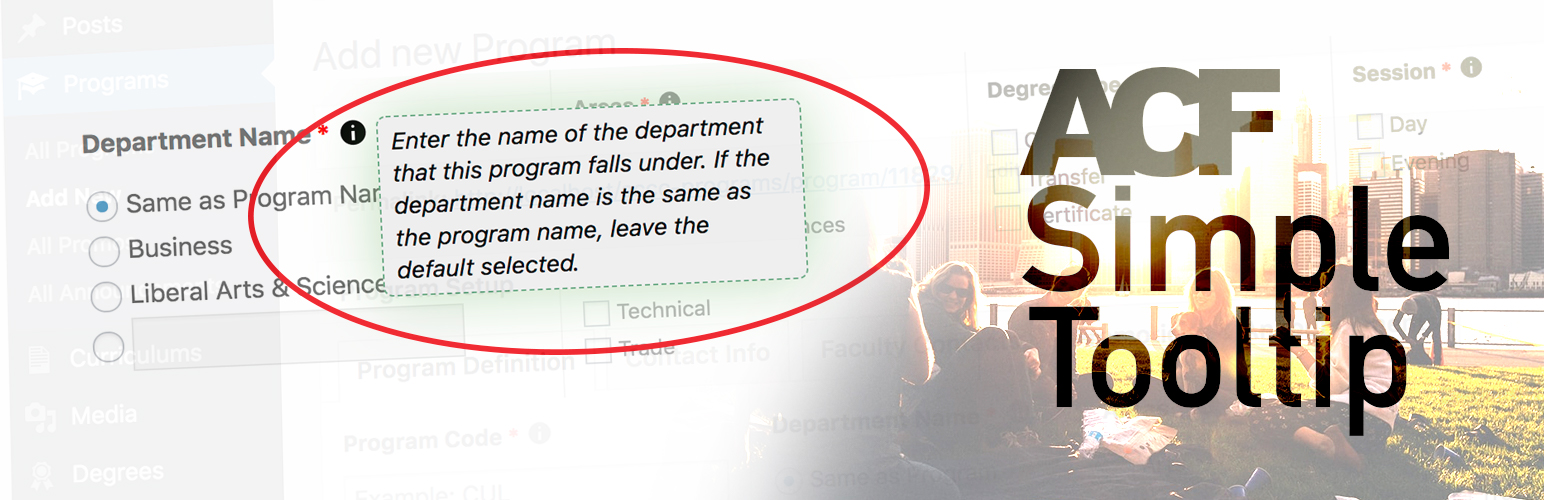
這個外掛程式 ACF Simple Tooltip 是一個輕量級的解決方案,只使用兩行 JavaScript 將有指導文字的 ACF 欄位標籤加上類別。CSS 會處理其餘部分(建立「資訊」ⓘ 圖標,將指導文字設計為工具提示,以及建立滑鼠滑過顯示工具提示的功能)。安裝此外掛程式,JS 和 CSS 將在 WP 儀表板的任何 post.php 頁面上連接。
聯絡方式
這是一個初始版本,如果您在使用此外掛程式時發現任何問題,請聯絡我。祝開發愉快!
外掛標籤
開發者團隊
原文外掛簡介
Displays ACF field instructions as tooltips using only CSS.
Overview
The Advanced Custom Fields plugin by Elliot Condon is a fantastic resource for developers, allowing us to structure custom data and create a great user experience for data entry personnel.
The instruction text for ACF fields is useful, but creates visual clutter in the WordPress interface when there is a lot of instructional text. Thomas Meyer has created a great plugin to address this issue with his ACF Tooltip Plugin. However, when using this plugin on implementations that have a large number of ACF fields, I have seen that performance drops and load-time of the WP Dashboard increases.
This plugin, ACF Simple Tooltip, is a lightweight solution that uses only two lines of JavaScript to add classes to ACF field labels which have instruction text. CSS takes care of the rest (creating the “info” ⓘ icon, styling the instruction text as a tooltip, and creating the hover functionality for showing the tooltip). Simply install the plugin, and the JS and CSS will enqueue on any post.php page in the WP Dashboard.
Contact
This is an initial version, so please contact me if you find any issues while using the plugin. Happy developing!