內容簡介
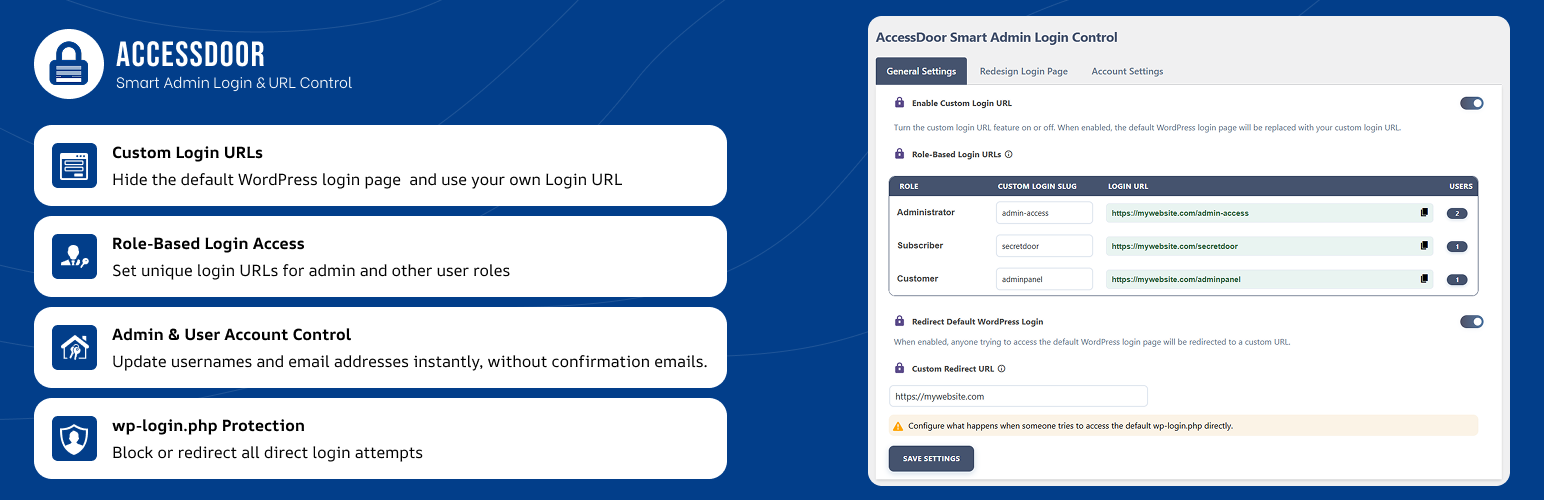
AccessDoor 是一款專為 WordPress 設計的安全外掛,幫助用戶自訂和保護登入體驗。它允許變更預設登入網址、創建角色專屬登入網址,並提供多項安全強化功能,確保網站安全性。
【主要功能】
• 自訂 WordPress 登入網址
• 角色專屬登入網址管理
• 立即變更管理員用戶名
• 更新用戶電子郵件地址無需確認
• 自訂登入畫面樣式
• 啟用八項內建安全強化功能
外掛標籤
開發者團隊
② 後台搜尋「AccessDoor – Smart Admin Login & Security」→ 直接安裝(推薦)
原文外掛簡介
AccessDoor helps you customize and secure the WordPress login experience.
Change the default WordPress login URL to a custom login address and create separate login URLs for different user roles. You can also manage administrator usernames and user email addresses, customize the WordPress login screen, and enable additional security hardening options from a single settings page.
AccessDoor includes 8 built-in security features designed to help reduce common WordPress attack surfaces, including disabling XML-RPC, REST API access, file editing, directory browsing, PHP execution in the uploads directory, comments, and pingbacks.
The plugin provides a simple settings interface so administrators can configure login and security options without modifying theme or core files.
Key Features
Change the default WordPress admin login URL (wp-admin) to a custom login URL.
Create role-based login URLs for different WordPress user roles, including custom roles.
Instantly change the administrator username.
Update administrator and user email addresses without confirmation emails.
Help protect against common or predictable administrator usernames and email addresses.
Customize the WordPress login screen with a custom logo, background color, or background image.
Block or redirect access to wp-login.php and wp-admin based on your configuration.
Enable 8 built-in security hardening features from a single settings page.
Security Features
AccessDoor provides the following security options:
Disable Comments
Disable XML-RPC Pingbacks
Disable REST API
Disable XML-RPC
Block Directory Browsing
Disable PHP Execution in the Uploads Directory
Disable Pingbacks
Disable File Editing in the WordPress Dashboard
Each security feature can be enabled or disabled independently from the AccessDoor settings page.
Important Notes
AccessDoor is not compatible with WordPress Multisite or Network installations. The plugin will not provide its settings or functionality on multisite/network sites.
AccessDoor does not permanently remove WordPress’s default login functionality.
A fallback access method is available to help prevent accidental administrator lockouts.
Always keep your configured login URL and recovery information secure.
Test your custom login URL after changing login settings and before ending your current administrator session.
Some security features may affect functionality provided by WordPress, themes, or third-party plugins. Enable them according to your site’s requirements.