[WordPress] 外掛分享: AccessDoor – Smart Admin Login & Security

WordPress 外掛 AccessDoor – Smart Admin Login & Security 的封面圖片。

前言介紹

  • 這款 WordPress 外掛「AccessDoor – Smart Admin Login & Security」是 2026-01-04 上架。
  • 目前尚無安裝啟用數,是個很新的外掛。如有要安裝使用,建議多測試確保功能沒問題!
  • 上一次更新是 2026-02-05,距離現在已有 20 天。
  • 外掛最低要求 WordPress 6.0 以上版本才可以安裝。
  • 外掛要求網站主機運作至少需要 PHP 版本 7.4 以上。
  • 尚未有人給過這款外掛評分。
  • 還沒有人在論壇上發問,可能目前使用數不多,還沒有什麼大問題。

外掛協作開發者

wpeople | drashti16 | mayur8991 | itpathsolutions |

外掛標籤

security | login url | login page | admin login | custom login |

內容簡介

**總結:**

這個 WordPress 外掛讓您能夠更改預設的管理員登入網址,並為不同的使用者角色建立自訂登入連結。它有助於保護您的網站,阻止或重新導向對 wp-login.php 或 wp-admin 的訪問。您可以輕鬆更新管理員使用者名稱和電子郵件地址,而無需確認郵件,並自訂 WordPress 登入畫面設計。

**問題與答案:**

1. 這個外掛可以做什麼?
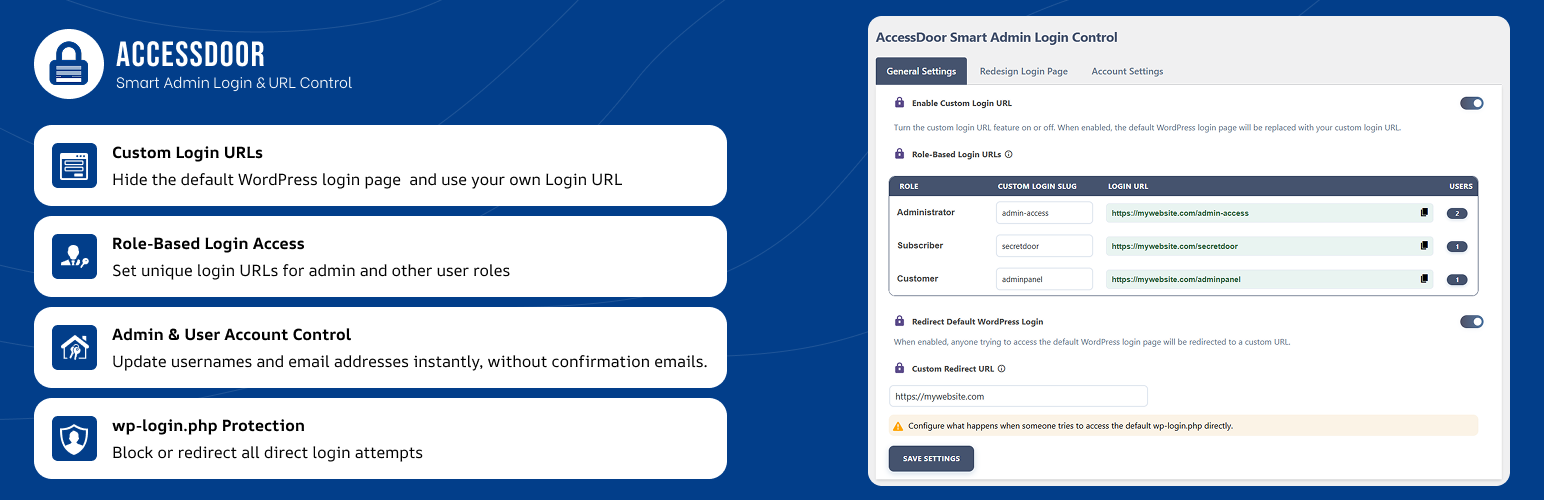
- 更改預設的 WordPress 管理員登入網址為自訂登入網址。
- 創建基於角色的登入網址,適用於不同的 WordPress 使用者角色,例如訂閱者、供應商、SEO 或任何自定義角色。
- 即時更改管理員使用者名稱。
- 更新管理員和使用者電子郵件地址,無需確認郵件。
- 保護您的網站免受常見或可預測的管理員使用者名稱和電子郵件地址的影響。

2. 這個外掛的重要注意事項是什麼?
- 這個外掛不會永久停用預設的 WordPress 登入功能。
- 始終可使用後備途徑,以避免意外被鎖定。
- 管理員應保持恢復訪問詳細資料的安全。

原文外掛簡介

It allows you change the default WordPress admin login URL and create custom login links for different user roles. It helps protect your site by blocking or redirecting access to wp-login.php or wp-admin.
You can easily update admin usernames and email addresses without confirmation emails, and customize the WordPress login screen design.
Easily harden your site with 8 built-in security features, including disabling comments, XML-RPC, REST API, file editing, directory browsing, and more—all with a single click from the plugin settings.
Key Features

Change the default WordPress admin login URL (wp-admin) to a custom login URL
Create role-based login URLs for different WordPress user roles such as Subscriber, Vendor, SEO, or any custom role
Instantly change the admin username
Update admin and user email addresses without confirmation emails
Protect your site from common or predictable admin usernames and email addresses
Customize the WordPress login page with a custom logo, background color, or background image
Block or redirect access to wp-login.php and wp-admin for unauthorized users
8 security features to harden your site with a single click (see below)

Security Features
Easily enable or disable these 8 security features from the plugin settings:

Disable Comments
Disable XML-RPC Pingback
Disable REST API
Disable XML-RPC
Block Directory Browsing
Disable PHP Execution in Uploads folder
Turn Off Pingbacks
Disable File Editing in Dashboard

Important Notes

This plugin is not compatible with WordPress Multisite (Network) installations. It will not work or show settings on multisite/network sites.
This plugin does not permanently disable default WordPress login functionality.
A fallback access method is always available to avoid accidental lockouts.
Administrators should keep recovery access details safe.

各版本下載點

  • 方法一:點下方版本號的連結下載 ZIP 檔案後,登入網站後台左側選單「外掛」的「安裝外掛」,然後選擇上方的「上傳外掛」,把下載回去的 ZIP 外掛打包檔案上傳上去安裝與啟用。
  • 方法二:透過「安裝外掛」的畫面右方搜尋功能,搜尋外掛名稱「AccessDoor – Smart Admin Login & Security」來進行安裝。

(建議使用方法二,確保安裝的版本符合當前運作的 WordPress 環境。


1.0.0 | 1.0.1 | 1.0.2 | 1.0.3 | trunk |

延伸相關外掛(你可能也想知道)

  • Wordfence Security – Firewall, Malware Scan, and Login Security 》fective way to manage multiple WordPress sites with Wordfence installed from a single location., Monitor security status across all your sites from...。
  • Hostinger Tools 》- Hostinger Onboarding WordPress Plugin 简化和加快了WordPress网站的设置过程。, - 提供了简便和快速的方式来建立WordPress网站。。
  • Really Simple Security – Simple and Performant Security (formerly Really Simple SSL) 》le Plugins include Complianz GDPR, Disable Updates Manager, and Really Simple CAPTCHA., , Really Simple SSL是一個外掛,自動配置你的網站最大程度上使...。
  • Jetpack – WP Security, Backup, Speed, & Growth 》search engines, and grow your traffic with Jetpack. It’s the ultimate toolkit for WordPress professionals and beginners alike., , Customize and des...。
  • Limit Login Attempts Reloaded – Login Security, Brute Force Protection, Firewall 》Limit Login Attempts Reloaded 是一款WordPress外掛,可阻止暴力破解攻擊並透過限制常規登錄、XMLRPC、Woocommerce和自訂登錄頁面的登錄嘗試次數來優化您的...。
  • ManageWP Worker 》, Want to clone or migrate your WordPress website to a new host or domain? No problem! With ManageWP, you can easily clone or migrate your website ...。
  • Security Optimizer – The All-In-One Protection Plugin 》透過精心挑選且易於配置的功能,SiteGround Security 外掛提供了您所需的一切來保護您的網站並預防多種威脅,例如暴力破解攻擊、登錄錯誤、資料外洩等等。, ...。
  • Safe SVG 》Safe SVG 可以讓你安心地在 WordPress 中上傳 SVG 檔案!, 它能夠讓你允許上傳 SVG 檔案的同時,確保它們已經經過消毒以防止 SVG/XML 弱點影響你的網站。此外...。
  • Loginizer 》Loginizer 是一個 WordPress 外掛,可幫助您對抗暴力攻擊,當 IP 地址達到最大重試次數時,該外掛會阻止其登錄。您可以使用 Loginizer 將 IP 地址列入黑名單...。
  • All-In-One Security (AIOS) – Security and Firewall 》vated to your website, All-in-One Security's WAF will detect and block hacking attempts, adding an extra layer of security to your WordPress site. ...。
  • User Role Editor 》「User Role Editor」WordPress 外掛讓您輕鬆更改使用者角色和權限。, 只需打開您希望新增到所選角色的能力核取方塊,然後按「更新」按鈕以保存您的更改。完...。
  • MainWP Child – Securely Connects to the MainWP Dashboard to Manage Multiple Sites 》這是一個針對「MainWP Dashboard」的子外掛程式,可將您的 WordPress 網站連接至 MainWP Dashboard。, MainWP是一個完整的 WordPress 管理解決方案,是自助...。
  • Solid Security – Password, Two Factor Authentication, and Brute Force Protection 》ing iThemes Security Plugin can benefit you:, 保護您的 WordPress 網站的最佳外掛程式, 平均每天有 30,000 個網站遭受駭客攻擊,在網路上每 39 秒就會有一...。
  • Sucuri Security – Auditing, Malware Scanner and Security Hardening 》Sucuri Inc. 是全球公認的網站安全權威,專門為 WordPress 安全提供專業知識。, Sucuri Security WordPress 擴充套件對所有 WordPress 使用者免費提供。它是...。
  • SiteGuard WP Plugin 》版本: 1.6.7, , 您可以在日文網頁和英文網頁上找到文件、常見問題和更詳細的資訊。 , 安裝SiteGuard WP Plugin後,WordPress安全性會得到提高。, 本外掛是一...。

文章
Filter
Apply Filters
Mastodon