內容簡介
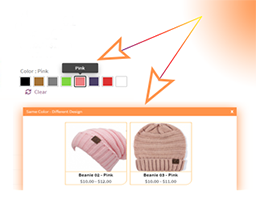
總結:這款 WordPress 外掛能強化您的 WooCommerce 變數商品,提供最終版的圖片庫外掛!這個外掛可以取代 WooCommerce 的預設變數圖片處理方式,讓您可以為每個變數添加多個圖片庫圖像,為客戶提供更引人入勝、視覺化的購物體驗。
**常見問題與答案:**
- 這個外掛的關鍵功能有哪些?
- 針對每個商品變數添加個別的圖片庫
- 與 WooCommerce 和大多數主題無縫整合
- 輕量、優化以及快速加載
- 具備直觀的管理面板,可快速設置和自定義
- 如果想進一步自定義或擴展圖片庫功能該怎麼辦?
- 這裡提供了一個具有高級自定義選項和擴展圖庫功能的 Pro 版本:https://variation-gallery.3wart.ge
- 這個外掛是否與外部服務相連接?
- 這個外掛不會連接到任何外部服務。
- 如果想要更多功能、更多自定義選項和優先支持該怎麼辦?
- 可以查看 Product Variation Gallery 的 Pro 版本:https://variation-gallery.3wart.ge — 解鎖高級圖庫設計、無限的媒體選項、增強的變數選擇器等功能。
外掛標籤
開發者團隊
② 後台搜尋「Product Variation Gallery For WooCommerce」→ 直接安裝(推薦)
原文外掛簡介
Supercharge Your WooCommerce Variable Products with the Ultimate Image Gallery Plugin!
This plugin replaces WooCommerce’s default variation image handling and lets you add multiple gallery images per variation — giving your customers a more engaging and visual shopping experience.
Key Features
Add individual image galleries to each product variation
Seamless integration with WooCommerce and most themes
Lightweight, optimized, and fast-loading
Intuitive admin panel for quick setup and customization
Looking to customize even further or expand gallery capabilities?
A Pro version with advanced customization options and extended gallery functionality is available here: https://variation-gallery.3wart.ge
External services
This plugin does not connect to any external services.
Upgrade for More
Want additional functionality, more customization options, and priority support?
Check out the Pro version of Product Variation Gallery at https://variation-gallery.3wart.ge — unlock advanced gallery designs, unlimited media options, enhanced variation selectors, and more.