內容簡介
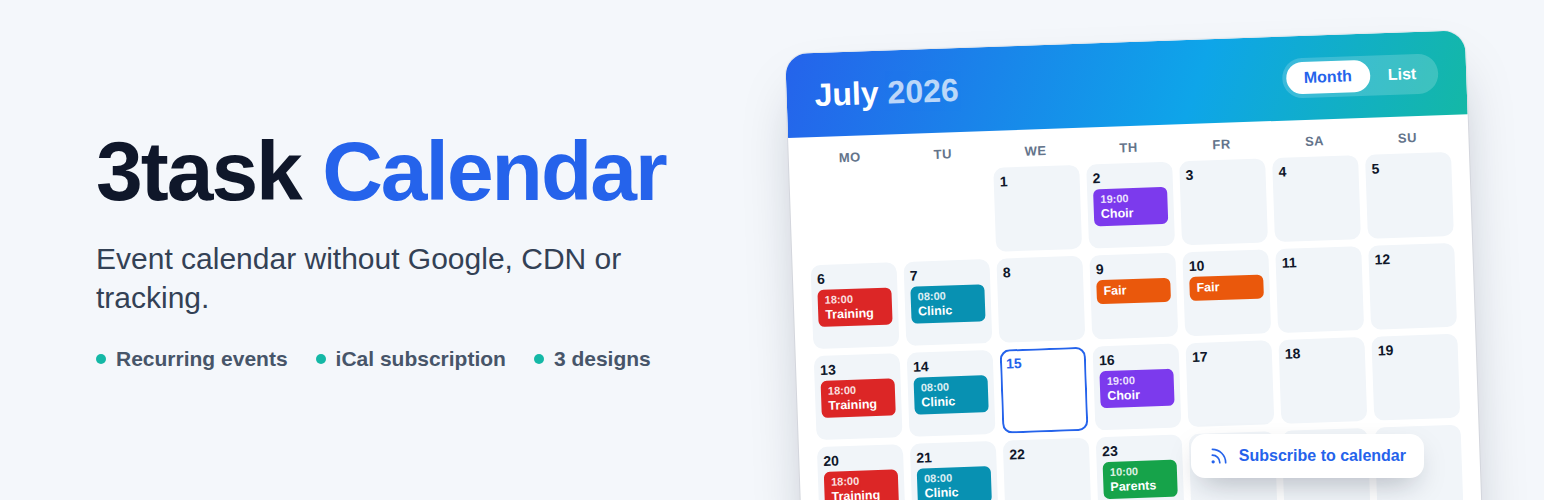
3task Calendar 是一款適合俱樂部、練習、學校及小型企業的活動日曆外掛,能在不將訪客資料傳送給第三方的情況下,輕鬆發布日期。所有功能皆在您的 WordPress 上運行,無需外部字型、CDN、追蹤或帳號。
【主要功能】
• 無限活動:可創建任意數量的活動
• 文章日期來源:文章編輯器中可設置日期欄位
• 現有日期欄位:可使用自定義欄位中的日期
• 文章中的日期框:顯示文章日期及「加入我的日曆」按鈕
• 海報視圖:以大圖塊顯示即將到來的日期
• CSV 匯入:從電子表格匯入活動
外掛標籤
開發者團隊
原文外掛簡介
3task Calendar is an event calendar for clubs, practices, schools and small businesses that want to publish dates without sending visitor data to third parties. Everything runs on your own WordPress: no external fonts, no CDN, no tracking, no account.
Dates can come straight from your posts. Set a date while you write, for example the cinema release of a film, a book release or a match day, and the post appears in the calendar by itself, with its title, link and image. A date you already keep in a custom field (Advanced Custom Fields, Meta Box or any other plugin) can be used without entering anything twice.
Visitors can add a single event to their own calendar or subscribe to the whole calendar (or one category) on their phone. Changes appear there automatically.
Key Features
Unlimited Events: Create as many events as you need
Dates from Posts: A date field in the post editor (block editor and classic editor) for posts, pages and custom post types; the calendar entry stays in sync with title, link, image and date
Existing Date Fields: Use a date you already store in a custom field (ACF, Meta Box, any plugin) and apply it to all existing posts with one click
Date Box in Posts: Block “Date of this post” or [threecal_post_date] shows the date with an “Add to my calendar” button, also automatically at the start or end of a post
Poster View: Upcoming dates as large tiles with the post image, for example “This week at the cinema”
Postponed Dates: When a published date moves, the calendar shows “Postponed, previously …” and subscribers get the new date
Only the Month Known: For festivals and other dates of which only the month is set, the calendar shows “July 2027, date to be announced”; the month view lists them in a bar above the grid. Such dates stay out of the iCal feed and the event schema until the day is known
CSV Import: Import events from a spreadsheet. A preview shows what happens before anything is saved, and importing the same file again updates the events instead of creating duplicates. Also available as WP-CLI command wp threecal import
Recurring Events: Daily, weekly, every two weeks, monthly or yearly, with an end date; single dates can be cancelled, removed or changed on their own
Cancelled Events: A cancelled date stays visible, crossed out, so nobody turns up in vain; subscribers and search engines get the cancellation too
iCal Export and Subscription: “Add to my calendar” for every event and a subscription feed (all events or one category) for Google Calendar, Apple Calendar, Outlook and Thunderbird
German Translation: Informal (du) and formal (Sie) German included
Unlimited Categories: Organize events with color-coded categories
Month and List Views: Multi-day events appear on every day they cover
Three Designs: Clear (light), Accent (bold color header) and Night (dark), with your own accent color; events take their category color automatically
Responsive: Adapts to small screens
Gutenberg Block: Live preview in the editor, choose view, design and category
Shortcodes: Flexible placement options
Schema.org SEO: Event markup with ISO dates and time zone for events at a real place; office hours, holidays or release dates can be excluded per category, as Google requires
Route Link: “Plan route” opens OpenStreetMap only when the visitor clicks it
Accessible Popup: Dialog role, keyboard focus and Escape to close
Mobile List: On small screens the calendar starts in list view
GDPR Friendly: Made in Germany with privacy in mind
Easy to Use
Install and activate
Create your first event
Add the calendar to any page with shortcode or Gutenberg block
Done!
Shortcodes
Display Calendar:
[threecal]
Options: view (month, list), category, location, theme, show_filters, show_legend, show_subscribe, mobile_list (true/false).
With Options:
[threecal view=”month” category=”1″]
Event List:
[threecal_events limit=”10″]
Options: view (list, grid, compact, poster), category, location, limit (per page), columns, show_past, show_pagination, month (current, next or a month such as 2026-10), running (number of days).
A Whole Month, for Example “Releases in October”:
[threecal_events view=”poster” month=”2026-10″ category=”1″]
Now Showing (Started Within the Last 40 Days):
[threecal_events view=”poster” running=”40″ category=”1″]
Posters with Post Images:
[threecal_events view=”poster” category=”1″ columns=”4″]
Date of a Post (with “Add to my calendar”):
[threecal_post_date]
Upcoming Events:
[threecal_upcoming limit=”5″]
Mini Calendar (Perfect for Sidebars):
[threecal_mini]
Gutenberg Block
Simply search for “3task Calendar” in the block inserter to add a calendar to any page or post.
No feature locks
3task Calendar works completely on its own. Every feature in this plugin is unlocked.
External Services
3task Calendar does not connect to any external service. The “Plan route” link of an event opens OpenStreetMap in a new tab only when a visitor clicks it; nothing is sent before that.
Credits
Icons: Tabler Icons, MIT license, embedded as inline SVG (no icon font, no external request).
About 3task.de
3task Calendar is developed by 3task.de, specialists in WordPress plugin development. We create focused, lightweight tools that solve real problems.
Visit 3task.de
Support
WordPress.org Support Forum
Built-in Help tab in plugin settings
Contact 3task.de