

本篇文章更新時間:2019/02/16
如有資訊過時或語誤之處,歡迎使用 Contact 功能通知或向一介資男的 LINE 社群反應。
如果本站內容對你有幫助,歡迎贊助支持 。
意外找尋關鍵字「Website speed」時看到的資源
原本是要找這個網站: Pingdom Website Speed Test
測試網站搭配CDN後的調整速度起伏。結果發現Google 也有這樣的工具,不但有檢測網站健康狀態還有提供優化的提示
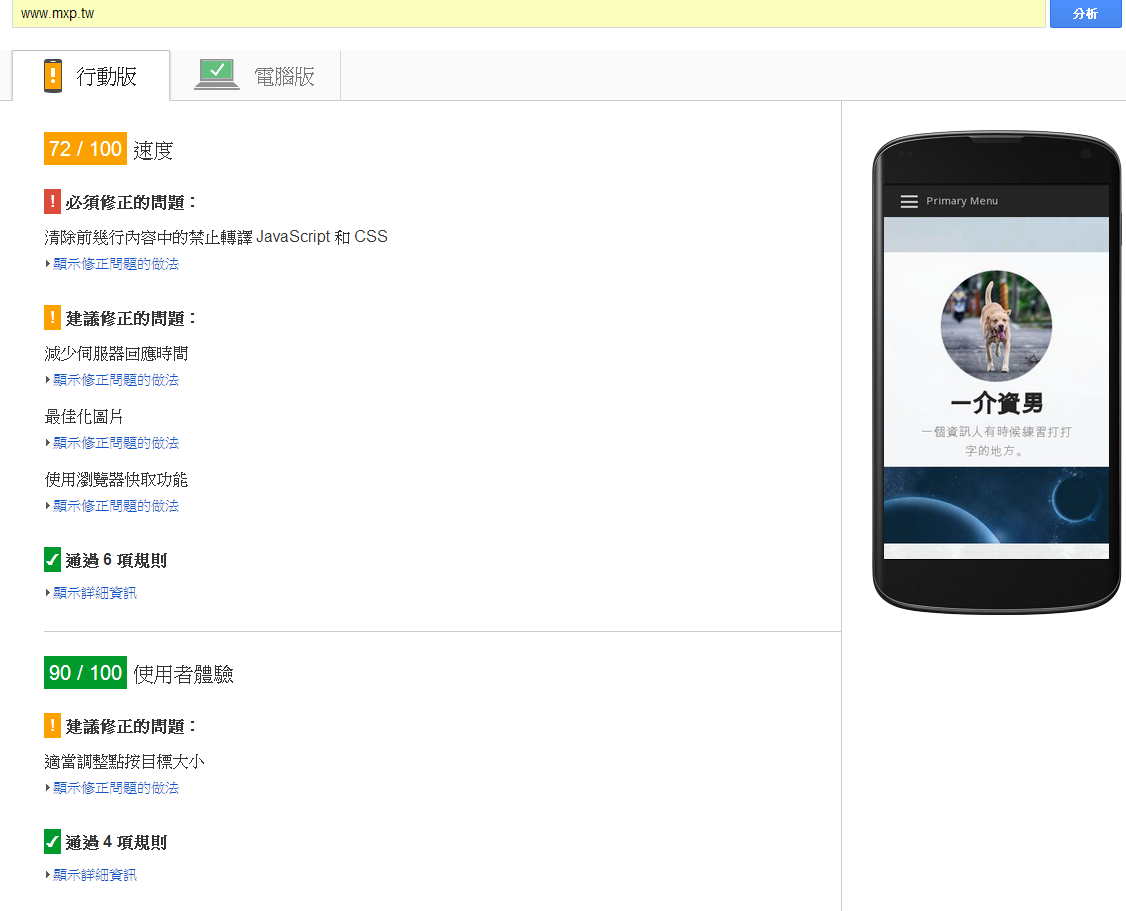
看圖最快~
針對手機與一般桌上型皆有提供檢測,整個超nice阿!
再來就是另一個搭配的好東西給 Server side : Apache 與 Nginx 的加速模組
Apache上滿簡單的,可以選擇安裝打包版,而在Nginx上就是照說明編譯過就好
流程如下
NPS_VERSION=1.8.31.4
wget https://github.com/pagespeed/ngx_pagespeed/archive/release-${NPS_VERSION}-beta.zip
unzip release-${NPS_VERSION}-beta.zip
cd ngx_pagespeed-release-${NPS_VERSION}-beta/
wget https://dl.google.com/dl/page-speed/psol/${NPS_VERSION}.tar.gz
tar -xzvf ${NPS_VERSION}.tar.gz
版本號的地方可以到這裡查
將上述的script存檔為shell來執行後,記下執行完產生的絕對路徑目錄
編譯Nginx時,在組態部分加上
./configure ... --add-module=/path/to/ngx_pagespeed-release-${NPS_VERSION}-beta
然後就 make 拉~
編譯好掛上模組後剩下的就是啟用設定,這部分直接參考官方文件即可~
不編譯nginx可以嗎
編譯這點似乎無可避免了! Nginx的第三方模組都必須經過這關,可以參考這裡: http://wiki.nginx.org/3rdPartyModules
因為我原本是用ubuntu 直接 install
編譯以後怎麼升級?
還是一樣升或者從此一輩子要升級呢?
流程上變成以後都是編譯升級上去!
不過這樣的做法也不會很頻繁,不一定每個版本都要升級,挑穩定的發佈版再升就好囉!
另外請問一下,那個nginx本來預設標準只納入 application/x-javascript 並未納入 application/javascript
那要怎麼編譯進去?
或者是裝好模組以後就能改善呢
你說的是nginx服務的多媒體檔案類型 mime types 吧?
我看了一下你server的Nginx版本有點舊(1.4.6) 那時還未修正更新! 自1.5.4以後已經改為 application/javascript 了!
參考: http://nginx.org/en/CHANGES (網頁內搜尋”js”就可以看到)
是說那個檔案是可以自己修改或新增的,在 conf 目錄下有個 mime.types 檔,在那裏補上就可以。
請問
清除前幾行內容中的禁止轉譯 JavaScript 和 CSS
還有
使用瀏覽器快取功能
要怎麼改善呀
謝謝
您好:
我在 nginx 系統已成功安裝 PageSpeed module,
請問,想要支援 HPPTS 的話,該怎麼做,謝謝
https://developers.google.com/speed/pagespeed/module/https_support
一般 Client Server 的架構下,這樣安裝上並啟用就已經支援 https 了,你這邊的支援是指有多層架構下的時候, Server 當 front-end 來 pass 資料時的意思嗎?
我開啟 pagespeed on; 後,網址前方就會出現警告,如圖:
off 掉就正常了
單看這個警示還不確定是什麼原因造成,通常是一個https協定下的網站載入了一個http協定的資源,我在使用的時候也僅打開啟用而已,沒有套上面提到的設定哦!
還是我的 config 文件有誤,我載入的 pagespeed_handler.conf 內容:
#ngx_pagespeed config
pagespeed FileCachePath /var/ngx_pagespeed_cache; # Use tmpfs for best results.
pagespeed RewriteLevel CoreFilters;
pagespeed EnableFilters local_storage_cache;
pagespeed EnableFilters collapse_whitespace,remove_comments;
pagespeed EnableFilters outline_css;
pagespeed EnableFilters flatten_css_imports;
pagespeed EnableFilters move_css_above_scripts;
pagespeed EnableFilters move_css_to_head;
pagespeed EnableFilters outline_javascript;
pagespeed EnableFilters combine_javascript;
pagespeed EnableFilters combine_css;
pagespeed EnableFilters rewrite_javascript;
pagespeed EnableFilters rewrite_css,sprite_images;
pagespeed EnableFilters rewrite_style_attributes;
pagespeed EnableFilters recompress_images;
pagespeed EnableFilters resize_images;
pagespeed EnableFilters convert_meta_tags;
pagespeed EnableFilters inline_preview_images;
pagespeed EnableFilters resize_mobile_images;
pagespeed EnableFilters lazyload_images;
pagespeed LazyloadImagesAfterOnload off;
pagespeed LazyloadImagesBlankUrl “http://www.gstatic.com/psa/static/1.gif”;
pagespeed MapOriginDomain “http://localhost” “https://gtour.info”;
# Ensure requests for pagespeed optimized resources go to the pagespeed
# handler and no extraneous headers get set.
location ~ “.pagespeed.([a-z].)?[a-z]{2}.[^.]{10}.[^.]+” { add_header “” “”; }
location ~ “^/ngx_pagespeed_static/” { }
location ~ “^/ngx_pagespeed_beacon$” { }
location /ngx_pagespeed_statistics { allow 127.0.0.1; deny all; }
location /ngx_pagespeed_global_statistics { allow 127.0.0.1; deny all; }
location /ngx_pagespeed_message { allow 127.0.0.1; deny all; }
location /pagespeed_console { allow 127.0.0.1; deny all; }
不好意思,原來是我的載入的 pagespeed_handler.conf 的內容有一行錯誤,修正後就正常了。