
內容簡介
總結文案:
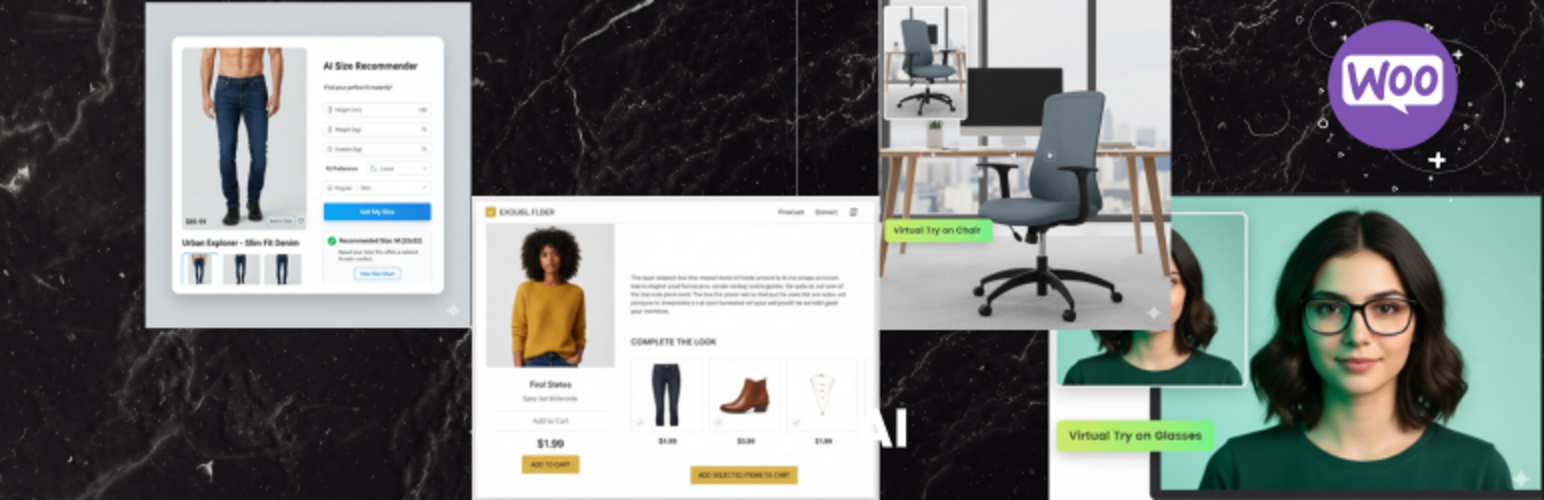
Virtual Fit & Style Assistant for WooCommerce 透過提供試衣間體驗給顧客,徹底革新了線上購物體驗。利用尖端的擴增實境技術和谷歌強大的人工智慧模型,此外掛不僅有助於降低退貨率,也提高轉換率,增加顧客信心。無論您銷售服飾、配飾還是家具,AI Try n Buy 以身臨其境、互動的方式讓購物者進一步了解您的產品。
問題與答案:
1. 這個外掛的關鍵功能有哪些?
- 沉浸式虛擬試穿 (AR):包括臉部追蹤模式和世界追蹤模式。
- AI 尺寸推薦器:由 Google 的 Gemini API 提供支持,作為個人尺寸助手。
- AI 風格助理 ("Complete The Look"):利用 Gemini API 分析當前產品,提出您目錄中的相關建議。
- 有效的分析儀表板:追踪各種事件如 "試穿" 和從試穿後的購買,可視化轉換漏斗,了解最受歡迎的試穿產品以及虛擬試穿後轉換最佳的物品。
- 無縫 WooCommerce 整合:在 WooCommerce 產品編輯畫面上添加專用的 "AI Try n Buy" 設置面板,方便按產品啟用/禁用功能。
2. 這個外掛如何幫助降低退貨率和增加轉換率?
- 透過提供沉浸式虛擬試穿功能和智能尺寸推薦器,幫助顧客更準確地選擇合適的尺寸和風格。
3. 有關AI風格助理的功能有哪些重要方面?
- 利用 Gemini API 分析產品,提供相關建議並透過 WP-Cron 定期生成和緩存建議,以確保高效運行和減少 API 成本。
外掛標籤
開發者團隊
② 後台搜尋「Virtual Fit & Style Assistant for WooCommerce」→ 直接安裝(推薦)
原文外掛簡介
Virtual Fit & Style Assistant for WooCommerce revolutionizes the online shopping experience by bringing the dressing room to your customers.
Using cutting-edge Augmented Reality and powerful AI models from Google, this plugin helps reduce returns, increase conversions, and boost customer confidence.
Whether you sell apparel, accessories, or even furniture, AI Try n Buy provides an immersive and interactive way for shoppers to connect with your products.
✨ Key Features
Immersive Virtual Try-On (AR):
Face Tracking Mode: Perfect for glasses, hats, jewelry, and other accessories.
Uses live camera feed to overlay 2D (PNG) or 3D (GLB) models onto the user’s face.
World Tracking Mode: Allows customers to place 3D models of furniture, art, and other objects in their own space using their device’s back camera.
AI Fit Recommender:
Powered by Google’s Gemini API, this feature acts as a personal sizing assistant.
Customers enter basic measurements (e.g., height, weight) to receive an intelligent size recommendation based on your product’s specific size chart.
AI Style Assistant (“Complete The Look”):
Leverages the Gemini API to analyze the current product and suggest complementary items from your catalog.
Recommendations are generated and cached periodically via WP-Cron to ensure fast performance and reduce API costs.
Actionable Analytics Dashboard:
Track key events like “try-ons” and subsequent “purchases from tries.”
Visualize your conversion funnel, identify your most popular try-on products, and see which items convert best after a virtual try-on.
Seamless WooCommerce Integration:
Adds a dedicated “AI Try n Buy” settings panel to the WooCommerce product edit screen.
Easily enable/disable features on a per-product basis.
Modern API Integration Note:
This plugin utilizes modern, third-party APIs including Google Gemini for generative AI features and Google Cloud Vision for image analysis.
It also integrates client-side AR libraries like MindAR and Google’s
All API calls are aggressively cached to optimize performance and prevent rate-limiting.
Dependencies and Credits
This plugin utilizes the following open-source libraries (all run client-side in the user’s browser and do not transmit data to external servers):
A-Frame: A web framework for building virtual reality experiences. MIT License.
MindAR: An open-source library for web-based Augmented Reality. MIT License.
Google
Chart.js: A flexible JavaScript charting library. MIT License.
Full license details for these libraries are included in the LICENSE-3RD-PARTY.txt file. These libraries process data locally in the browser and do not send any information to third-party servers.
External Services
This plugin relies on third-party external services provided by Google to enable its AI-powered features. By using this plugin, you acknowledge and consent to data being transmitted to these services.
1. Google Gemini API (Generative Language API)
What it’s used for: This service powers the “AI Fit Recommender” feature (which provides personalized size recommendations) and the “AI Style Assistant” feature (which suggests complementary products to complete the look).
When data is sent: Data is sent to Google’s Gemini API when:
A customer uses the “Find My Size” feature and submits their measurements (height, weight, fit preference)
The plugin automatically generates style recommendations for products via WP-Cron (based on your configured update frequency)
What data is sent:
For size recommendations: Customer measurements (height, weight, fit preference), product size chart data, and product name
For style recommendations: Product details (name, description, categories, price) and a list of other products in your catalog for comparison
Service provided by: Google LLC
Terms of Service: https://policies.google.com/terms
Privacy Policy: https://policies.google.com/privacy
API Documentation: https://ai.google.dev/gemini-api/terms
2. Google Cloud Vision API
What it’s used for: This service is used for advanced image analysis features.
When data is sent: Data is sent when testing the API connection in the plugin settings page.
What data is sent: Test image data is sent only when you manually test the API connection from the settings page. No customer data or product images are automatically sent to this API during normal plugin operation.
Service provided by: Google LLC
Terms of Service: https://cloud.google.com/terms
Privacy Policy: https://policies.google.com/privacy
API Documentation: https://cloud.google.com/vision/docs
Important Notes:
* All API calls are cached to minimize data transmission and improve performance
* You must obtain and configure your own API keys from Google to use these features
* You are responsible for ensuring your use of these services complies with applicable privacy laws and regulations
* By enabling these features, you consent to the transmission of data as described above