內容簡介
總結:
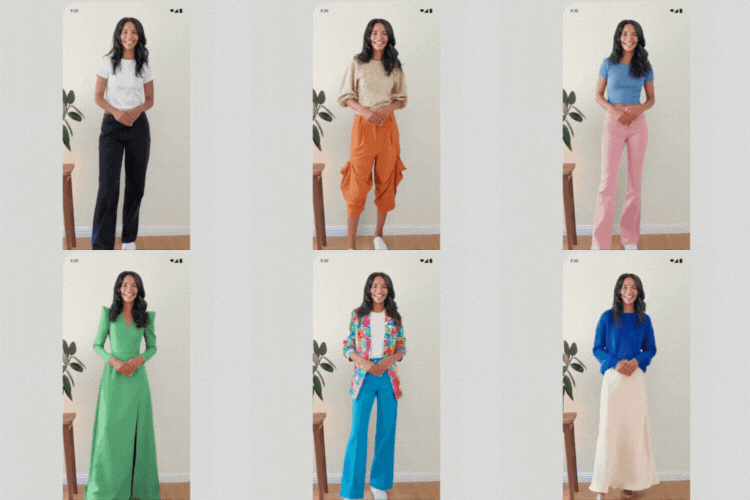
Selektable 是一個AI購物小工具,能讓顧客在購買前看到產品在自己身上或家中的樣子。將體驗直接嵌入任何WordPress或WooCommerce產品頁面,讓購物者更有信心購買。
問題與答案:
1. Selektable的功能是什麼?
- Selektable是一個AI購物小工具,讓顧客在購買前看到產品在自己身上或家中的樣子。
2. Selektable有哪兩種小工具類型?
- 虛擬試穿:顧客上傳自己的照片,AI將選定的服裝呈現在他們的圖像上。適用於時尚和服裝店。
- 空間可視化:顧客上傳自己空間的照片,看到產品逼真放置在其中。適用於家具和家飾店。
3. Selektable支援的是哪兩種環境?
- 可與或無需WooCommerce一起使用。當WooCommerce啟用時,可獲得自動產品頁面整合和完整購物車支持。沒有WooCommerce時,可以使用短代碼在網站上任何位置嵌入小工具。
4. 為什麼商店選擇使用Selektable?
- 減少退貨:顧客在購買前確切看到產品的樣子,購買決策更堅定。
- 提高轉換率:沉浸式試穿體驗讓購物者對添加到購物車更有信心。
- 內建潛在客戶收集:通過小工具直接收集客戶聯繫方式,無需額外設置。
- 社交分享:每個會話都會生成一個獨特可分享的頁面。顧客可以在WhatsApp等渠道上分享結果,為您的商店帶來有機曝光。
- 效能分析:實時儀表板追踪可歸因於Selektable的可視化、轉換和收入。
外掛標籤
開發者團隊
原文外掛簡介
THE AI-POWERED VIRTUAL TRY-ON AND ROOM VISUALIZATION PLUGIN FOR WORDPRESS
Selektable is an AI shopping widget that lets customers see how products look on themselves or in their home before buying. Embed the experience directly on any WordPress or WooCommerce product page and give shoppers the confidence to buy.
There are two widget types:
Virtual Try-On: Customers upload a photo of themselves and the AI renders the selected clothing on their image. Built for fashion and apparel stores.
Room Visualization: Customers upload a photo of their space and see the product placed realistically inside it. Built for furniture and home décor stores.
Works with or without WooCommerce. When WooCommerce is active, you get automatic product page integration with full cart support. Without WooCommerce, use shortcodes to embed the widget anywhere on your site.
WHY STORES CHOOSE SELEKTABLE
Fewer returns: Customers see exactly how products look before buying, so purchase decisions stick.
Higher conversions: Immersive try-before-you-buy experiences give shoppers the confidence to add to cart.
Built-in lead capture: Collect customer contact details directly through the widget with no extra setup.
Social sharing: Each session generates a unique shareable page. Customers share their results on WhatsApp and other channels, driving organic reach for your store.
Performance analytics: A real-time dashboard tracks visualizations, conversions, and revenue attributed to Selektable.
FEATURES
Easy setup: Connect your store in minutes by entering your Widget ID from the Selektable dashboard.
Works on any WordPress site: WooCommerce is optional. Use shortcodes to place the widget anywhere.
Fully customizable button: Control the button text, background color, text color, border, and border radius per integration.
WhatsApp sharing: Customers can share their try-on or room visualization result directly via WhatsApp.
Privacy-first: Customer-uploaded photos are automatically deleted after a configurable retention period (default: 30 days). No photos are stored in your WordPress database.
WITH WOOCOMMERCE
Automatic placement: Display the widget button before or after the Add to Cart button, or after the product summary.
Flexible activation: Enable the widget for all products, specific categories, specific tags, or per product.
Per-product control: Override global settings to force-enable or force-disable the widget on individual products.
Cart integration: Customers can add products to their WooCommerce cart directly from the Selektable widget.
Variable products: The widget updates automatically when a customer selects a variation (color, size, etc.).
Order attribution: Logged-in customer identity is passed to Selektable for accurate conversion tracking.
Dimension support: Product width, height, and length are automatically passed to the widget for accurate room visualization.
Override image: Set a custom generation image per product, separate from the default WooCommerce product image.
REQUIREMENTS
A Selektable account at selektable.com with an active widget
WooCommerce (optional, for product page and cart integration)
PRIVACY
Selektable connects to an external service at app.selektable.com to process AI generations. Product data is sent to the Selektable service when a customer opens the widget. Customer photos are processed securely and deleted automatically after 30 days by default. No photo data is stored in your WordPress database. See the Selektable Privacy Policy for full details.
Configuration
Integration Types
WC Product Page (requires WooCommerce): Automatically displays the widget button on product pages based on activation rules.
Shortcode: Place the widget button anywhere using the [selektable_button] shortcode.
General Settings
Store ID: Your Selektable Store ID (required). Find this in your Selektable dashboard under your store settings. The widget will not function without this.
Button Settings (per integration)
Widget ID: Your Selektable widget ID (e.g., wgt_abc123). Find this in your Selektable dashboard.
Button Text: The text shown on the button (default: “Try it on”)
Button CSS Class: Custom CSS classes for additional styling
Button Background Color: Hex color for the button background
Button Text Color: Hex color for the button label
Button Border Radius: Rounded corners in pixels
Button Border Color: Hex color for the button border
WooCommerce Product Page Settings
Button Placement: Where to display the button on product pages. Options: after Add to Cart (default), before Add to Cart, or after product summary.
Activation Mode: Enable the widget for all products, specific categories, or specific tags.
Per-Product Settings (WooCommerce)
Edit any product and find the “Selektable Widget” meta box in the sidebar:
Widget Status: Override global settings to force-enable or force-disable the widget for this product.
Override Generation Image: Use a specific image for AI generation instead of the default product image.
Shortcode
Use the [selektable_button] shortcode to place the button anywhere:
[selektable_button]
With custom button text and CSS class:
[selektable_button text="View in Your Room" class="my-custom-button"]
With a specific widget ID:
[selektable_button widget_id="wgt_abc123"]
When used on a WooCommerce product page, the shortcode automatically passes product data to the widget. Outside of product pages, the widget opens without product context.
Hooks and Filters
Available Filters
selektable_should_display_widget: Control whether to show the widget button for a given integration and product
selektable_button_text: Modify the button label text
selektable_button_class: Modify the button CSS classes
selektable_product_data: Modify the product data sent to the widget (WooCommerce only)
Examples
// Hide the widget for out-of-stock products (WooCommerce)
add_filter('selektable_should_display_widget', function($show, $integration, $product) {
if ($product && !$product->is_in_stock()) {
return false;
}
return $show;
}, 10, 3);
// Add custom fields to the widget product payload (WooCommerce)
add_filter('selektable_product_data', function($data, $product) {
$data['customField'] = get_post_meta($product->get_id(), 'my_custom_field', true);
return $data;
}, 10, 2);
Third-Party Service Disclosure
This plugin connects to the Selektable external service to provide virtual try-on and room visualization features.
Service: Selektable
App URL: https://app.selektable.com
When the Selektable widget is active on a page, the plugin:
Loads the widget embed script from https://app.selektable.com/widgets/embed.js
Sends product data (name, price, images, dimensions) to the Selektable service for rendering (when WooCommerce is active)
Transmits a visitor ID and session ID to the Selektable service for session tracking and order attribution
Sends logged-in user identity (name, email) to the Selektable service if the user is authenticated
No data is sent until a customer interacts with the widget button.
Selektable Terms of Service: https://selektable.com/terms
Selektable Privacy Policy: https://selektable.com/privacy
Privacy Policy
This plugin stores and transmits the following data:
Visitor ID: A unique identifier stored in the browser to track widget interactions across sessions.
Session ID: A per-session identifier for the current widget session.
User Identity: For logged-in customers, the plugin sends the user’s display name and email address to the Selektable service for order attribution.
Product Data: When WooCommerce is active, product name, price, image URLs, and dimensions are sent to the Selektable service when the widget is opened.
All data is transmitted to the Selektable service at app.selektable.com over HTTPS. No personal data is stored in the WordPress database by this plugin beyond standard WooCommerce order meta (visitor ID and session ID attached to orders placed through the widget).
Customer-uploaded photos are stored securely by Selektable and automatically deleted after a configurable retention period (default: 30 days).
For more details, see the Selektable Privacy Policy.