內容簡介
OptinCraft 是一款專為 WordPress 設計的拖放式外掛,能快速建立高轉換率的選項與彈出視窗。透過簡單的介面,使用者無需編碼即可輕鬆設計美觀的彈出視窗,提升網站的轉換效果。
【主要功能】
• 拖放式設計工具,無需編碼
• 多種彈出視窗樣式選擇
• 完全響應式設計,適合各種裝置
• 行動裝置優化的彈出視窗
• 多步驟行銷活動設計
外掛標籤
開發者團隊
② 後台搜尋「OptinCraft – Drag & Drop Optins & Popup Builder for WordPress」→ 直接安裝(推薦)
📦 歷史版本下載
原文外掛簡介
PRO – Up to 65% OFF | Roadmap
Grab attention, capture leads, and boost conversions fast. OptinCraft makes building high-converting optins & popups effortless with a simple drag-and-drop canvas builder in a fully WordPress-friendly environment. No coding, just results.
Build Beautiful Popups with Drag & Drop Simplicity
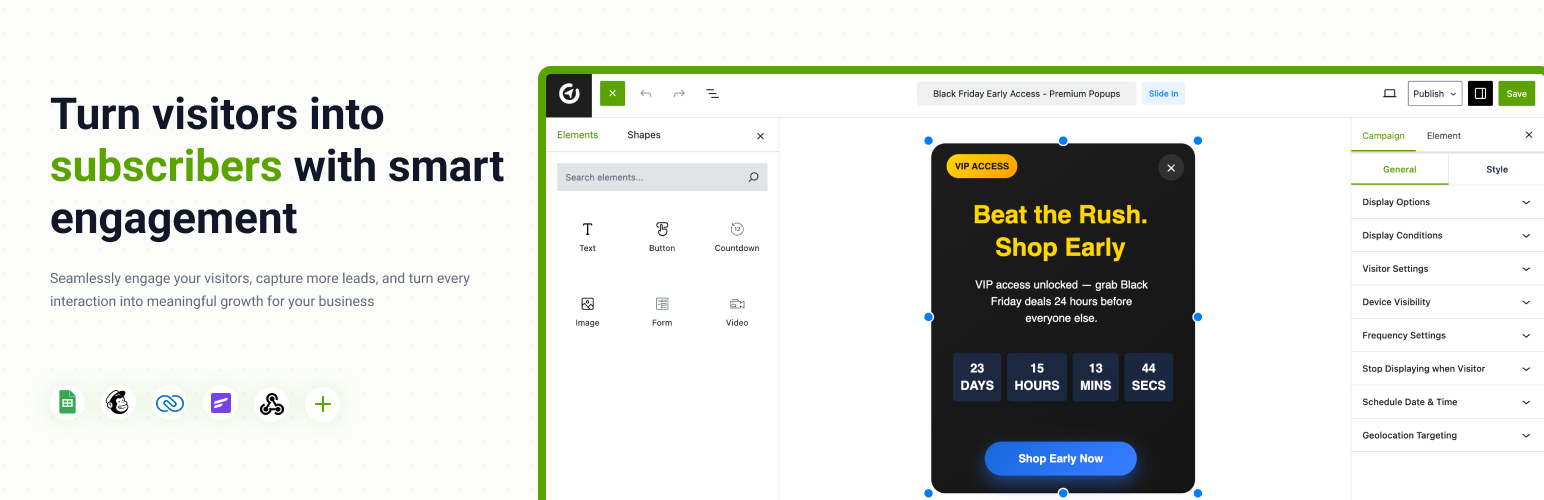
OptinCraft comes with an intuitive drag & drop builder that lets you create custom optin & popup designs easily. You can add text, images, countdown timers, and buttons while previewing your changes live.
No coding, no confusion: just simple, visual control over your popup’s look and behavior. Every design is 100% responsive, so your popups look great on desktop, tablet, and mobile.
Choose from Multiple Popup Styles
OptinCraft gives you flexibility to design Popups that fit your campaign goals perfectly. You can use:
Lightbox popups for email subscriptions or offers
Floating bar popups for announcements or notifications
Slide-in popups to promote new deals
Sidebar popups for persistent visibility
Each popup style feels modern and non-intrusive, keeping your visitors engaged without hurting their experience.
Drag & Drop Canvas Builder in the Shadow of Gutenberg
At first glance, it feels like you’re working in Gutenberg but it’s actually a powerful drag & drop canvas editor that works like Canva. Every click, every move flows naturally, letting creativity take the lead. Interesting, right?
Mobile-specific Popups That Perform
A large number of traffic comes from mobile users. OptinCraft ensures your popups are fully optimized for mobile screens, loading fast and displaying beautifully.
You can even create mobile-specific popups to deliver device-targeted experiences. That means smoother engagement, better conversions, and a more enjoyable browsing experience for every visitor.
Multi-Step Campaign
A Multi-Step Campaign guides prospects through a structured journey that increases engagement and conversions by breaking the opt-in process into simple, intentional steps.
Instead of asking for too much information upfront, OptinCraft captures micro-commitments first, then uses conditional logic and smart segmentation to deliver highly relevant messages and follow-ups.
This approach reduces friction, improves lead quality, and allows you to personalize nurturing sequences based on user behavior and intent, resulting in higher opt-in rates, stronger trust, and better overall campaign performance.
Smart Targeting & Trigger Controls
OptinCraft gives you complete control over where, when, and to whom your popups appear. Use smart targeting options like:
Device targeting (desktop, mobile, tablet)
Page-level targeting (show popups on specific pages)
Conditional display (custom rules for visibility)
Target new visitors or returning visitors (PRO)
Geo-location targeting (PRO)
Trigger your popups with behavior-based controls such as:
On page load
After inactivity
Click count
Page Scrolled (PRO)
On page exit intent optin (PRO)
Custom selector click (PRO)
On hover (PRO)
These options let you build campaigns that appear at the right time without annoying your audience.
Create Urgency with Timers and Schedules
You can boost conversions by adding countdown timers to your popups. Perfect for flash sales or limited-time offers, timers add urgency and drive instant action.
OptinCraft also lets you schedule popups with specific start and end times. Run seasonal promotions, limited-time events, or recurring announcements even when you’re offline.
Stunning Templates for Every Campaign
No design experience? No problem. OptinCraft includes a bunch of pre-made templates crafted to look professional and convert effectively.
Each template is customizable with your branding, colors, and fonts. You can use Google Fonts to personalize your popups and match your website style.
These ready templates save hours of design work and help you launch beautiful popups in minutes.
Measure Success with Detailed Analytics
OptinCraft’s powerful analytics dashboard helps you track performance in real-time. You can view:
Campaign analytics for impressions, clicks, and conversions
Device-wise data to see which popups perform best on mobile or desktop
Country-wise analytics
Page-wise and browser-wise analytics
These insights help you optimize your designs, adjust targeting, and continuously improve your campaigns.
Integrate with Your Favorite Tools
OptinCraft connects seamlessly with your existing favorite tools, making automation easy. Available integrations include:
Email Notification (Free)
WooCommerce (PRO)
EDD (Easy Digital Downloads) (PRO)
SureCart (Upcoming)
FluentCart (Upcoming)
Mailchimp (PRO)
Zoho CRM (PRO)
FluentCRM (PRO)
HubSpot (Upcoming)
ActiveCampaign (Upcoming)
MailPoet (Upcoming)
Kit (formerly ConvertKit) (Upcoming)
MailerLite (Upcoming)
Google Sheets (PRO)
Webhook (PRO)
Zapier (Upcoming)
Pabbly (Upcoming)
FlowMattic (Upcoming)
Slack (Upcoming)
WPML (Upcoming)
These integrations help you sync data, manage leads, and automate follow-ups, saving time while improving marketing efficiency.
Seamless Compatibility with Popular Page Builders
OptinCraft works hand-in-hand with your favorite design tools. Whether you’re crafting pages with Elementor, Gutenberg, Bricks, Beaver Builder, Brizy, Oxygen, Breakdance, or Divi, OptinCraft integrates flawlessly to fit your workflow.
No clunky add-ons, no style mismatches, just seamless harmony between your design vision and conversion goals. Build and launch campaigns directly within your existing page builder environment, ensuring perfect alignment across your entire website.
A/B Testing Made Simple
Find what converts best with A/B testing. Test different headlines, designs, triggers, or layouts and see which one performs better. This feature helps you understand your audience’s behavior and optimize campaigns for maximum conversions. (Upcoming)
You can deliver personalized experiences, increase engagement, and drive long-term results.
Free Features You’ll Love
Drag & Drop Popup builder
Lightbox, floating bar, slide-in, and sidebar popups
Mobile-specific popups
Newsletter popup
Countdown timers
Conditional display
Device and page-level targeting
Campaign analytics
Google Fonts support
On-page load & inactivity triggers
Campaign duplicate
Multi-device responsive design
Verification code / One-time password (OTP) (Upcoming)
Built for Performance and Simplicity
OptinCraft is optimized for speed and built with clean code that won’t slow down your website. Every popup loads fast and adjusts smoothly to your layout.
The user-friendly dashboard ensures even beginners can create campaigns without confusion. With constant updates and improvements, OptinCraft stays aligned with modern WordPress standards.
Get in Touch With Us
Join Our Facebook Community | Facebook Page | LinkedIn
Privacy Policy
OptinCraft uses Appsero SDK to collect some telemetry data upon user’s confirmation. This helps us to troubleshoot problems faster & make product improvements.
Appsero SDK does not gather any data by default. The SDK only starts gathering basic telemetry data when a user allows it via the admin notice. We collect the data to ensure a great user experience for all our users.
Integrating Appsero SDK DOES NOT IMMEDIATELY start gathering data, without confirmation from users in any case.
Learn more about how Appsero collects and uses this data.