
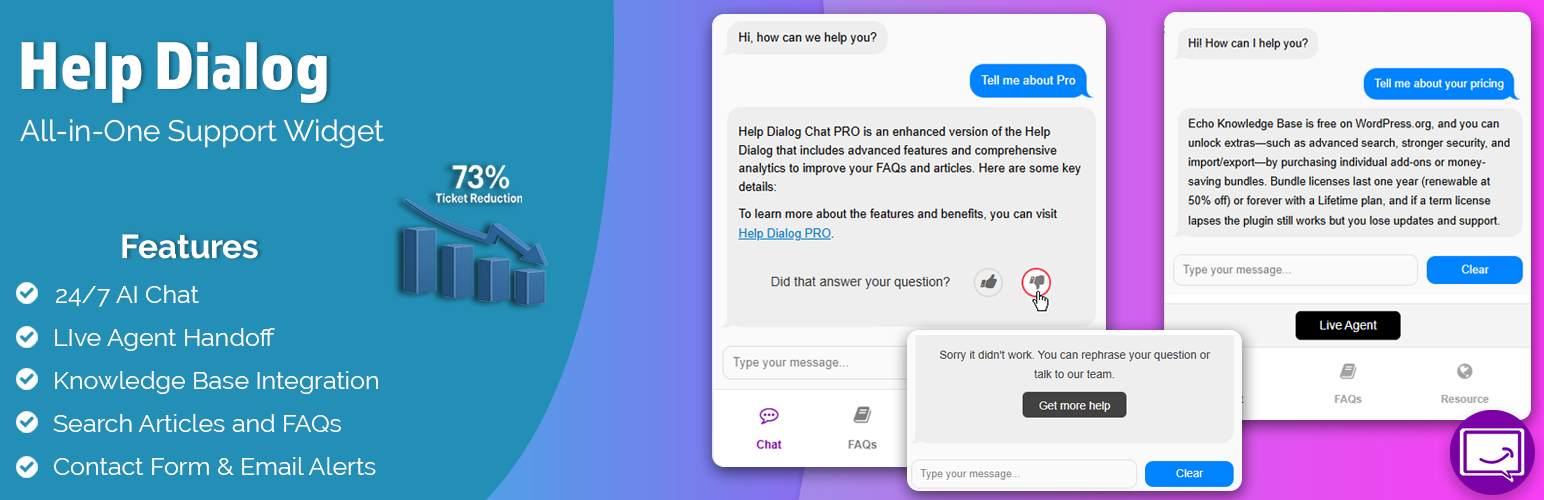
內容簡介
此外插件的簡介:
Help Dialog Chat 提供增強的客戶支援和增加銷售機會的聊天式介面。它包括WhatsApp和電話支援的鏈結、常見問題、搜尋工具和聯絡表單,確保快速和個人化的協助。
避免錯過機會和不滿意的客戶。
主要功能
✅ WhatsApp 聊天按鈕
✅ 常見問題 (FAQs)
✅ 像 ChatGPT 一樣的 AI 內容撰寫
✅ 電話按鈕
✅ 聯絡表單
✅ 搜尋常見問題、文章和文章
觀看 Help Dialog Chat 的實際演示。在我們的網站右下角開啟:
Help Dialog Demo
Help Dialog Chat 如何幫助我的客戶?
您的客戶可以使用 WhatsApp、電話或常見問題即時獲得答案。
Help Dialog 提供常見問題、搜尋和聯絡表單。
聯絡表單可供用戶查詢和提交問題。
易於找到支援問題可顯示在任何頁面上。
功能詳情
✅ 1. 幫助使用者使用 WhatsApp 鏈結、電話鏈結和自訂 URL 輕鬆聯繫您
自訂 WhatsApp 鏈結、電話鏈結和自訂 URL。
✅ 2. 使用 ChatGPT AI 幫您編寫常見問題
檢查拼寫和語法。
生成問題的變化並選擇最佳選項。
生成問題的答案。
✅ 3. 創建自訂的問題和答案 (常見問題)
提供最適合您網站頁面的最佳內容和資訊。
添加 Help Dialog 到產品頁面、文件、文章、主頁等。
在多個頁面上共用常見問題。
✅ 4. 搜尋常見問題,知識庫文章等
客戶可以搜索現有的常見問題、文檔和文章。
與 Echo Knowledge Base 整合搜索
啟用文章和特定自訂文章類型的搜索。
✅ 5. 在任何頁面上使用聯絡我們表單
確保沒有客戶被漏掉。
如果需要幫助,客戶可以聯繫您。
當使用者提交查詢時,即時收到電子郵件。
跟踪使用者提交查詢的頁面。
✅ 6. 自訂 Help Dialog 小部件
輕鬆自訂小部件以適應您的網站外觀。
符合您的主題、品牌風格和顏色。
💡 主要功能
五分鐘快速安裝。
輕量級和可自訂的小部件,與您的品牌風格完美匹配。
支持 RTL 和 WCAG 可訪問性。
響應式設計,與任何主題兼容。
💡 為什麼選擇 Help Dialog Chat?
創新功能和不斷改進
友善且及時的全天候支援
集成 Echo Knowledge Base
無限的 Help Dialog 小部件和常見問題
請參閱我們的 Help Dialog Chat 文件 此處
⭐ 我們的免費附加外掛 ⭐
✅ Echo Knowledge Base 是 WordPress 的文檔插件。創建知識庫,文件,
外掛標籤
開發者團隊
② 後台搜尋「AI Chat App – Live Agent Handover, Help Docs, Email, Call Button, Fast Support」→ 直接安裝(推薦)
原文外掛簡介
⚠️ This plugin is being discontinued. We recommend switching to Echo Knowledge Base which includes a free, more powerful AI Chat.
Features not available in KB AI Chat: FAQs in the chat widget, article search in the chat widget, and direct contact form in the chat widget.
Free KB AI Chat features:
* Built-in ChatGPT and Google Gemini support
* AI training from your KB articles
* Source citations in AI responses
* Chat history and analytics
* AI Smart Search
PRO features:
* Agent Handoff and Feedback
* Email Notifications
* PDF Training Data
Learn more about Echo Knowledge Base.
✅ AI Chat Integration
AI Chat can answer questions based on content from your Knowledge Base, FAQs, internal documentation, notes, pages, or any other information source.
73 % fewer repeat tickets (our own numbers)
After enabling AI Chat, we saw a 73 percent drop in repetitive questions response times shrank, customers got answers faster, and the team could finally tackle higher-value projects without hiring extra staff.
Why Customers Love It
Answers in Seconds, Day or Night
The bot reads your KB articles, FAQs, pages, and internal notes, then delivers clear replies before a ticket ever lands in your inbox.
Set-Up in a Coffee Break
A guided wizard walks you from install to “live” in under 30 minutes. No coding, no APIs, no fuss.
Visible ROI, Fast
Most teams cut repeat questions by the first week freeing staff for revenue-generating work instead of copy-and-paste responses.
Built-In Extras
Content Gap Alerts – Flags missing or outdated KB articles so you fix an issue once and never hear about it again.
Pain-point analytics – Real-time dashboards surface the topics that frustrate users the most, turning support data into a product roadmap.
Smart learning – As you update or add content, the model re-indexes automatically, keeping answers accurate without manual re-training.
Intelligent Agent Handover – Multiple triggers ensure users get human help when needed:
Keyword Detection: Automatically offers agent support when users mention terms like “human”, “agent”, or “support”
Sentiment Analysis: Detects frustrated users through thumbs down feedback and offers immediate human assistance
Always-On Option: Display a persistent “Talk to Agent” button for instant human connection
Powered by AI Engine, the leading WordPress AI plugin that also drives site-wide content and image generation.
Intelligent Agent Handover Features
Our smart handover system ensures no customer gets stuck:
Multi-Trigger System – Detects when users need human help through keywords, negative feedback, or manual request
One-Click Setup – Configure agent buttons, keywords, and routing in minutes
Custom Workflows – Route to different teams based on keywords or customer type (beta)
Our AI integration is powered by AI Engine, the leading WordPress AI plugin, which supports not only your chat but also site editing and image generation needs.
Result: fewer tickets, happier users, and support staff who finally have time for the work that moves your business forward.
For detailed setup instructions, visit our AI Chat Integration Guide
✅ Contact Form
Add contact form to any page
Get instant email notifications for inquiries
Track which pages generate inquiries
Ensure no customer question goes unanswered
✅ FAQs
Create custom questions and answers
Display FAQs on any page
Share FAQs across multiple pages
Customize content for individual pages
✅ Search
Search FAQs and documentation
Integrate with Echo Knowledge Base
Search posts and custom post types
Quick access to relevant content
✅ Contact Options
Add phone support link
Include custom URL links
Multiple contact methods
Easy access to support
✅ Customization
Match your website’s branding
Customize widget appearance
Adjust colors and styles
Flexible design options
See the AI Chat in action. Open it in the right bottom corner of our website: AI Chat Demo
⭐ How Will AI Chat Assist My Customers?
Your customers can get instant answers to their questions through AI Chat, Phone, or FAQs.
The AI Chat assistant provides 24/7 automated support by learning from your knowledge base and documentation.
AI Chat widget provides FAQs, search, and a contact form.
The contact form is available for user queries and issue submissions.
Easy-to-find support questions can be displayed on any page.
⭐ KEY FEATURES
Quick, five-minute setup.
Intelligent agent handover with keyword detection and sentiment analysis.
Full conversation context preserved during agent transfers.
A lightweight and customizable widget that works great with your branding.
Supports RTL and WCAG accessibility.
Responsive design that works with any theme.
⭐ WHY CHOOSE AI CHAT WIDGET?
Innovative features and ongoing improvements
Friendly and timely 24/7 support
Integrated with Echo Knowledge Base
Unlimited AI Chat widgets and FAQs
See our AI Chat documentation here
—
⭐ OUR FREE COMPLEMENTARY PLUGINS ⭐
✅ Echo Knowledge Base is a documentation plugin for WordPress. Create knowledge base, docs, FAQs, and wikis easily. Learn More
✅ Creative Add-Ons for Elementor helps you write articles and documents faster and more easily using our powerful and practical Elementor widgets. Learn More
✅ Show IDs reveals IDs on admin screens that list posts, pages, custom post types and taxonomies, and others. Learn More
✅ Scroll Down Arrow Scroll Down Arrow is an easy-to-use WordPress plugin that displays a downward-pointing arrow. It provides users with a visual cue that there is more content further down the page.














