內容簡介
若要觀看視頻教學,請參考以下連結:
–(最新)教學
感謝真主賜福,您可以使用簡碼[timetable],透過Ajax月份選擇器顯示每年和每月的祈禱時間表。
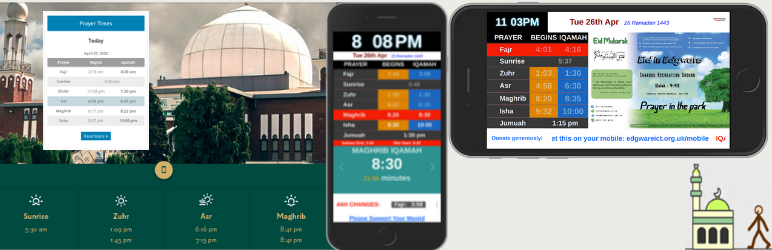
您可以在您喜歡的部件區域垂直或水平顯示每日祈禱時間。 適用於任何清真寺或伊斯蘭研究所。
您需要在外掛程式管理區域上傳您的清真寺時間表。
拉取請求
[GIT 存儲庫] https://bitbucket.org/daily-prayer-time/daily-prayer-time.bitbucket.io/src/master/
新增您的提交並提交拉取請求。請描述您的功能,我會將其添加到核心中。
同時,隨意發布帶有新插件名稱以及添加您現有新想法的代碼。
我的唯一意圖是支持伊斯蘭教友。
只要您的意圖相同,我就沒有任何抱怨,fi sabilillah。
Mustafiz。
功能
完成以上安裝後,您可以:
顯示祈禱開始和集會時間
顯示每日或整月的開齋節時間表
顯示下一個祈禱和IQAMAH通知
以垂直或水平部件方式顯示祈禱時間。
僅在您選擇時顯示“Jamah時間”。
從三種不同的主題中選擇
選擇Asr Salah開始方法
使用簡碼[timetable]從任何頁面或文章中顯示每月和每年時間表
在星期五顯示Khutbah時間公告
僅使用簡碼顯示每月時間表的Iqamah時間
上傳任何天數、週數、月數或一整年。
支持網站上可讀取的所有語言
使用dptUserStyles類使用自定義CSS來裝飾您的項目表元素。
使用span類dpt_jamah和dpt_start以及[next_xxxx_prayer],並按照您的喜好設計您的視圖。
顯示明天的Iqamah更新
在清真寺的大屏幕上顯示祈禱時間
在簡碼中顯示古蘭經節選
簡碼
[monthlytable] – 使用Ajax月份選擇器顯示每年和每月的祈禱時間表
[dailytable_horizontal] – 水平顯示每日時間表
[dailytable_horizontal asr=hanafi] – 使用Hanafi Asr開始方法水平顯示每日時間表
[dailytable_vertical] – 垂直顯示每日時間表
[dailytable_vertical asr=hanafi] – 使用Hanafi Asr開始方法垂直顯示每日時間表
[dailytable_horizontal asr=hanafi friday_alert=”First Khutbah: 1:15. Second Khutbah: 1:45″] – 顯示星期五公告
[monthlytable display=iqamah_only] – 使用Ajax月份選擇器僅顯示Iqamah的每年和每月的祈禱時間表
[monthlytable display=azan_only] – 使用Ajax月份選擇器僅顯示Azan的每年和每月的祈禱時間表
[monthlytable heading=”Månedlige Tidsplan”] – 使用任何語言顯示月份時間表標題,默認為'Monthly Time Table for'
[digital_screen] – 在清真寺的大屏幕上顯示祈禱時間
[quran_verse] – 顯示來自古蘭經的隨機節選
外掛標籤
開發者團隊
📦 歷史版本下載
原文外掛簡介
For video tutorial please follow these links:
– (Latest) How to tutorial
Alhamdulillah that you can display Yearly and Monthly prayer time with ajax month selector using shortcode [timetable]
Daily prayer time can be displayed vertically or horizontally in your preferable widget area. Designed for any Mosque or Islamic institutes.
You need to upload your masjid’s timetable from plugin admin section.
PULL REQUEST
[GITHUB https://github.com/mmrs151/daily-prayer-time/pulls]
Add your commit and make a pull request. Please describe your feature, I will add it to the core.
[IMPORTANT]
If you don’t see any update of this plugin for over a year, I might have departed.
Please feel free to copy the whole code and relase in a different name, so the masajid can be served.
My sole intention is to support the ummah.
So I have absolutely no complain as long as you have the same intention, Fi Sabilillah.
Mustafiz.
Features
Once the installation above is done, this will allow the Admin/Editor
To display prayer start and jamah time
To display ramadan timetable for daily or full month
To display next prayer and IQAMAH notifications
To display prayer time either vertical or horizontal widget.
To display ‘Jamah time’ only if you chose.
To chose from three different themes
To chose Asr salah start method
Display monthly and yearly timetable using shortcode [timetable] from any page or post
Display Khutbah time announcement on Friday
Display Iqamah time only for monthly timetable using shortcode
Upload any number of days, weeks, months or a full year.
Support all language that are readable on the web
Use custom css using the class dptUserStyles to decorate your element table elements.
Use span class dpt_jamah and dpt_start along with [next_xxxx_prayer] and design your view however you want.
Display Iqamah update for next day
Display prayer time on big monitors in the masjid
Display Quran verse in a shortcode
shortcodes
[monthlytable] – Display Yearly and Monthly prayer time with ajax month selector
[dailytable_horizontal] – Display daily timetable horizontally
[dailytable_horizontal asr=hanafi] – Display daily timetable horizontally with Hanafi Asr start method
[dailytable_vertical] – Display daily timetable vertically
[dailytable_vertical asr=hanafi] – Display daily timetable vertically with Hanafi Asr start method
[dailytable_horizontal asr=hanafi friday_alert=”First Khutbah: 1:15. Second Khutbah: 1:45″] – Display Friday announcement
[monthlytable display=iqamah_only] – Display Iqamah only for Yearly and Monthly prayer time with ajax month selector
[monthlytable display=azan_only] – Display Azan only for Yearly and Monthly prayer time with ajax month selector
[monthlytable heading=”Månedlige Tidsplan”] – Display monthly time table heading in any language, default is ‘Monthly Time Table for’
[digital_screen] – Display prayer time on big monitors in the masjid
[quran_verse] – Display a random verse from the Holy Quran
**[disable_overnight_dim] – disable overnight dimming of the digital screen
… and more. Check the ‘helps-and-tips’ page in plugin settings once you install it.